ENGLISH
ESPAÑOL
3030
Displaying the Date/Time (Date/Time)
✤ The Date/Time function works in
<Camera>/<Player>/<M.Cam>/<M.Player> modes. ➥page 19
✤ The date and time are automatically recorded on a special data area
of the tape.
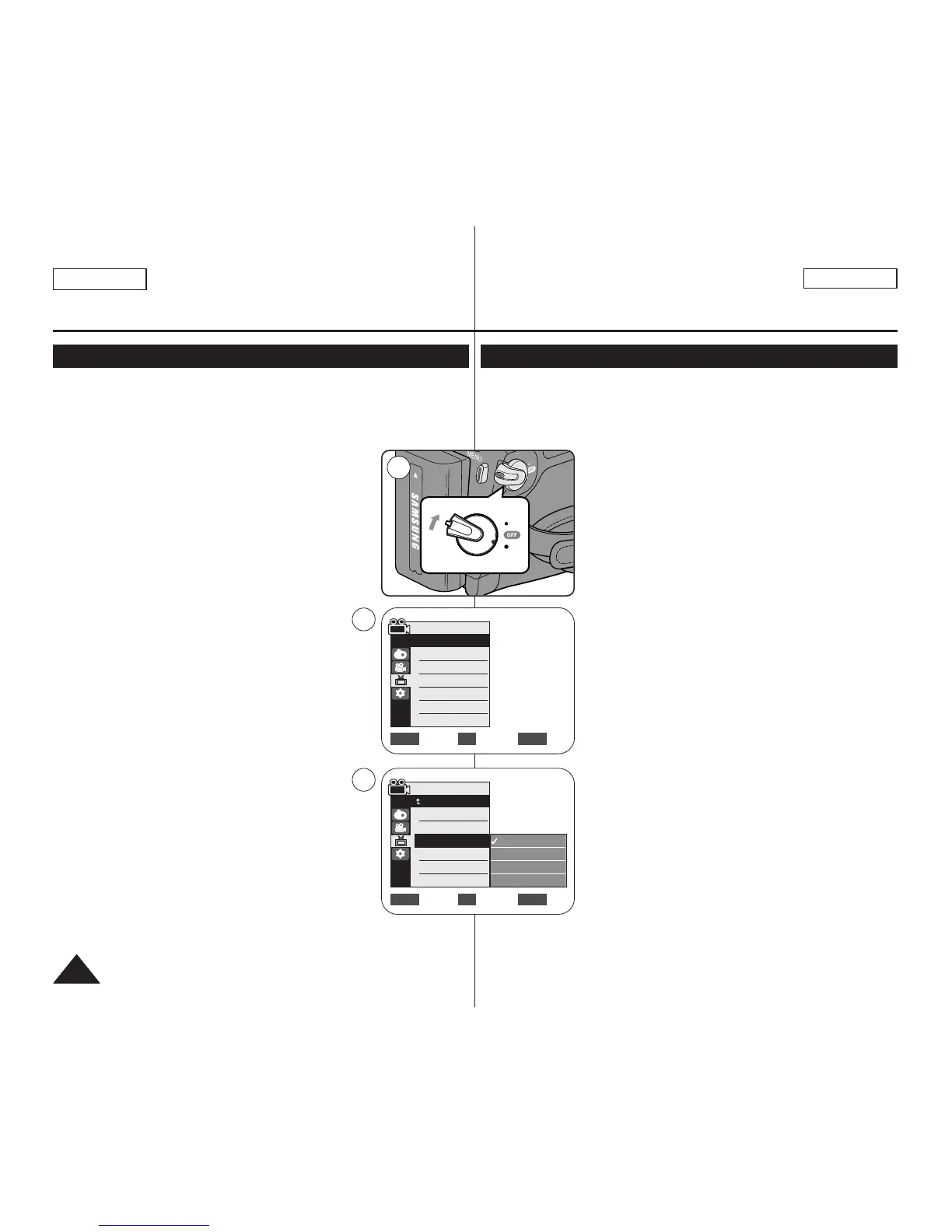
1. Set the [Power] switch to [CAMERA] or [PLAYER].
2. Set the [Mode] switch to [TAPE] or [MEMORY].
(SC-D363/D364/D365/D366 only)
3. Press the [MENU] button.
■
The menu list will appear.
4. Move the [Zoom] lever to the up or down to select
<Display>, then press the [OK] button.
5. Move the [Zoom] lever to the up or down to
select <Date/Time>, then press the [OK] button.
6. Move the [Zoom] lever to the up or down to select
the display type of the Date/Time, then press the
[OK] button.
■
Display type of the Date/Time: <Off>, <Date>,
<Time>, <Date&Time>.
7. To exit, press the [MENU] button.
[ Notes ]
■
The Date/Time will read <12:00 AM JAN.1,2006> in
the following conditions.
- During playback of a blank section of a tape.
- If the tape was recorded before setting the
<Date/Time> in the Camcorder.
- When the Lithium Battery becomes weak or dead.
■
Before you use the <Date/Time> function, you must
set the clock. ➥page 23
Initial Setting : Display Menu Setting
Visualización de la fecha y hora <Date/Time> (Fecha/Hora)
✤ La función Date/Time está operativa en los modos
<Camera>/<Player>/<M.Cam>/<M.Player>. ➥pág. 19
✤ La fecha y hora se graban automáticamente en un área de datos
especial de la cinta.
1. Coloque el interruptor [Power] en [CAMERA] o
[PLAYER].
2. Coloque el interruptor [Mode] en [TAPE] o
[MEMORY].
(Sólo SC-D363/D364/D365/D366.)
3. Presione el botón [MENU].
■
Aparecerá la lista de menús.
4. Mueva la palanca [Zoom] arriba o abajo para
seleccionar <Display> y presione el botón [OK].
5. Mueva la palanca [Zoom] arriba o abajo para
seleccionar <Date/Time> y presione el botón [OK].
6. Mueva la palanca [Zoom] arriba o abajo para
seleccionar el tipo de visualización de la fecha y
hora y presione el botón [OK].
■
Tipo de visualización de la fecha y hora:
<Off>, <Date>, <Time>, <Date&Time>.
7. Para salir, presione el botón [MENU].
[ Notas ]
■
La fecha y hora aparecerán como <12:00 AM
JAN.1,2006> en las siguientes situaciones.
- Durante la reproducción de una sección en
blanco de una cinta.
- Si la cinta se grabó antes de ajustar la
<Date/Time> en la videocámara.
- Cuando la batería de litio se debilita o se agota.
■
Antes de utilizar la función <Date/Time>, debe
ajustar el reloj. ➥pág. 23
Ajuste inicial: ajuste del menú Display (Pantalla)
Move Select Exit
MENUOKZOOM
Camera Mode
√Display
LCD Bright
LCD Color
Date/Time
TV Display
4
Move Select Exit
MENUOKZOOM
Off
Date
Time
Date&Time


 To Next Page