Advanced Recording Grabación avanzada
Setting the Digital Image Stabilizer (DIS) Ajuste del Estabilizador digital de la imagen (DIS)
✤ The DIS function works only in <Camera> mode. ➥page 19
✤ DIS (Digital Image Stabilizer) is a function that compensates for any
shaking or hand movement while holding the Camcorder (within
reasonable limits).
✤ It provides more stable pictures when:
- Recording with the zoom (DIS is not available
in Digital Zoom mode.)
- Recording a small object close-up
- Recording and walking at the same time
- Recording through the window of a vehicle
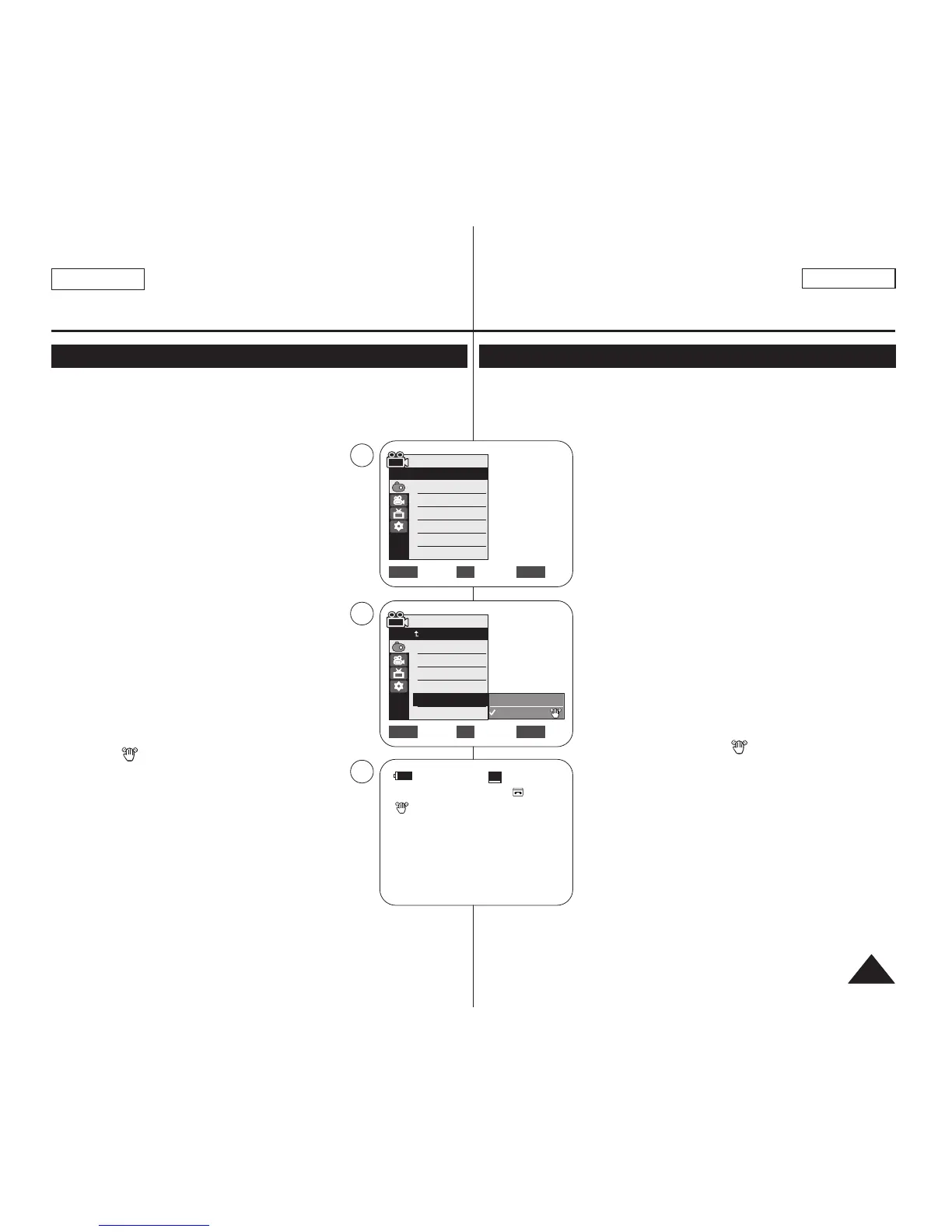
1. Set the [Power] switch to [CAMERA].
2. Set the [Mode] switch to [TAPE].
(SC-D363/D364/D365/D366 only)
3. Press the [MENU] button.
■
The menu list will appear.
4. Move the [Zoom] lever to the up or down to
select <Camera>, then press the [OK] button.
5. Move the [Zoom] lever to the up or down to select
<DIS>, then press the [OK] button.
6. To activate the DIS function, move the [Zoom] lever
to the up or down to select <On>, then press the
[OK] button.
■
If you do not want to use the DIS function, set the
<DIS> menu to <Off>.
7. To exit, press the [MENU] button.
■
DIS ( ) icon is displayed.
[ Notes ]
■
You can directly access the DIS function using
the [QUICK MENU] button.
➥page 20
■
Digital Zoom, COLOR NITE, Emboss2, Pastel2,
Mirror or Mosaic is not available in the DIS mode.
■
16:9 Wide is not available in the DIS mode.
(SC-D263/D362/D363/D364 only)
■
When you press the [PHOTO] button while the DIS
function is enabled, the DIS will be released shortly
and resume automatically after the still image
recording.
■
It is recommended that you deactivate the DIS function when using a
tripod.
■
If you use the DIS function, the picture quality may deteriorate.
■
EASY.Q mode automatically sets the <DIS> to <On>.
✤
La función DIS sólo está operativa en el modo <Camera>. ➥pág. 19
✤ DIS (Estabilizador digital de la imagen) es una función que compensa los
temblores o el movimiento de las manos mientras sujeta la videocámara (en
los límites razonables).
✤ Proporciona imágenes más estables cuando:
- Se graba con zoom (DIS no está disponible en el
modo Digital Zoom);
- Se graba un objeto pequeño muy de cerca;
- Se graba mientras se camina;
- Se graba a través de la ventanilla de un vehículo.
1. Coloque el interruptor [Power] en [CAMERA].
2. Coloque el interruptor [Mode] en [TAPE].
(Sólo SC-D363/D364/D365/D366)
3. Presione el botón [MENU].
■
Aparecerá la lista de menús.
4. Mueva la palanca [Zoom] arriba o abajo para seleccionar
<Camera> y presione el botón [OK].
5. Mueva la palanca [Zoom] arriba o abajo para seleccionar
<DIS> y presione el botón [OK].
6. Para activar la función DIS, mueva la palanca [Zoom]
arriba o abajo para seleccionar <On> y presione el botón
[OK].
■
Si no desea utilizar la función DIS, defina el menú
<DIS> en <Off>.
7. Para salir, presione el botón [MENU].
■
Aparece el icono de DIS ( ).
[ Notas ]
■
Puede acceder directamente a la función DIS utilizando el
botón [QUICK MENU]. ➥pág. 20
■
Digital Zoom, COLOR NITE, 16:9 Wide, Emboss2 o
Pastel2, Mirror o Mosaic no están disponibles en el modo
DIS.
■
16:9 Wide no está disponible en el Modo DIS.
(Sólo SC-D263/D362/D363/D364.)
■
Cuando presione el botón [PHOTO] mientras se desactiva
la función DIS, DIS se liberará brevemente y se reanudará
automáticamente tras la grabación de las imágenes fijas.
■
Se recomienda desactivar esta función cuando se emplee
un trípode.
■
Si utiliza esta función, puede que la calidad de la imagen se vea afectada.
■
El modo EASY.Q ajusta automáticamente <DIS> en <On>.
ENGLISH
ESPAÑOL
5555
Move Select Exit
MENUOKZOOM
Off
On
√Auto
√Auto
√Off
√Off
√Off
√Off
Move Select Exit
MENUOKZOOM
Camera Mode
√Camera
Program AE
White Balance
Visual Effect
16:9 Wide
DIS
Digital Zoom
4
6
60min
0:00:10
SP
STBY
7
œ
Camera Mode
Back
Program AE
White Balance
Visual Effect
16:9 Wide
DIS
Digital Zoom


 To Next Page