ENGLISH
ESPAÑOL
8686
PictBridge
TM
(SC-D363/D364/D365/D366 only)
PictBridge
TM
(sólo SC-D363/D364/D365/D366)
Selecting Images
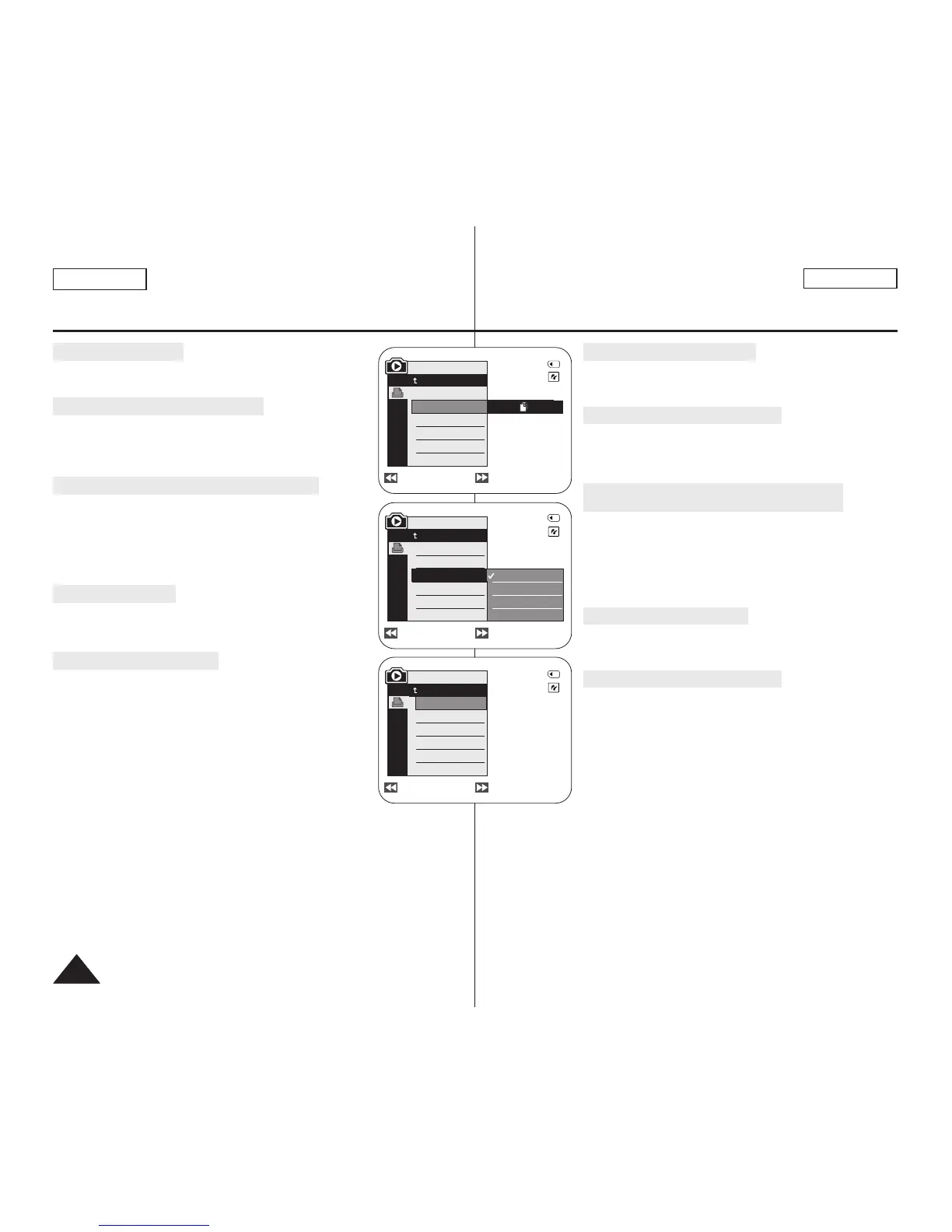
1. In the <PictBridge> settings menu, press the [
œœœœ
/
√√√√
(REV/FWD)] buttons to select an image to print.
Setting the Number of Prints
2. Move the [Zoom] lever to the up or down to select
<Copies>, then press the [OK] button.
3. Move the [Zoom] lever to the up or down to set the
number of prints, then press the [OK] button.
Setting the Date/Time Imprint Option
4. Move the [Zoom] lever to the up or down to select
<Date/Time>, then press the [OK] button.
5. Move the [Zoom] lever to the up or down to select the
Date/Time display type, then press the [OK] button.
■
Date/Time display type: <Off>, <Date>, <Time>,
<Date&Time>
Printing Images
Move the [Zoom] lever to the up or down to select <Print>,
then press the [OK] button, and selected image files will be
printed.
Canceling the Printing
To cancel the image printing, press [OK] button again.
The message “Cancel” appears and the image printing will
be canceled.
[ Notes ]
■
The Date/Time Imprint Option may not supported by all
printers. Check with your printer manufacturer. The
<Date/Time> menu cannot be setup if the printer does
not support this option.
■
The PictBridge
TM
is a registered trademark of CIPA
(Camera & Imaging Products Association), an image transfer standard
developed by Canon, Fuji, HP, Olympus, Seiko Epson, and Sony.
■
PictBridge supporting printers are commercially available.
■
Use the USB cable provided with the Camcorder.
■
Use the AC power adapter for your Camcorder during PictBridge Direct
Printing. Turning your Camcorder off during printing might damage
data on the Memory Card.
■
Printing photo images is supported. Moving images are not available for
printing.
■
You can set various printing options depending on the printer.
■
Please refer to the user’s manual of the printer for details.
Selección de imágenes
1. En el menú de ajuste <PictBridge>, presione los botones
[
œœœœ
/
√√√√
(REV/FWD)] para seleccionar la imagen que va a
imprimir.
Ajuste del número de copias
2. Mueva la palanca [Zoom] arriba o abajo para seleccionar
<Copies> y presione el botón [OK].
3. Mueva la palanca [Zoom] arriba o abajo para seleccionar
el número de impresiones y presione el botón [OK].
Ajuste de la opción Date/Time Imprint
<Estampado de fecha y hora>
4. Mueva la palanca [Zoom] arriba o abajo para seleccionar
<Date/Time> y presione el botón [OK].
5. Mueva la palanca [Zoom] arriba o abajo para seleccionar
el tipo de visualización de la fecha y hora y presione el
botón [OK].
■
Tipo de visualización de fecha y hora: <Off>, <Date>,
<Time>, <Date&Time>.
Impresión de imágenes
Mueva la palanca [Zoom] arriba o abajo para seleccionar
<Print> y presione el botón [OK] y seleccione los archivos
de imágenes que se van a imprimir.
Cancelación de la impresión
Para cancelar la impresión de imágenes, presione de nuevo
el botón [OK].
Aparece el mensaje “Cancel…” y se cancelará la impresión
de las imágenes.
[ Notas ]
■
La opción de impresión de fecha y hora no la admitirán
todas las impresoras. Compruébelo con el fabricante de
la impresora. El menú <Date/Time> no puede
configurarse si la impresora no admite esta opción.
■
PictBridge
TM
es una marca registrada de CIPA (Camera & Imaging Products
Association), un estándar de transferencia de imágenes desarrollado por
Canon, Fuji, HP, Olympus, Seiko Epson y Sony.
■
Existen en el mercado impresoras que soportan PictBridge.
■
Utilice el cable USB que se facilita con la videocámara.
■
Utilice el adaptador de CA para la videocámara durante la impresión directa
de PictBridge.
Apagar la videocámara durante la impresión puede dañar los datos de la
tarjeta de memoria.
■
Se admite la impresión de fotografías. Las secuencias no se pueden
imprimir.
■
Puede definir varias opciones de impresión dependiendo de la impresora.
■
Consulte el manual del usuario de la impresora.
Previous Next
Previous Next
M.Player Mode
Back
Print
Copies
Date/Time
Off
Date
Time
Date&Time
Previous Next
M.Player Mode
Back
Print
Copies
Date/Time
Num. 02
2/46
2/46
2/46
M.Player Mode
Back
Print
Copies
Date/Time
100-0002
100-0002
100-0002


 To Next Page