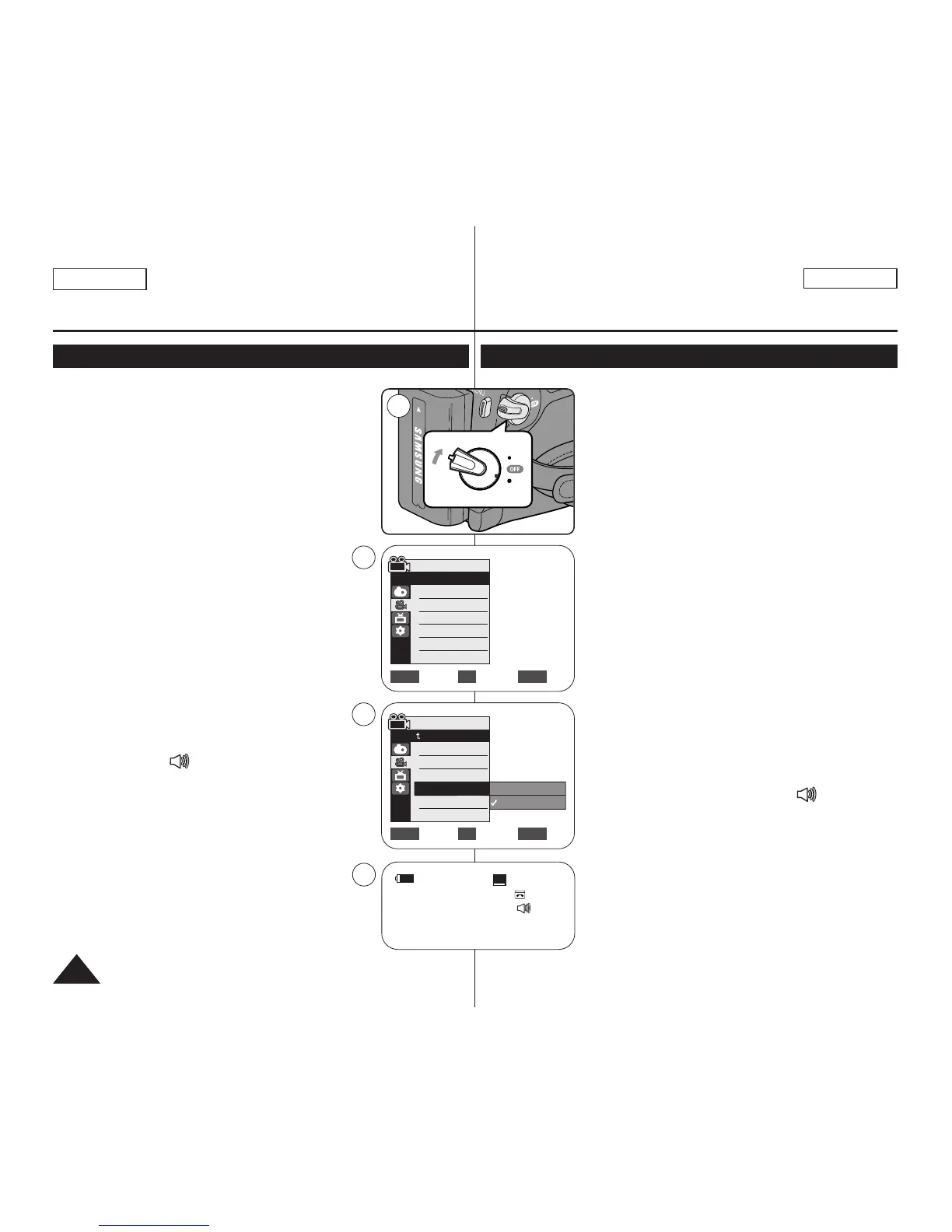
✤ The Real Stereo function works only in <Camera>
mode. ➥page 19
✤ Real Stereo enhances the left and right input signals
when using the Internal or External MICs.
1. Set the [Power] switch to [CAMERA].
2. Set the [Mode] switch to [TAPE].
(SC-D363/D364/D365/D366 only)
3. Press the [MENU] button.
4. Move the [Zoom] lever to the up or down to select
<Record>, then press the [OK] button.
5. Move the [Zoom] lever to the up or down to select
<Real Stereo>, then press the [OK] button.
6. To activate the Real Stereo function, move the
[Zoom] lever to the up or down to select <On>,
then press the [OK] button.
7. To exit, press the [MENU] button.
■
Real Stereo ( ) icon is displayed.
Advanced Recording
Selecting the Real Stereo
✤ La función Real Stereo sólo está operativa en el
modo <Camera>. ➥pág. 19
✤ Real Stereo aumenta las señales de entrada
izquierda y derecha al utilizar los micrófonos interno
y externo.
1. Coloque el interruptor [Power] en [CAMERA].
2. Coloque el interruptor [Mode] en [TAPE].
(Sólo SC-D363/D364/D365/D366.)
3. Presione el botón [MENU].
4. Mueva la palanca [Zoom] arriba o abajo para
seleccionar <Record> y presione el botón [OK].
5. Mueva la palanca [Zoom] arriba o abajo para
seleccionar <Real Stereo> y presione el botón
[OK].
6. Para activar la función <Real Stereo>, mueva la
palanca [Zoom] arriba o abajo para seleccionar
<On> y presione el botón [OK].
7. Para salir, presione el botón [MENU].
■
Aparece el icono Real Stereo ( ).
Grabación avanzada
Selección de la función <Real Stereo>
ENGLISH
ESPAÑOL
4646
Move Select Exit
MENUOKZOOM
Camera Mode
√Record
Rec Mode
Audio Mode
WindCut Plus
Real Stereo
√SP
√12Bit
√Off
√Off
Move Select Exit
MENUOKZOOM
Off
On
4
6
Camera Mode
Back
Rec Mode
Audio Mode
WindCut Plus
Real Stereo


 To Next Page