ENGLISH
ESPAÑOL
3434
Basic Recording
Making your First Recording
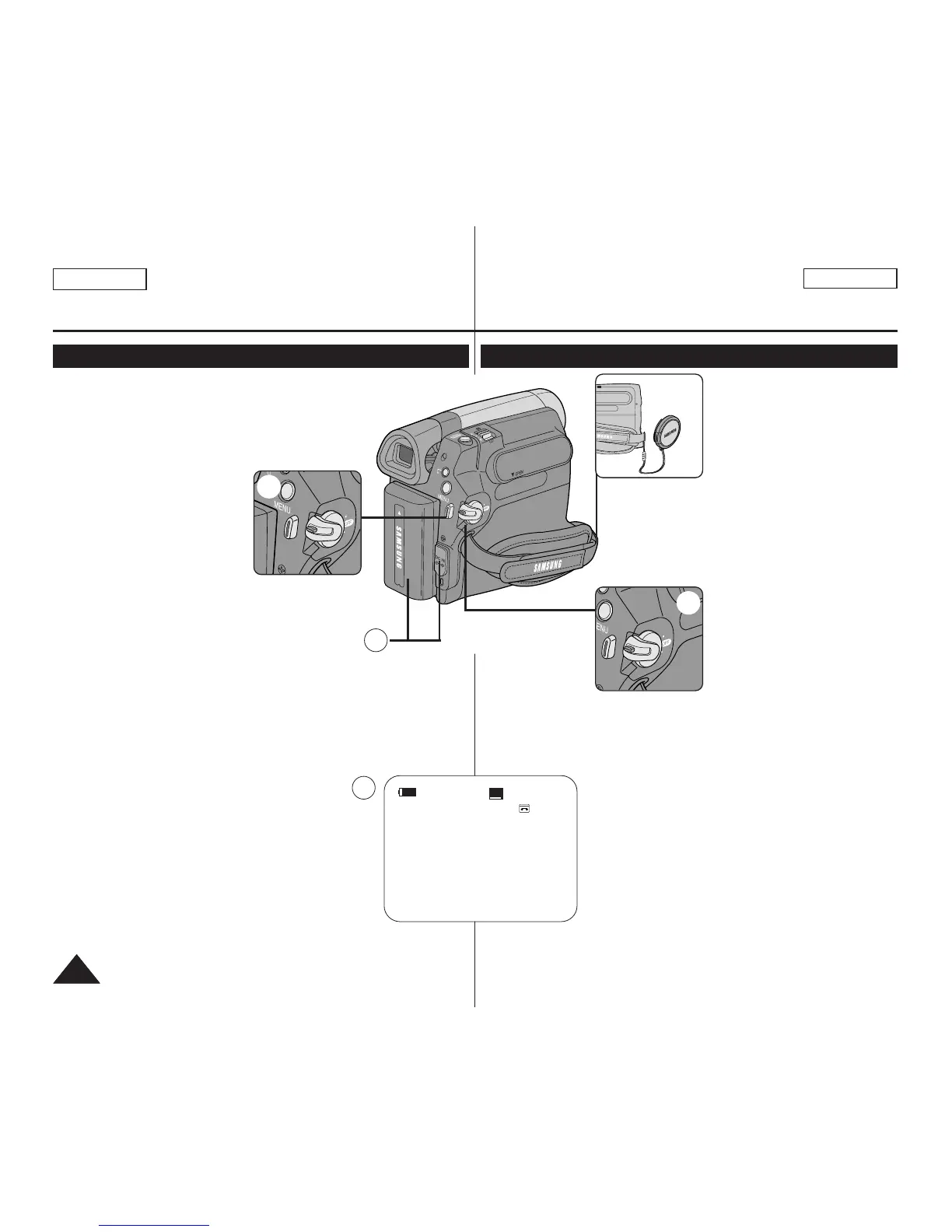
1. Connect a power source to the
Camcorder. ➥page 19
(A Battery pack or a AC Power
adapter)
Insert a cassette. ➥page 32
2. Remove the Lens Cover.
3. Set the [Power] switch to
[CAMERA].
■
Open the LCD Screen.
■
Set the [Mode] switch to
[TAPE]. (SC-D363/D364/
D365/D366 only)
Make sure that <STBY> is
displayed.
■
If the write protection tab of
the cassette is open (set to
save), <STOP> and
<Protection!> will be displayed. Release the write protection tab
to record.
■
Make sure the image you want to record appears on the LCD
Screen or Viewfinder.
■
Make sure the Battery Level indicates that there is enough
remaining power for your expected recording time.
■
You can select the Record Mode of your choice.
➥pages 44, 45, 46
4. To start recording, press the [Start/Stop] button.
■
<REC●> is displayed on the LCD Screen.
To stop recording, press the [Start/Stop] button again.
■
<STBY> is displayed on the LCD Screen.
[ Note ]
Detach the Battery Pack when you are finished recording
to prevent unnecessary battery power consumption.
Grabación básica
Primera grabación
4
3
2
√
√
60min
0:00:10
SP
REC
●
√
4
1
1. Conecte a la cámara a una
fuente de alimentación.
➥pág. 19 (Una batería o un
adaptador de CA.)
Inserte un casete. ➥pág. 32
2. Retire la tapa del objetivo.
3. Coloque el interruptor [Power] en [CAMERA].
■
Abra la pantalla LCD.
■
Coloque el interruptor [Mode] en [TAPE].
(Sólo SC-D363/D364/D365/D366) Asegúrese
de que aparece <STBY>.
■
Si la pestaña de protección del casete está
abierta (protegida), aparecerá
<STOP> y <Protection!>.
Libere la pestaña de
protección contra escritura
para grabar.
■
Asegúrese de que la imagen que desea grabar aparezca en la
pantalla LCD o en el visor.
■
Asegúrese de que el nivel de la batería indique que tiene suficiente
energía para grabar durante el tiempo deseado.
■
Puede seleccionar el modo de grabación que desee. ➥pages 44, 45, 46
4. Para iniciar la grabación, presione el botón
[Start/Stop].
■
Aparece <REC ●>en la pantalla LCD.
Para detener la grabación, presione el botón
[Start/Stop] de nuevo.
■
Aparece <STBY> en la pantalla LCD.
[ Nota ]
Desconecte la batería al terminar de grabar para
evitar un consumo innecesario de la batería.


 To Next Page