ENGLISH
ESPAÑOL
99
Getting to Know Your Camcorder Introducción a la videocámara
Front & Left View Vistas frontal y lateral izquierda
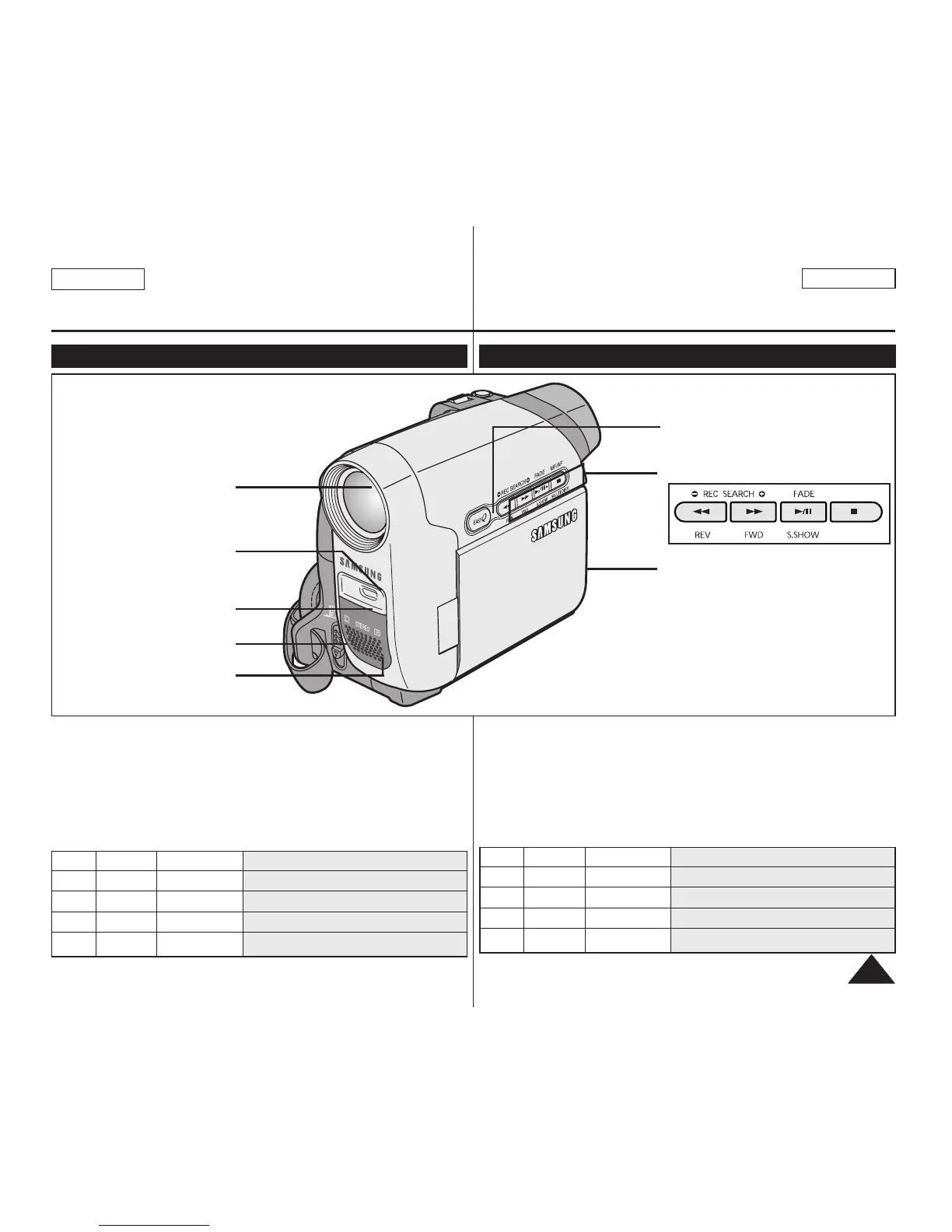
1. Lens
2. LIGHT ➥page 43 (SC-D362/D364/D365/D366 only)
3. Remote Sensor (SC-D364/D366 only)
4. TAPE EJECT
5. Internal MIC
6. EASY.Q Button ➥page 35
7. Function Buttons
8. TFT LCD Screen
1. Lens
2. LIGHT
(SC-D362/D364/D365
/D366 only)
3. Remote Sensor
(SC-D364/D366 only)
5. Internal MIC
8. TFT LCD Screen
7. Function Buttons
6. EASY.Q Button
4. TAPE EJECT
Button <Player> <Camera> <M.Player> (SC-D363/D364/D365/D366 only)
œœœœ
REW REC SEARCH – REV
√√√√
FF REC SEARCH + FWD
√√
/❙❙ PLAY/STILL FADE S.SHOW (SLIDE SHOW)
■ STOP MF/AF MULTI DISP. (MULTI DISPLAY)
Botón <Player> <Camera> <M.Player> (sólo SC-D363/D364/D365/D366)
œœœœ
REW REC SEARCH – REV
√√√√
FF REC SEARCH + FWD
√√
/❙❙ PLAY/STILL FADE S.SHOW (SLIDE SHOW)
■ STOP MF/AF MULTI DISP. (MULTI DISPLAY)
1. Objetivo
2. LUZ ➥pág. 43 (sólo SC-D362/D364/D365/D366)
3. Sensor de control remoto (sólo SC-D364/D366)
4. TAPE EJECT
5. Micrófono incorporado
6. Botón EASY.Q ➥pág. 35
7. Botón de funciones
8. Pantalla LCD TFT


 To Next Page