ENGLISH
ESPAÑOL
9090
✤ USB Connect function works only in <M.Player> mode. ➥page 19
✤ Using the USB cable, you can connect your Camcorder to a
computer to copy your moving images and photo images from the
Memory Card (or built-in memory; SC-D366), or to a printer to print
your images.
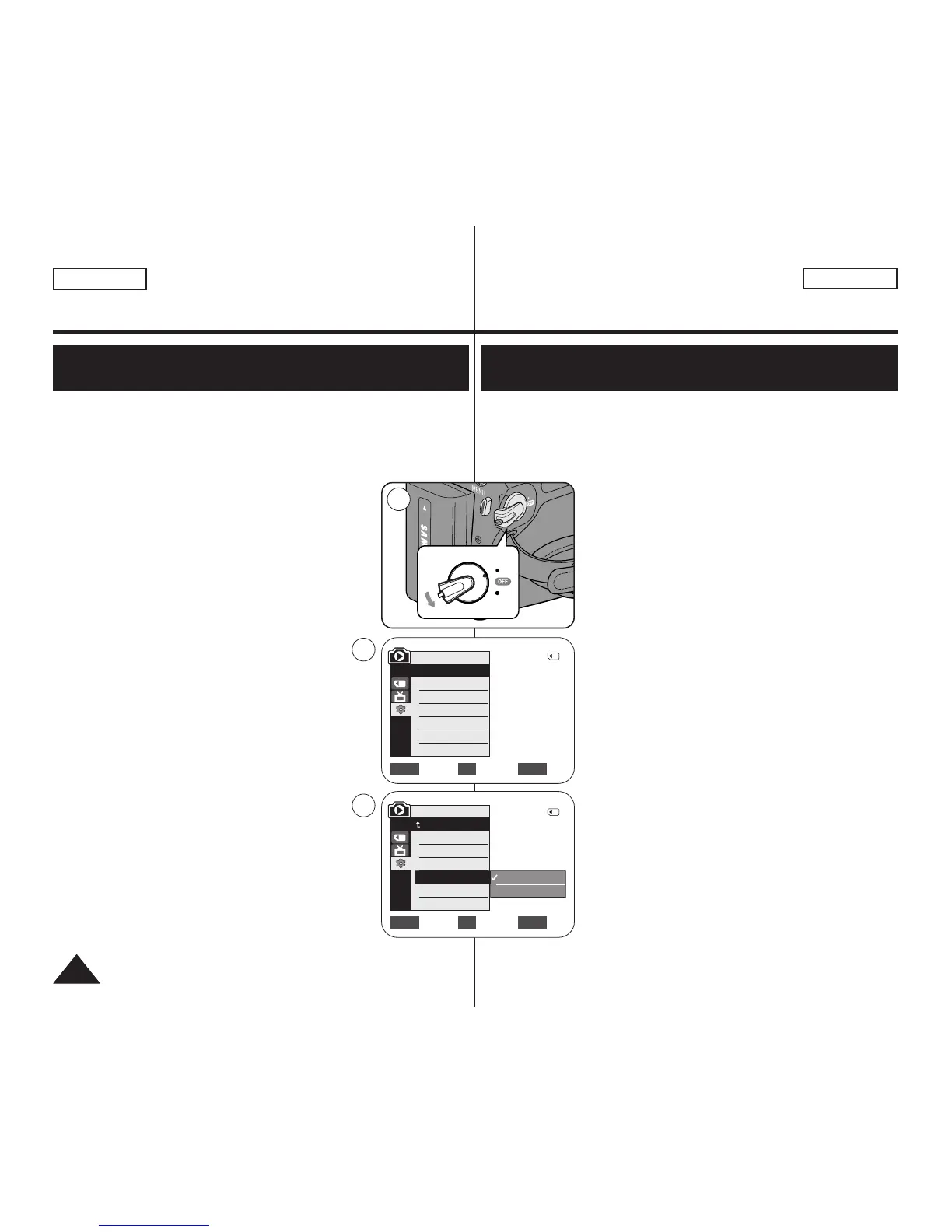
1. Set the [Power] switch to [PLAYER].
2. Set the [Mode] switch to [MEMORY].
3. Press the [MENU] button.
■
The menu list will appear.
4. Move the [Zoom] lever to the up or down to select
<System>, then press the [OK] button.
5. Move the [Zoom] lever to the up or down to
select <USB Connect>, then press the [OK] button.
6. Move the [Zoom] lever to the up or down to select
<Computer> or <Printer>, then press the [OK]
button.
■
You can select <Computer> to use the
Camcorder as a PC Camera, USB Stream or
removable disk.
■
You can select <Printer> to use the
Pictbridge feature. ➥page 84
7. To exit, press the [MENU] button.
✤ La función USB Connect sólo está operativa en el modo <M.Player>.
➥pág. 19
✤ Con el cable USB, puede conectar su videocámara a un PC para
copiar sus películas e imágenes desde la tarjeta de memoria (o
memoria interna; SC-D366), o conectarla a una
impresora para imprimir las imágenes.
1. Coloque el interruptor [Power] en [PLAYER].
2. Coloque el interruptor [Mode] en [MEMORY].
3. Presione el botón [MENU].
■
Aparecerá la lista de menús.
4. Mueva la palanca [Zoom] arriba o abajo para
seleccionar <System> y presione el botón [OK].
5. Mueva la palanca [Zoom] arriba o abajo para
seleccionar <USB Connect>y presione el botón
[OK].
6. Mueva la palanca [Zoom] arriba o abajo para
seleccionar <Computer> o <Printer> y presione el
botón [OK]. A continuación, presione el botón OK.
■
Puede seleccionar <Computer> para utilizar la
videocámara como una cámara Web, USB
Streaming o disco extraíble.
■
Puede seleccionar <Printer> para utilizar la función
Pictbridge. ➥pág. 84
7. Para salir, presione el botón [MENU].
USB Interface
(SC-D362/D363/D364/D365/D366 only)
Interfaz USB
(sólo SC-D362/D363/D364/D365/D366)
Selecting the USB Device (USB Connect)
(SC-D363/D364/D365/D366 only)
Selección del dispositivo USB <USB Connect>
(Conexión
USB)
(sólo SC-D363/D364/D365/D366)


 To Next Page