ENGLISH
ESPAÑOL
6565
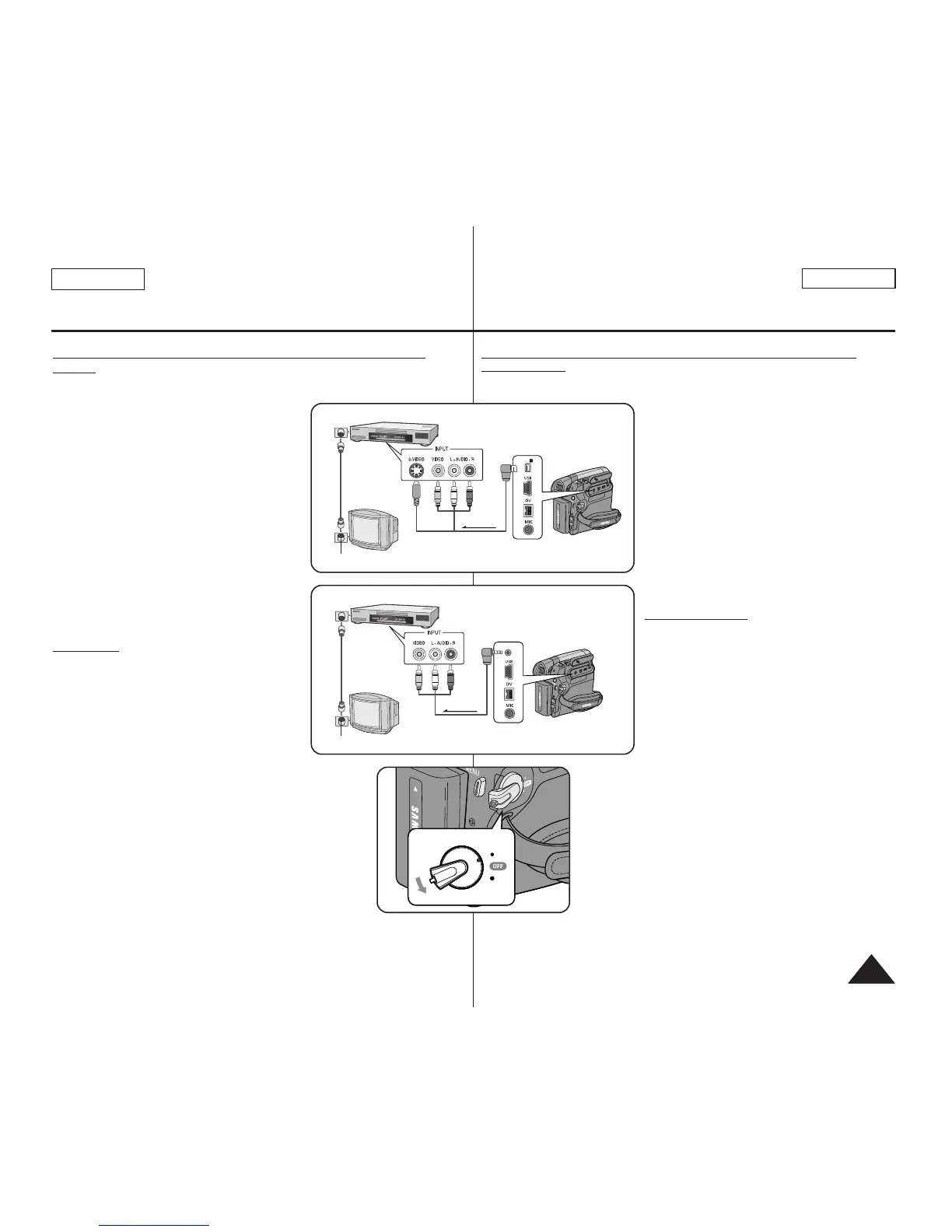
Connecting to a TV which has no Audio/Video Input
Jacks
✤ You can connect your Camcorder to a TV
through a VCR.
1. Connect the Camcorder to your VCR with
the Audio/Video Cable or Multi Cable.
■
The yellow jack: Video
■
The white jack: Audio(L) - Mono
■
The red jack: Audio(R)
2. Connect a TV to the VCR.
3. Set the [Power] switch to [PLAYER].
4. Set the [Mode] switch to [TAPE].
(SC-D363/D364/D365/D366 only)
5. Turn on both the TV and VCR.
■
Set the input selector on the VCR to
Line.
■
Select the channel reserved for your
VCR on the TV set.
6. Play the tape.
Playback
1. Connect a power source and set the
[Power] switch to [PLAYER].
2. Set the [Mode] switch to [TAPE].
(SC-D363/D364/D365/D366 only)
3. Insert the tape you wish to play back.
4. Using the [
œœœœ
(REW)] /[
√√√√
(FF)] buttons,
find the first position you wish to play
back.
5. Press the [
√√
/❙❙ (PLAY/STILL)] button.
■
The images you recorded will appear on the TV
after a few seconds.
■
If a tape reaches its end while being played back,
the tape will rewind automatically.
[ Notes ]
■
The playback mode (SP/LP) is selected automatically.
■
If the VCR has an S-Video input terminal, you may
use S-Video connector for better quality.
(SC-D362/D364/D365/D366 only)
■
The S-Video connector transmits video only. Connect
audio cables for sound.
■
If only a mono audio input is available on the TV set, use the audio
cable with the white jack (Audio L).
Conexión a un TV que no dispone de conectores de
audio/video
✤ Pude conectar la videocámara a un TV a través de una video casetera.
1. Conecte la videocámara al aparato de
video mediante el cable de audio/video o
el cable múltiple.
■
El terminal amarillo: Video
■
El terminal blanco: Audio(L)-mono
■
El terminal rojo: Audio(R)
2. Conecte el televisor a la video casetera.
3.
Coloque el interruptor [Power] en [PLAYER].
4. Coloque el interruptor [Mode] en [TAPE].
(Sólo SC-D363/D364/D365/D366.)
5. Encienda el televisor y la video casetera.
■
Coloque el selector de entrada de la
video casetera en Line (Línea).
■
Seleccione el canal reservado para la
video casetera en el equipo de TV.
6. Reproduzca la cinta.
Reproducción
1. Conecte la fuente de alimentación y
coloque el interruptor [Power] en
[PLAYER].
2. Coloque el interruptor [Mode] en [TAPE].
(Sólo SC-D363/D364/D365/D366.)
3. Inserte la cinta que desee reproducir.
4. Con los botones [
œœœœ
(REW)] /[
√√√√
(FF)],
busque la primera posición que desea
reproducir.
5. Presione el botón [
√√
/❙❙ (PLAY/STILL)].
■
Las imágenes grabadas aparecerán en
el TV transcurridos unos segundos.
■
Si la cinta llega al final mientras se esté
reproduciendo, se rebobinará
automáticamente.
[ Notas ]
■
El modo de reproducción (SP/LP) se selecciona
automáticamente.
■
Si la video casetera tiene un terminal de entrada
S-Video, puede utilizar el conector de S-Video para
obtener una mejor calidad.
(Sólo SC-D362/D364/D365/D366.)
■
El conector de S-Video sólo transmite video. Conecte
los cables de audio para el sonido.
■
Si sólo está disponible una entrada de audio monoaural en el equipo de
TV, utilice el cable de audio con el terminal blanco (Audio L).
Playback Reproducción


 To Next Page