Eng-101
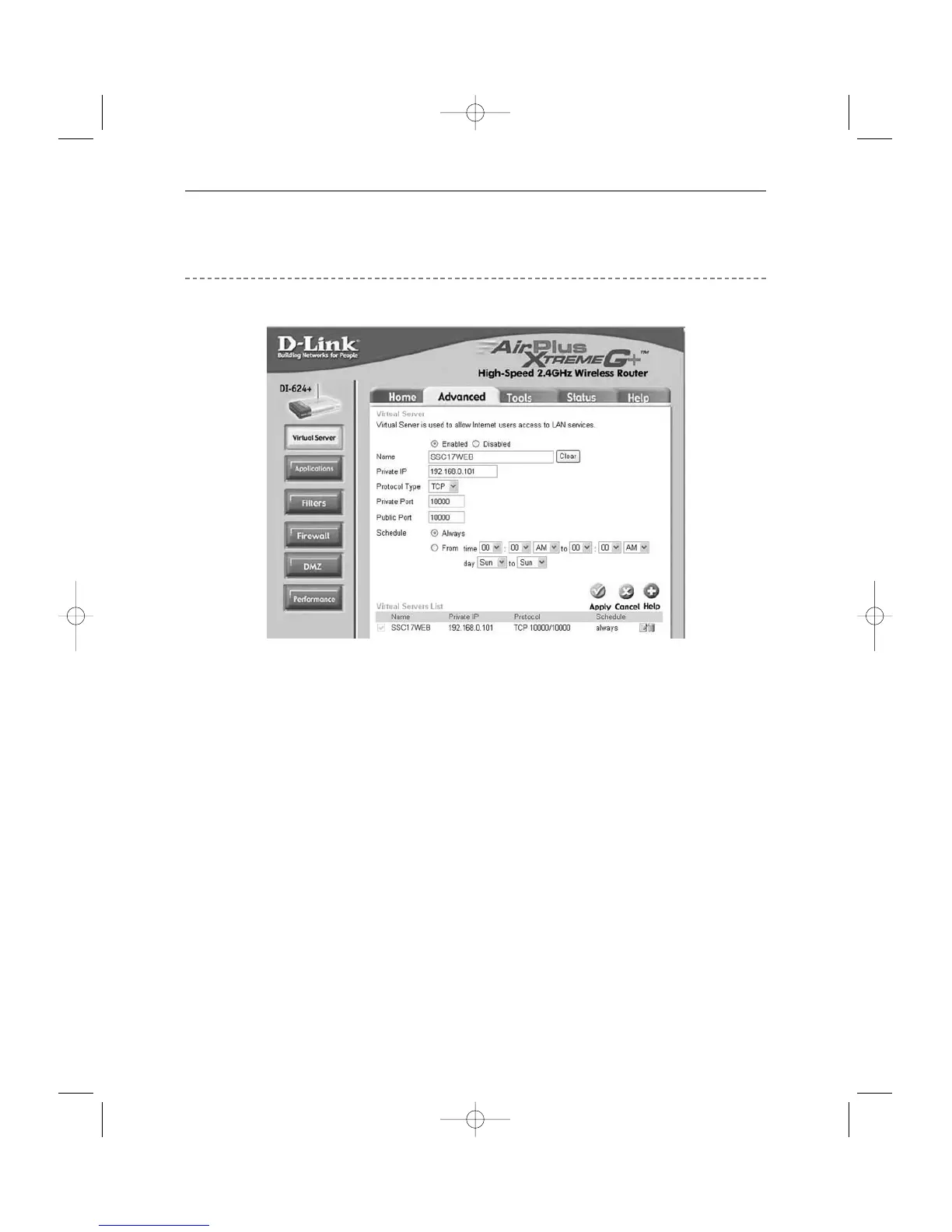
Step-by-Step Setup Example of IP Router
D-Link model DI-624+
1. Select “Virtual Server” and “Advanced”
You need to create Virtual Servers (Port Forwarding) for HTTP, TCP and Upgrade separately.
2. Virtual Server (Port Forwarding) for HTTP
! Enabled : Leave this “checked”
@ Name : Set this to “HTTP”
# Private IP : SETUP MENU -> 7. NETWORK SETUP -> Check IP from network
status to apply it identically to Private IP after DHCP setup.
(Eng-32 Setup)
* That is not in use by any other device connected to the IP Router including the
Local PC.
$ Protocol Type : Select “TCP”
% Private Port and Public Port : Set both to “From 10000 to 65535”
^ Schedule : Select “Always”
& Click “Apply”
3. Close browser window.



 To Next Page