36
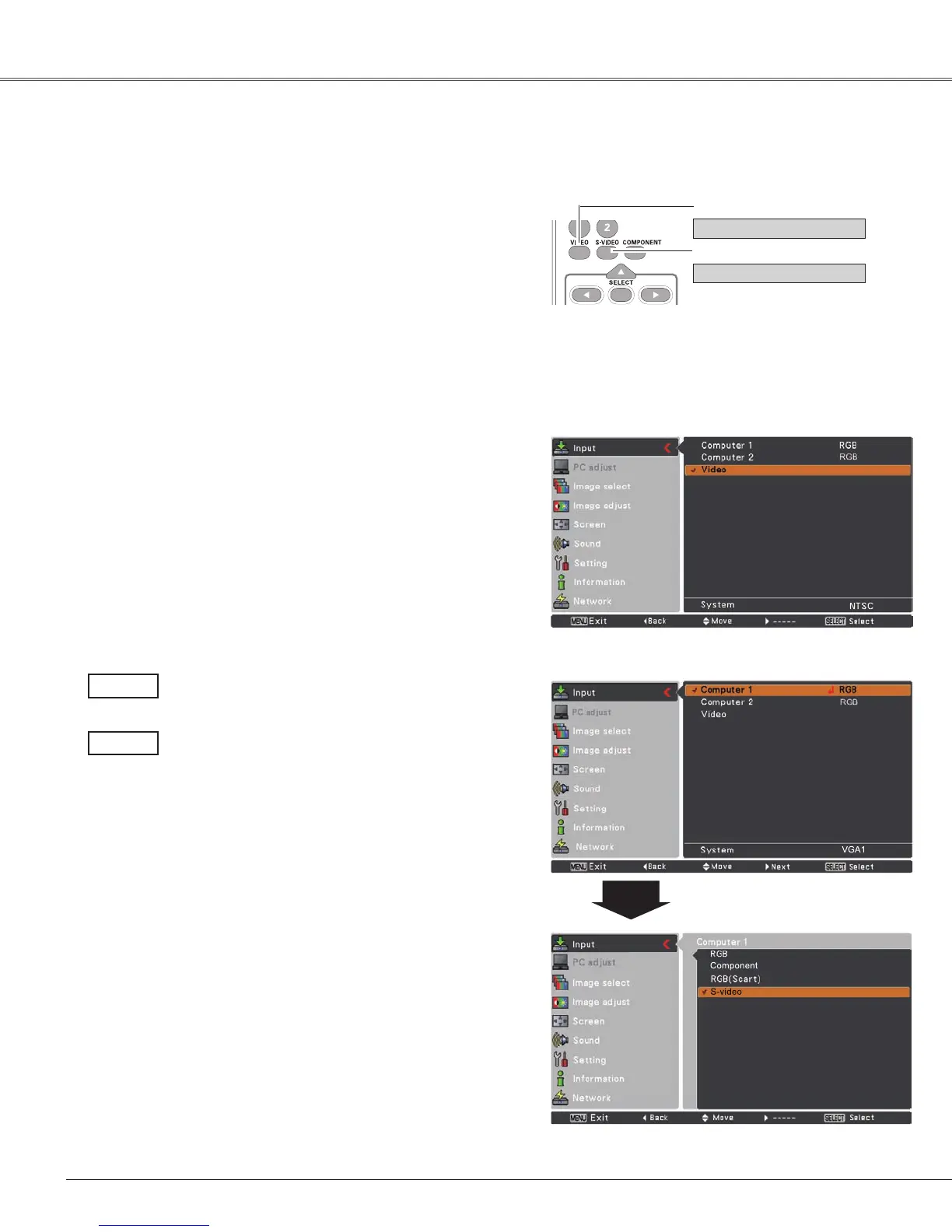
Choose Video or S-video by pressing the VIDEO or the
S-VIDEObuttonontheremotecontrol.
Beforeusing these buttons,correctinput sourceshouldbe
selectedthroughmenuoperationasdescribedbelow.
1
2
Input Menu
Input Source Selection (Video, S-video)
Video Input
Direct Operation
Menu Operation
When video input signal is connected to the
VIDEOjack,selectVideo.
Video
When video input signal is connected to the S-
VIDEOjack,selectS-video.
S-video
Note:
WhentheInputSearchfunctionissettoOn1orOn2in
theAutosetupfunction,theinputsignalwillbesearched
automatically(p.44).
Remote Control
VIDEO button
PresstheMENUbuttontodisplaytheOn-Screen
Menu.UsethePoint▲▼buttonstoselectInputand
thenpressthePoint
►
ortheSELECTbutton.
UsethePoint▲▼buttonstoselectVideoandthen
presstheSELECTbutton.
S-VIDEO button
Video
S-video
3
UsethePoint▲▼buttonstoselectComputer 1.And
then
pressthePoint
►button
toaccessthesubmenu
items
.UsethePoint▲▼buttonstoselecttheS-video
andthenpresstheSELECTbutton.
or
Computer
1
or


 To Next Page
 Loading...