Notice: USB devices with power more than 0.5 mAh are not supported.
Notice: Firmware Upgrade available through download.
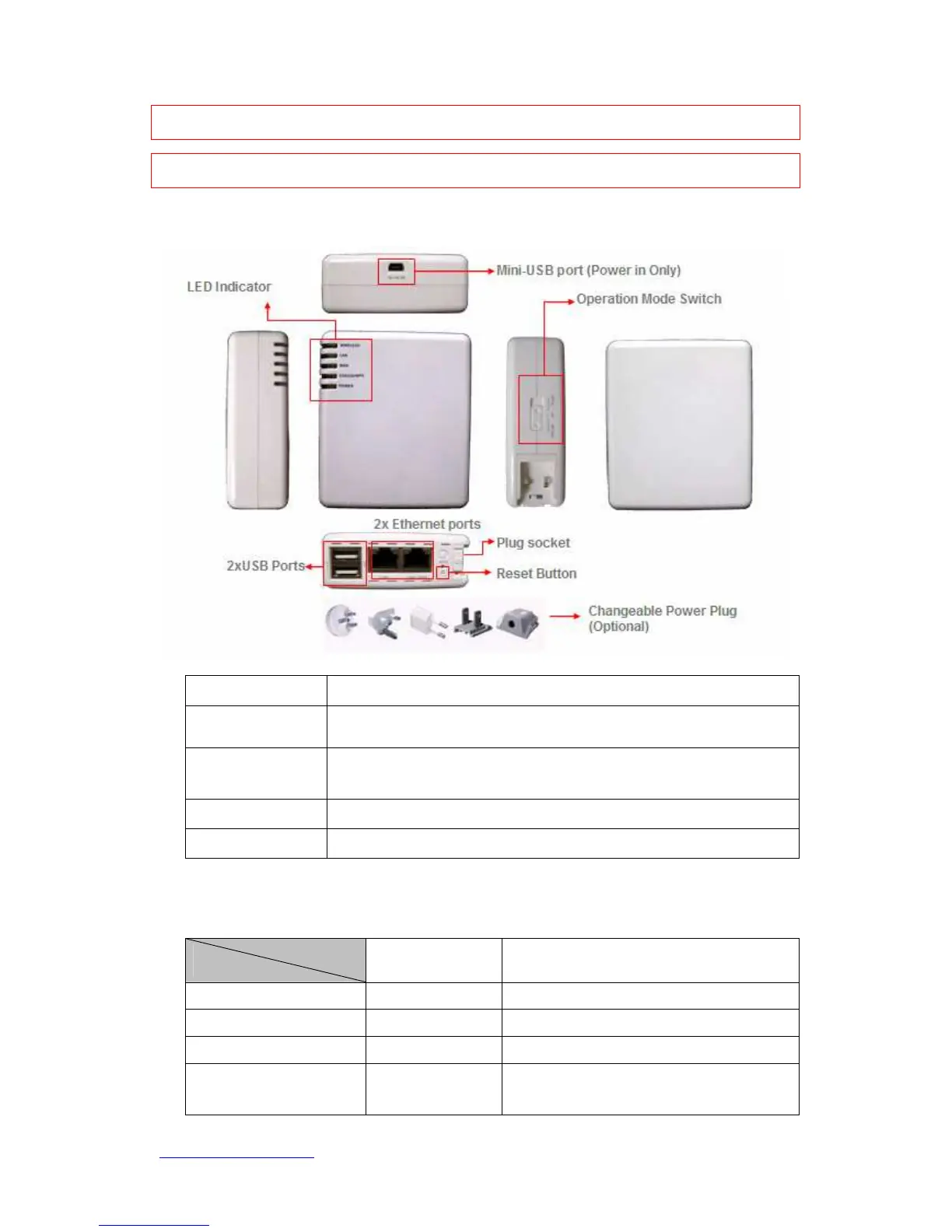
1.3.1 Six Views of Product Appearance
Power Plug
100V ~ 240V Input
Operation Mode
Switch
Router, AP, and Client. 3 operation modes
Reset Button
Press “Reset” button over 7 seconds. When status indicator turns from
flashing to solid, the process is completed. All settings are back to
default.
Ethernet Port
2 RJ-45 Ethernet 10/100 Ports
USB2.0 Ports
2 USB Ports
1.3.2 LED Indicator Status Description
Status
Solid Flashing
WIRELESS Operation OK Transmitting Data
LAN Ethernet OK Transmitting Data
WAN Internet OK Transmitting Data
STATUS & WPS Operation OK
Green: Reset/Firmware updates in
progress
Orange: WPS enabled



 To Next Page