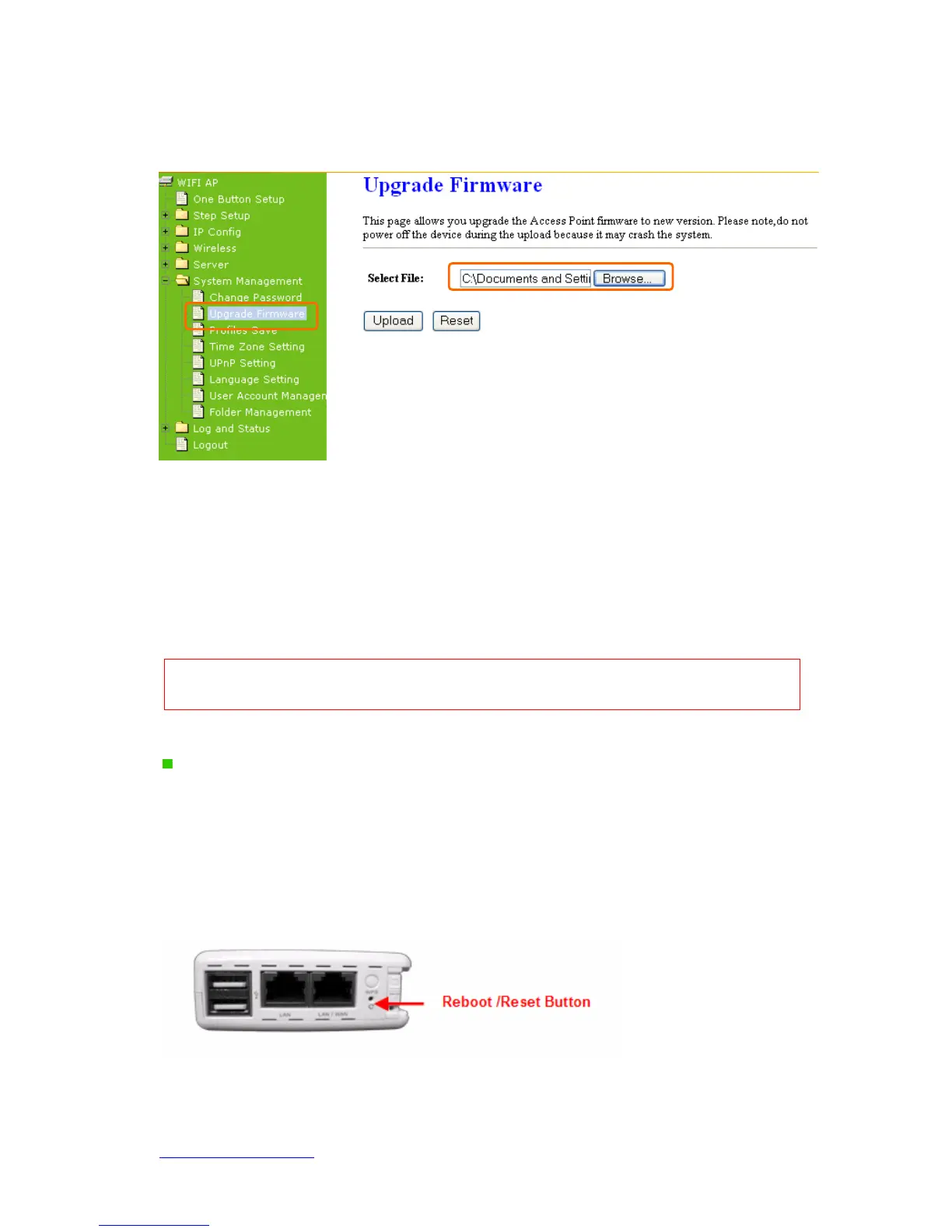
Server Router on this page. Make sure the firmware you want to use is on the local hard
drive of the computer. Click Firmware Upgrade to proceed.
1. Update Firmware
Click on Browse… button to search your local hard drive and locate the firmware to be
used for update.
2. Upload & Reset:
Click Upload to upgrade the firmware or Reset to restore to factory default Settings
Note: 1. To prevent the firmware upgrading interrupted by other wireless signals and caused failure. We
recommend using wired connection to do the upgrading.
2.
The firmware upgrade will not remove your previous settings.
Reset button:
On the back of this router, there is a reset button. If you can not login the administrator
page by forgetting your password; or the router has problem you can’t solve.
You can
push the reset button for 5 seconds with a stick. The router will reboot and all settings will
be restored to factory default settings. If the problem still exists, you can visit our web site
to see if there is any firmware for download to solve the problem.



 To Next Page