Sapido Technology Inc. www.sapido.com.tw
115
9. Advanced Settings of SH106+
Sirens will continue beeping until you turn off the alarm manually. If you want to change the setting to
Define Alarm Sounds, then you can adjust alarm sounding time under any abnormal movement, such as:
1 second, 2 seconds, 5 minutes ... etc.
9.1 How to mute the alarm and the notification message
The security system has preinstalled setting with "Sensor Alarm" and “Notification Message”.
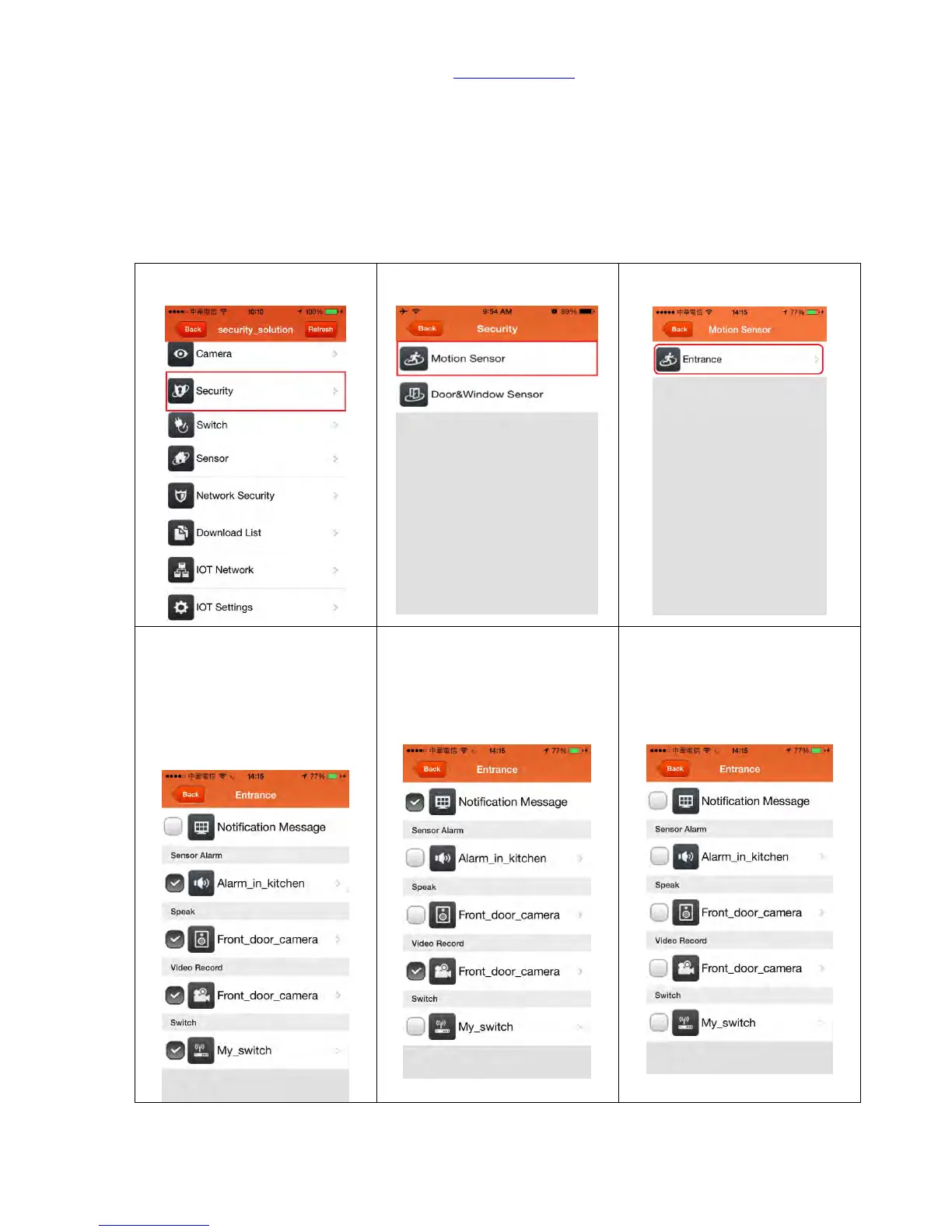
Below are the steps of how to cancel those functions.
9.1.1 ZigBee Cloud Motion Sensor (MDKA0z)
Step 2. Click <Motion Sensor>
Step 3. Enter the alarm system
to the setting page.
Step 4. Cancel the <Notification
Message>: Once detected
someone's movement, you will
not receive the push
notification but alarm keeps
working.
Step 5. Cancel the <Sensor Alarm>:
Once detected someone's
movement, alarm will not make
the beeping sound but you will
receive the push notification.
Step 6. Cancel both <Notification
Message> & <Sensor Alarm>: Once
detected someone's movement,
you will not receive any message
notification and the alarm will not
make the sound either.



 To Next Page