Sapido Technology Inc. www.sapido.com.tw
170
12.3 Add a new Smart Switch(WSG70n)
SH106+ can keep your home secure. In addition, you can add another Sapido Smart Switch
(WSG70n) to improve your power saving system. With Sapido Smart Repeater Technology, you can
easily connect the Home Gateway (GR267c) and Smart Switch (WSG70n) by pressing WPS buttons.
Therefore, you will have a new Switch and updating security system.
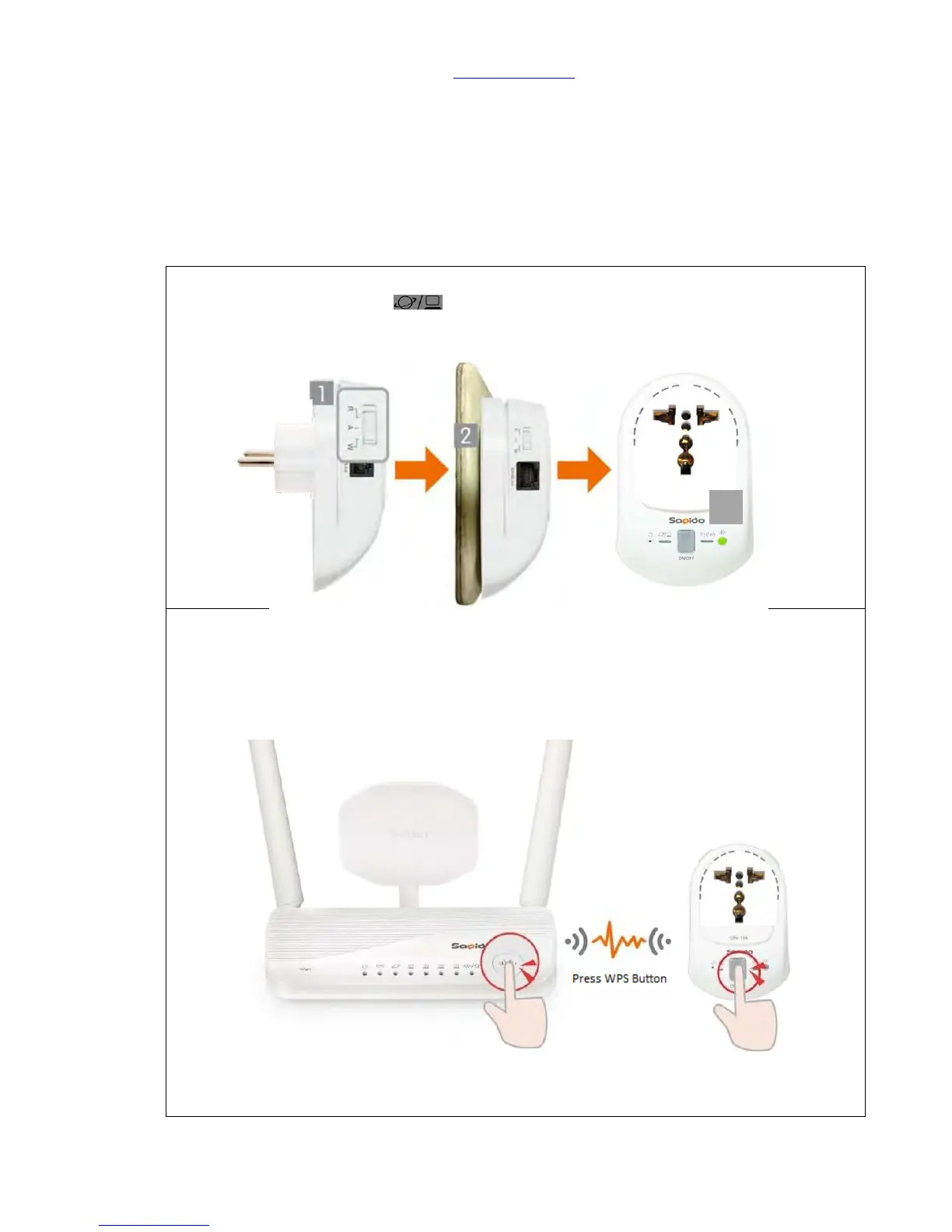
Step 1. Switch your Smart Switch to “W” network mode and Plug-in. Wait for 30 seconds to
start up. When Wireless/WPS light turns to green, which means the start-up was
successful.
Step 2. There are several ways to make WiFi connection with Smart Switch (WSG70n) based on
distance:
(1) Get started to make the WPS wireless (Wi-Fi) connection of Smart Switch (WSG70n)
and Home Gateway (GR267c) if they are closer: Please press the WPS button on
both Smart Switch (WSG70n) and Home Gateway (GR267c) separately. When both
of the lights stop blinking, it means the connection is completed.
(2) Get started to make the WPS wireless (Wi-Fi) connection of Security Alarm Router
(WDG71n) if they are closer: Please press the WPS button on both Security Alarm
Router (WDG71n) and Smart Switch (WSG70n) separately. When both of the lights



 To Next Page