EasyManua.ls Logo

Sapido SH106+ - Page 50

Default Icon
174 pages
Print Icon
To Next Page IconTo Next Page
To Previous Page IconTo Previous Page
Loading...
Sapido Technology Inc. www.sapido.com.tw
50
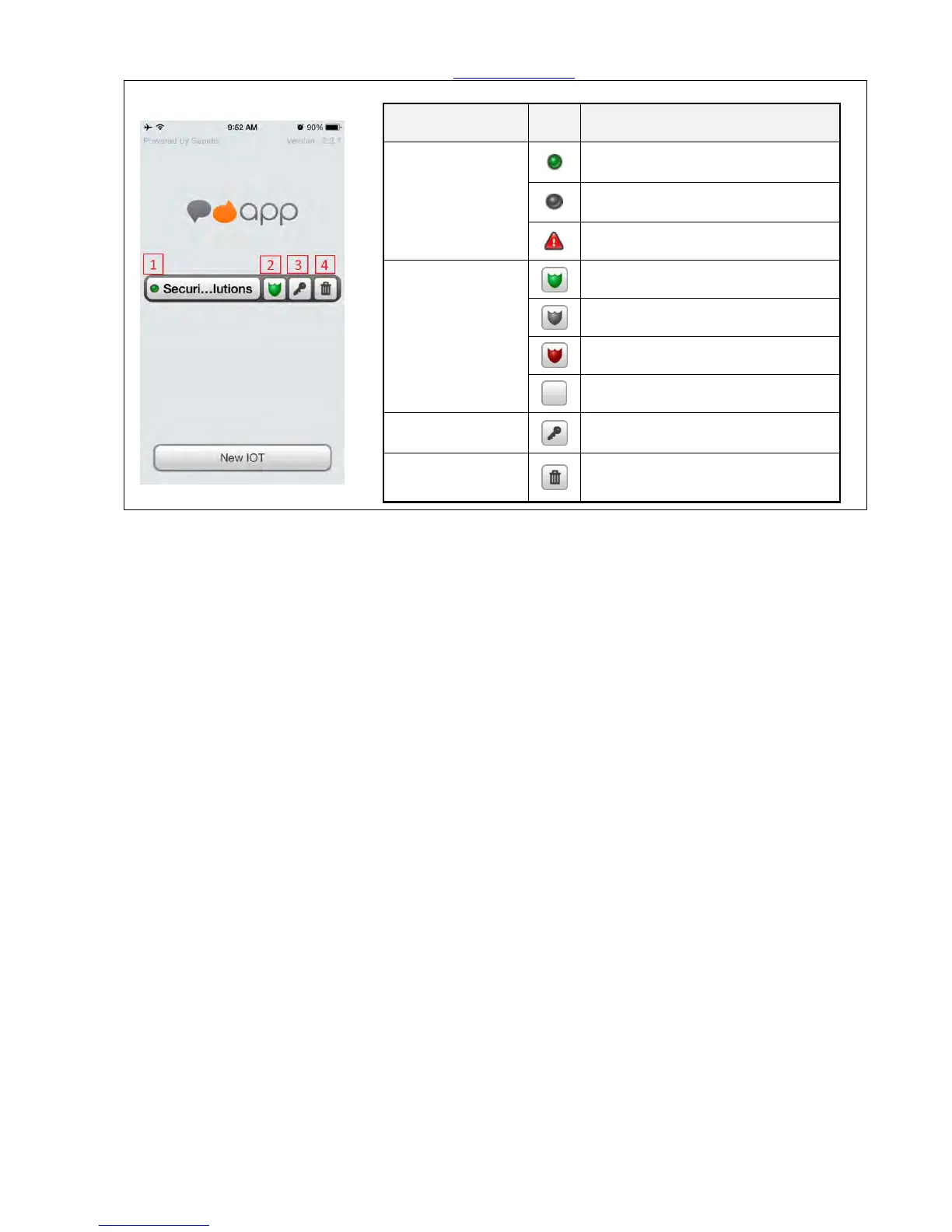
Step 8. The instruction of the symbols from the main page:
Guide-light
Light
Statue Instruction
1. The lights of
device of the
domain
Green- Domain and network is
connected.
Gray- Domain and network is
disconnected
Red- Event alert
2. The light
symbols of the
Cloud Security
Green- Security System Arm.
Gray- Security System Disarm.
Red- Alarm is triggered.
(Empty)-No Installed or Security
System offline.
3. Change the
password Key
To change the password of domain.
4. Trash Can
Symbol
To delete the domain.
Congratulations!!! The Internet Setting of Home Gateway (GR267c) is completed. Please enter the Smart
Home System to utilize the functions.

Table of Contents