12 VERSA SATEL
Mounting the keypad
The keypads are designed for indoor installation. The place of installation should be readily
accessible to the system users.
1. Open the keypad enclosure.
2. Put the enclosure base on the wall and mark the location of mounting holes.
3. Drill the holes for wall plugs (screw anchors).
4. Run wires through the opening in the enclosure base.
5. Using wall plugs (screw anchors) and screws, fasten the enclosure base to the wall.
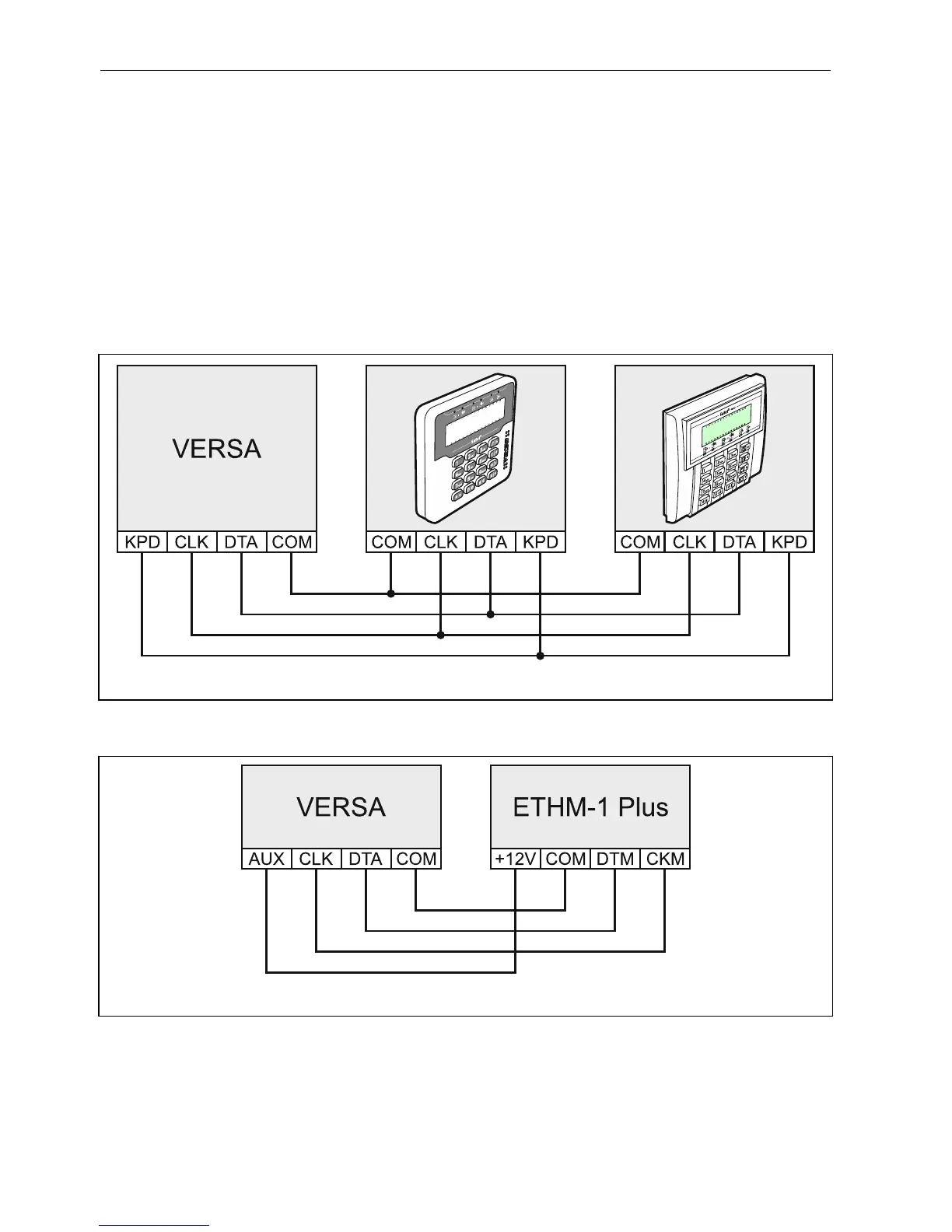
6. Connect the keypad terminals to the corresponding terminals of the control panel (see:
Fig. 5).
7. Close the keypad enclosure.
Fig. 5. Connecting keypads to the control panel.
5.5.2 Connecting Ethernet module
Fig. 6. Connecting the ETHM-1 Plus module to the control panel.
One ETHM-1 Plus or ETHM-1 module can be connected to the control panel. It allows
reporting of events and programming of the control panel via the Ethernet network.
Additionally, the ETHM-1 Plus module makes possible notification of events by means of
e-mail messages as well as operation of the alarm system from mobile devices by means of
VERSA Control application.
Address 4 (04h) must be set in the Ethernet module.













 To Next Page