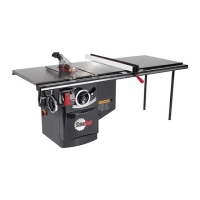
2 SawStop 10” Professional Cabinet Saw
Table of Contents
Warranty 5
No Warranty of Safety 5
If You Have an Accident 5
Safety and Warnings 6
Warning Labels 10
The SawStop
®
Safety System 11
Unpacking Your Saw 14
Standing Up Your Saw 16
Assembling Your Saw 18
Installing the Elevation Handwheel 19
Installing the Tilt Handwheel 20
Installing the Dust Port 21
Installing the Motor Cover 22
Mounting the Extension Wings 23
Mounting the Switch Box 24
Mounting the Accessory Holders 25
Get to Know Your Saw 26
Preparing Your Saw for Use 28
Saw Placement 28
Table Insert Removal and Installation 28
Blade or Dado Installation 29
Brake Position Adjustment 30
Blade Guard and Riving Knife Installation 32
Dust Collection 34
Electrical Power Connection 35
Re-Wiring a PCS175 Saw for 208-240V Power 36
Changing the Plug or Power Cord on a 208-240V Saw 38





 To Next Page