RTC
®
4 PC Interface Board
Rev. 1.3 e
4 Principle Of Operation
18
innovators for industry
Variable Jump Delay
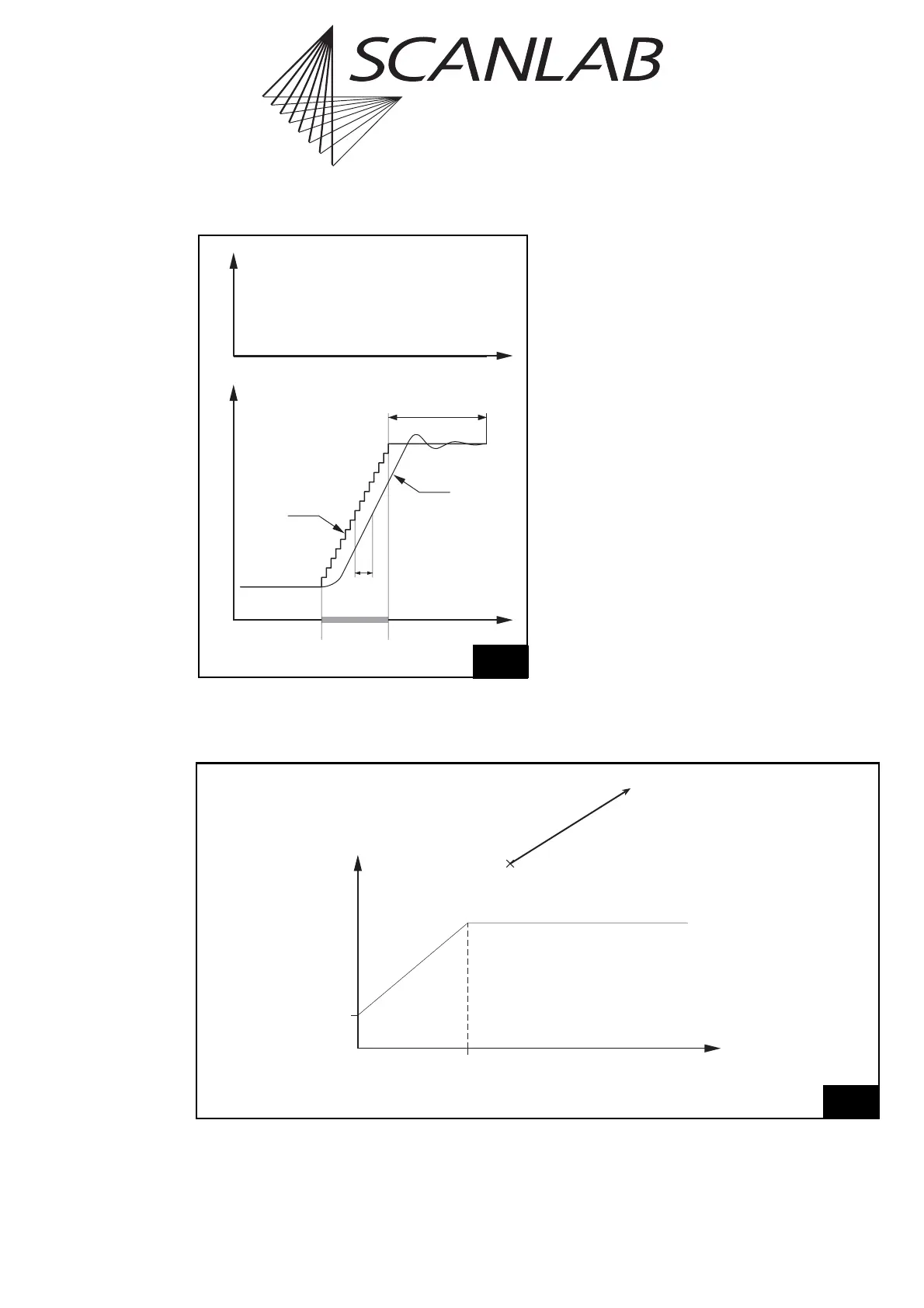
During a jump vector, the laser focus (output
position) usually moves with a constant linear
velocity, the jump speed. Since the jump speed is the
same for each jump vector, a constant jump delay is
required for settling of the mirrors.
However, if a jump vector is very short, the scanners
might not reach the full jump speed during the jump
because of the inertia of the mirrors. In this case, a
shorter jump delay might be sufficient for settling.
To make use of this, the RTC
®
4 offers a variable jump
delay mode. In this mode, the jump delay for short
jump vectors will be reduced in time, as shown in
figure 6 on page 18. The minimum jump delay (for a
jump vector of zero length) and the jump length limit
are set by the user with the command
set_delay_mode (see page 104).
When using the variable jump delay mode, total
marking time can be reduced, especially in
applications involving many short jumps.
Notes
To t u r n off the variable jump delay mode, simply
set the parameter
JumpLengthLimit
to zero.
Time
Real
Position
Lag
Jump
Delay
Jump
Command
Set Position
(Microvectors)
LaserPosition
5
Scan head control timing during a jump command with a jump
delay. The laser is not turned on.
0
l
J
u
m
p
6
Minimum Jump Delay,
set by set_delay_mode
Variable Jump Delay
Top: length l of the jump vector
Bottom: Variation of the jump delay
Constant Jump Delay,
set by set_scanner_delays
Jump Length Limit,
set by set_delay_mode
Jump Length l
Jump Delay



 To Next Page