humimeter RH2 Operating Manual
Page 28
6.3 Auto save function (time-based)
The device can be configured in such a way that it will automatically save a reading
(log) at a selected time interval.
6.3.1 Activating the Auto save function in the Options menu
To do so: The device has to be switched on and be in the product selection menu.
1. Press
twice or hold for 2 seconds.
2. Select Options. To do so, press
or and con-
firm by pressing
.
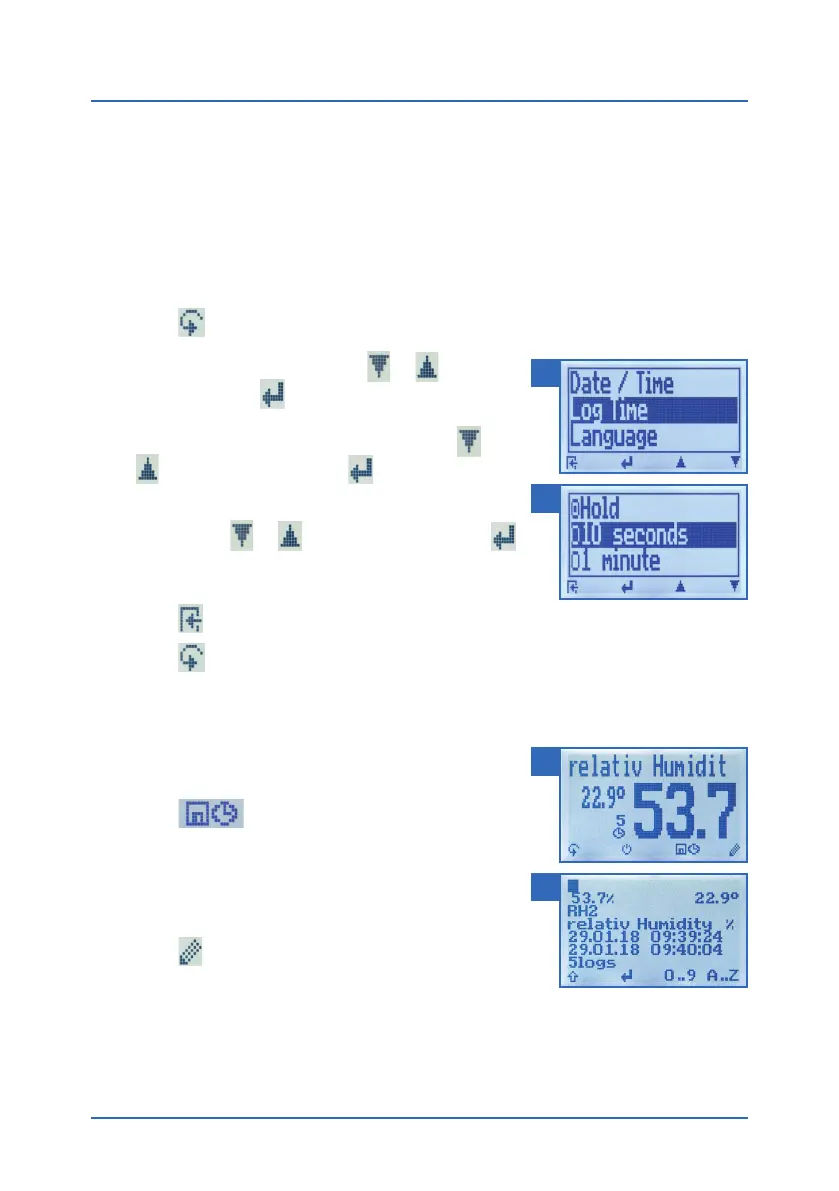
3. Select Log Time (figure 25). To do so, press
or
and confirm by pressing .
4. Navigate to the desired time interval (figure 26). To
do so, press
or and confirm by pressing .
» The setting has been saved.
5. Press
to leave the Options menu.
6. Press
to leave the main menu.
6.3.2 Auto save function: Saving measured values
To do so: The device has to be in the Data Log menu
(see "Data Log menu" page 8).
1. Press
.
» The device will save a reading at the selected time
interval. The number of data saves will increase by
one every time a reading is saved. The display will
now appear as shown in figure 27.
2. Press
to finish the measuring process and to
enter a name for the saved readings.
» The display will now appear as shown in figure 28.
3. The data you have inputted can be overwritten at any time.
25
26
27
28



 To Next Page