humimeter RH2 Operating Manual
Page 40
10. Configuring the device
10.1 Turning on Bluetooth
The information on Bluetooth is provided in a separate operating manual.
10.2 Adjusting the date/time
1. Press twice or hold for 2 seconds.
2. Select Options. To do so, press
or and confirm by pressing .
3. Select Date/Time. To do so, press
or and confirm by pressing .
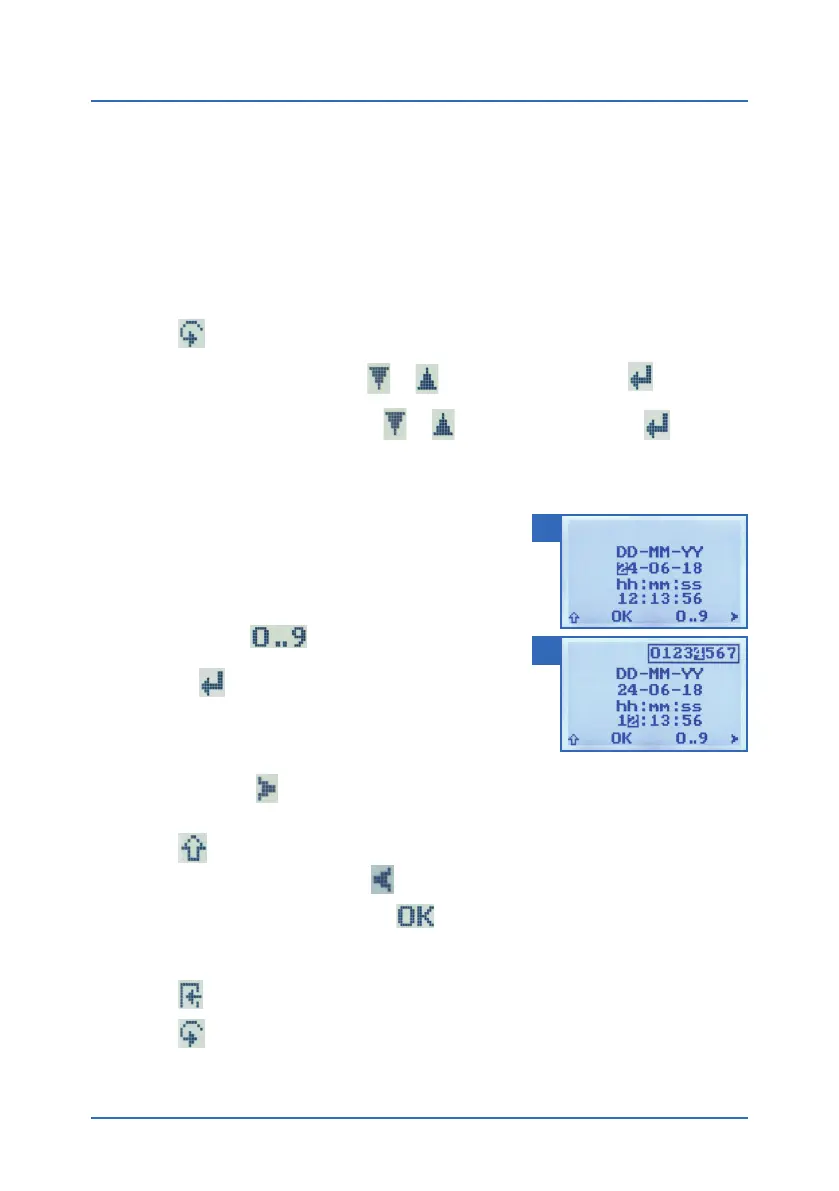
4. The display will now appear as shown in figure 57.
» The format for the date is DD-MM-YY (Day-Month-
Year).
» The format for the time is hh:mm:ss
(hour:minutes:seconds).
5. Inputting numbers:
Press and hold
o quickly scroll to the
required number and either press it for 3 seconds
or press
to confirm the selected number (figure
58).
6. Moving forward:
To move forward between DD-MM-YY and
hh:mm:ss, press
.
7. Moving back:
Press
to switch to another input level. To move backward between
DD-MM-YY and hh:mm:ss, press
.
8. Confirm the date/time by pressing
.
» The settings have been saved.
9. Press
to leave the Options menu.
10. Press
to leave the main menu.
57
58



 To Next Page