Page 27
6.2.2 Saving several readings (a measurement series) at the same time
To do so: The device has to be in the Data Log menu (see "Data Log menu" page
8).
1. Take several readings (see "5. The measuring process").
2. To save a reading, press
as soon as the reading has been taken.
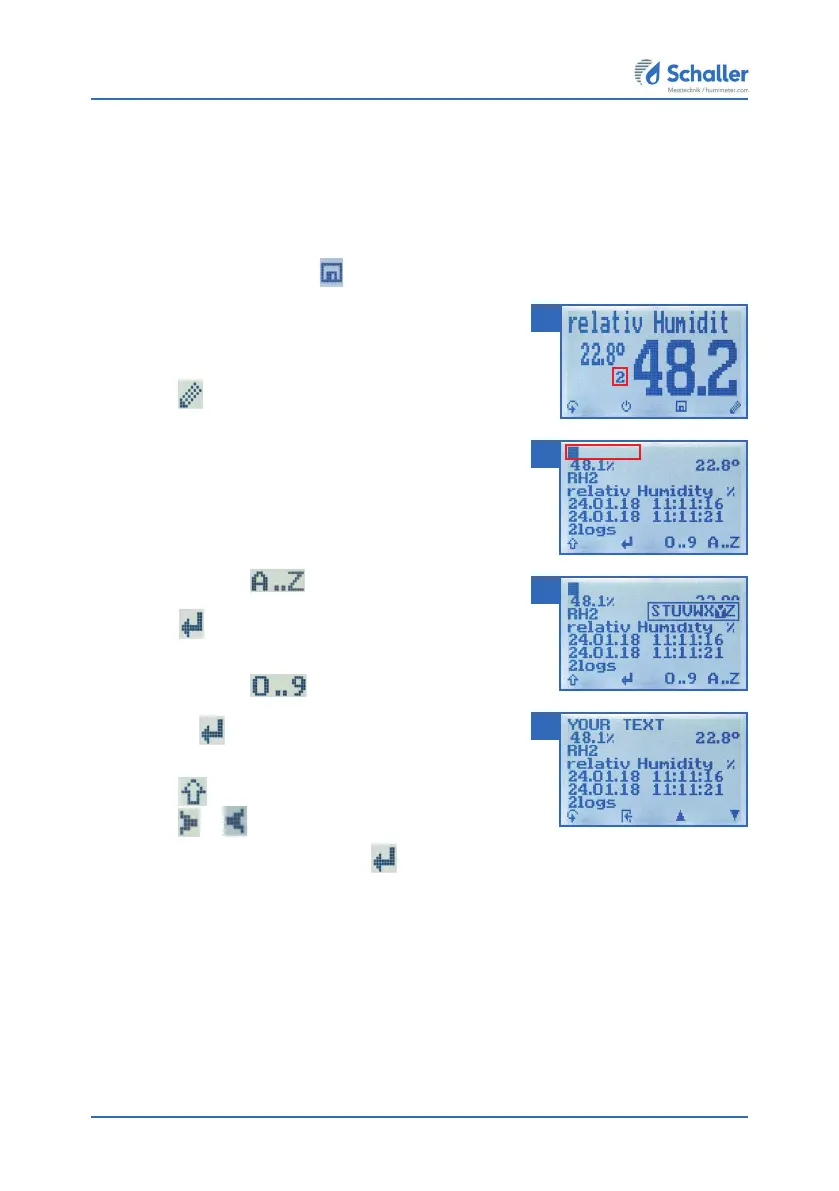
» The display will now appear as shown in figure
21. The marked number shows the number of
readings that have already been saved.
3. Press
to enter a name for the saved reading
and to finish the measuring process.
» The display will now appear as shown in figure 22.
4. The data you have inputted can be overwritten at
any time.
5. Inputting letters:
Press and hold
to quickly scroll to the
required letter and either press it for 3 seconds or
press
to confirm the selected letter (figure 23).
6. Inputting numbers:
Press and hold
to quickly scroll to the
required number and either press it for 3 seconds
or press
to confirm the selected number.
7. Moving forward/back:
Press to switch to another input level.
Press
or to move forward or back.
8. Confirm your entry by pressing
.
» The data you entered has been saved.
21
22
23
24



 To Next Page