humimeter RH2 Operating Manual
Page 32
6.8 Deleting individual values from a single series of measurements
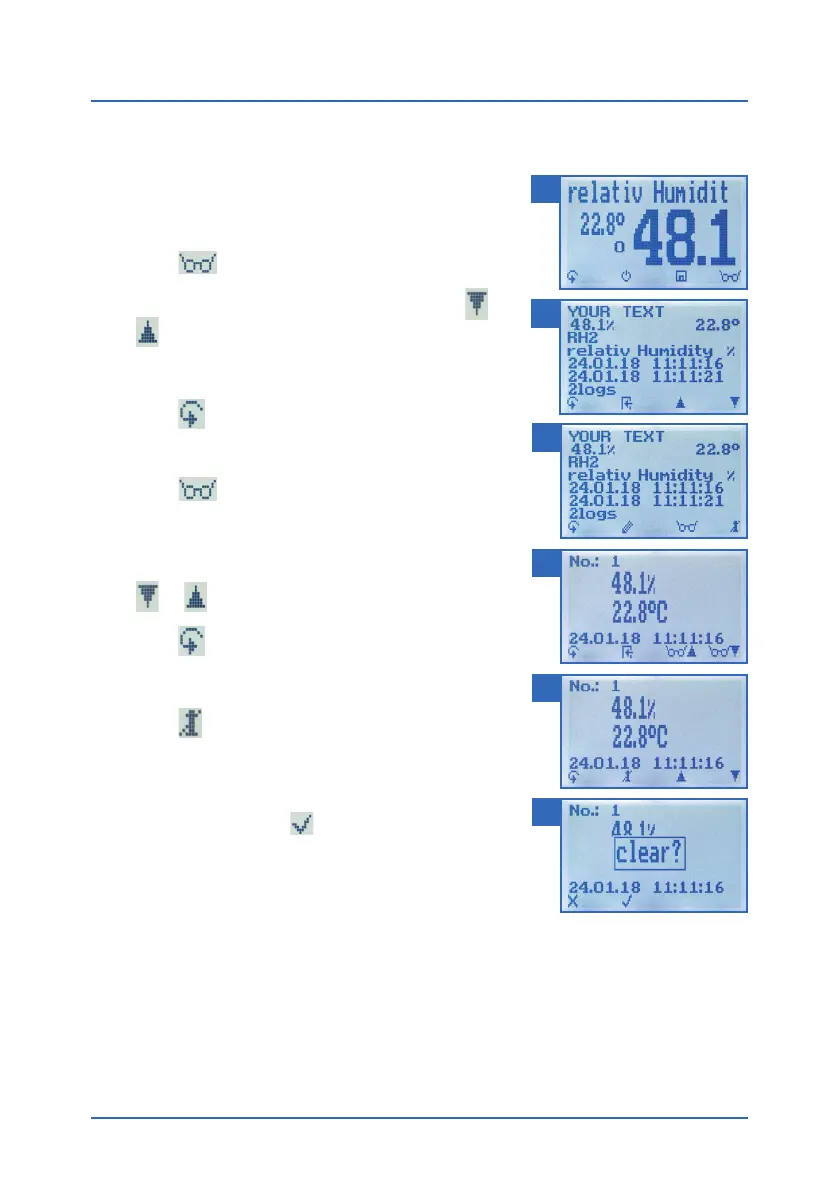
To do so: You must have saved a series of measurements
comprising at least 2 logs. The display will now appear
as shown in figure 42.
1. Press
.
2. Select the required reading. To do so, press
or
.
» The display will now appear as shown in figure 43.
3. Press
to switch to another input level.
» The display will now appear as shown in figure 44.
4. Press
.
5. The display will now appear as shown in figure 45.
6. Select the required measured value. To do so, press
or .
7. Press
to switch to another input level.
» The display will now appear as shown in figure 46.
8. Press
to delete the value shown.
» The display will then show the message clear?
(figure47).
9. Confirm by pressing
.
» The value has been deleted.
» Deleted measuring values will be transferred to the
LogMemorizer (see "8. Using the LogMemorizer
program") and have to be deleted separately there.
42
43
44
45
46
47



 To Next Page