humimeter RH2 Operating Manual
Page 30
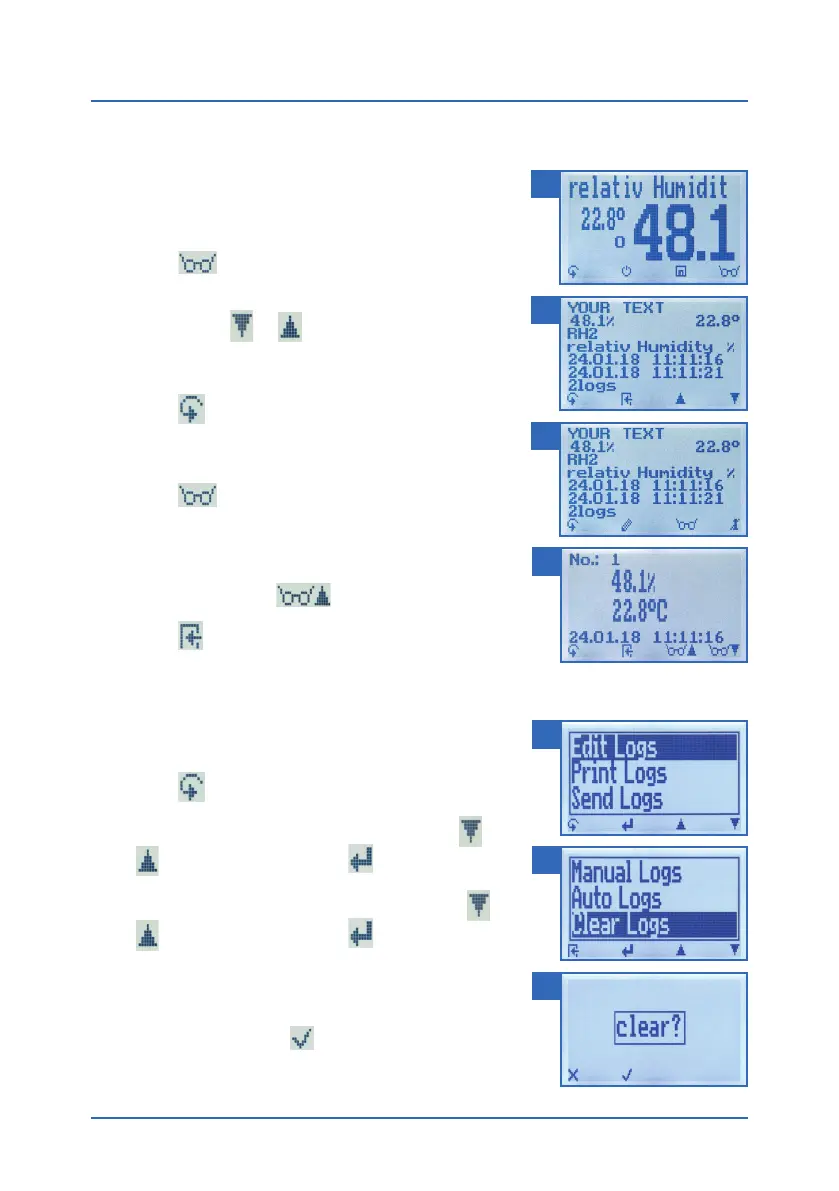
6.5 Viewing individual readings from a series of measurements
To do so: You must have saved a series of measurements
(e.g. 2 logs). The display will now appear as shown in
figure 31.
1. Press
.
2. Navigate to the required measurement series. To
do so, press
or .
» The display will now appear as shown in figure 32.
3. Press
to switch to another input level.
» The display will now appear as shown in figure 33.
4. Press
again.
» The display will now appear as shown in figure 34.
5. Navigate to the required reading (No.: 1, No.: 2, No.:
3). To do so, press
.
6. Press
to leave this screen.
6.6 Deleting all measured values (data log)
To do so: You must have taken and saved one or several
readings.
1. Press
twice or hold for 2 seconds.
2. Select Edit Logs (figure 35). To do so, press
or
and confirm by pressing .
3. Select Clear Logs (figure 36). To do so, press
or
and confirm by pressing .
4. The display will then show the message clear?
(figure 37).
5. Confirm by pressing
.
» The data log has been deleted.
31
32
33
34
35
36
37



 To Next Page