- 25 -
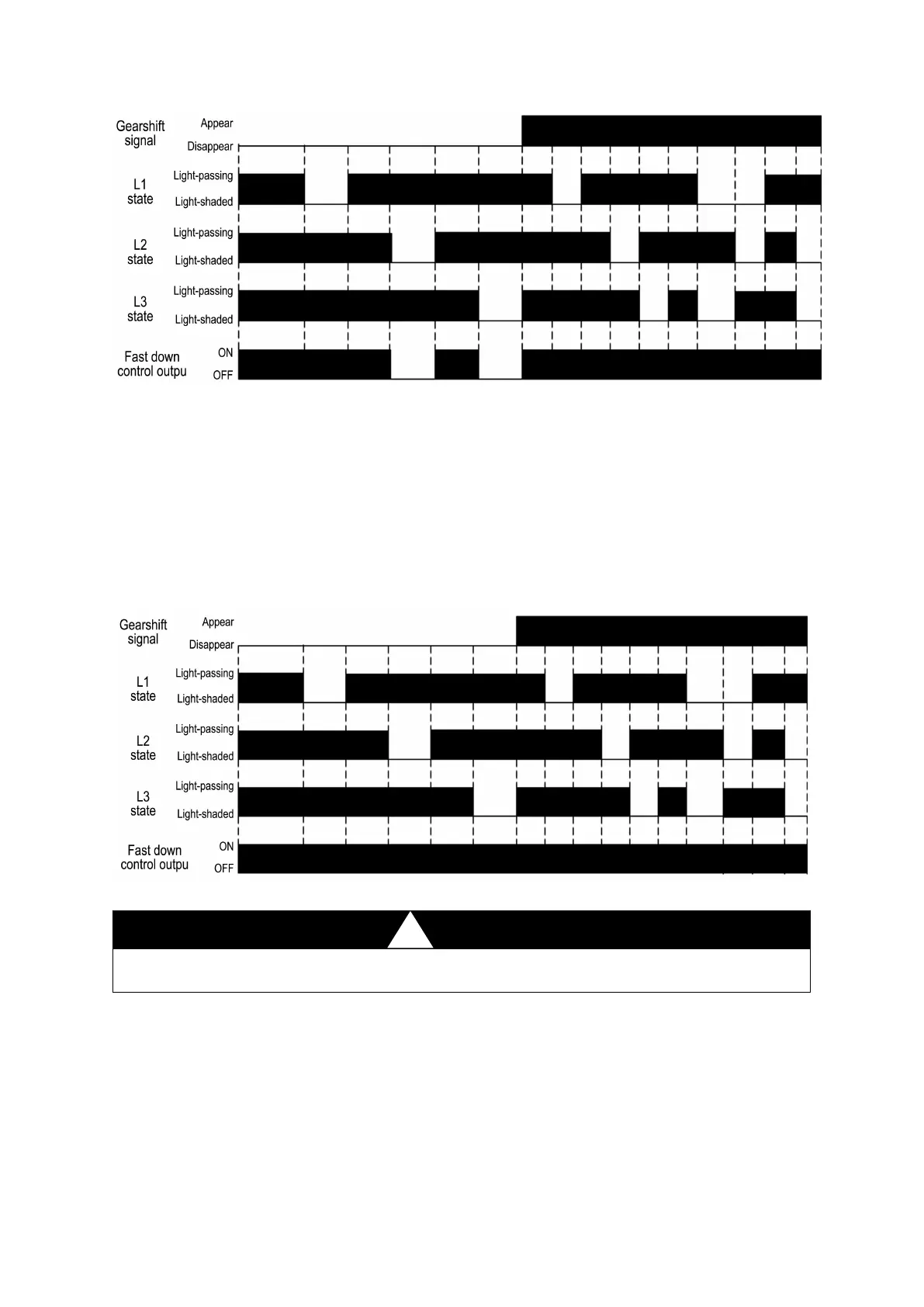
Fig.2.5 Operational timing chart of folding box mode of SR
Muting mode
Under muting mode, all the protection areas (L1, L2, L3) are ineffective and SR controller
can not provide protection. Fast down control output (13/14, 23/24) still keeps on ON-state
even if there is an object in the detection area.
The operating mode can be switched to muting mode only in case of sensors are on the
light-passing state.
The muting mode should be selected when the shape of the workpiece is so complex that it
will block the middle area beam before the bender change the speed of the working stroke.
Fig.2.6 Operational timing chart of muting mode of SR
The muting mode may be selected when the bender processes complex shape workpiece.
Other protection measures should be taken to protect the operator under this mode.
2.3.3 Sensor and SP controller used together
SP controller provides three operating modes: normal mode, folding box mode and muting
mode, using the mode switch (self-resetting) to change the operating mode. The system enters
normal mode after it is powered on and monitor the state of sensor and internal circuit at the
same time. Rotate the mode switch, operating mode will be converted into folding box
mode—muting mode—normal mode in sequence.
Protective stroke of SP controller is the fast down stroke (between the down going signal


 To Next Page