MAN.270.EN--05--SDT270-user-manual-Eng.docx
18 Updating & upgrading your SDT270
… using the SDT270 Updater software (for SDT270 SB and SS device versions)
… using the DataDump software (for SDT270 SD and DD device versions)
… using the Ultranalysis Suite software (for SDT270 SU and DU device versions)
To check your SDT270 version, please refer to the chapter "System Info".
18.1 Updating & upgrading your SDT270 using the "SDT270
Updater" software (for SDT270 SB and SS device versions)
You need first to install first the SDT270 driver, to install Updater software, and to activate
it, before performing an update or an upgrade.
You need an Internet connection to complete an update or an upgrade.
After the warranty period, this functionality is reserved to our customers who have a valid
SoundCare Support Program.
18.1.1 Updating
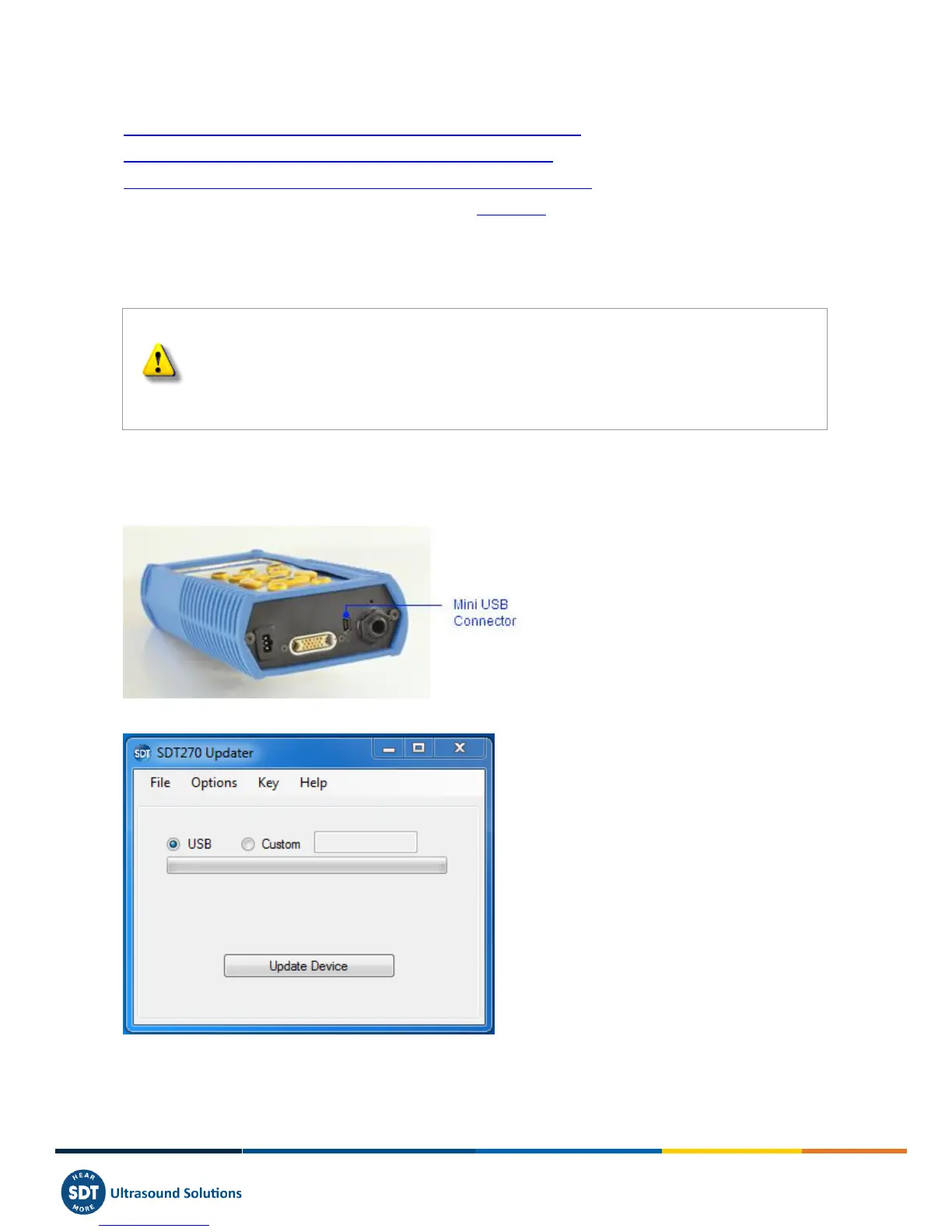
To get the latest version of your SDT270 Firmware, Turn on your SDT270 and when the measurement screen is loaded,
connect it to your computer using the USB/Mini USB cable.
Run SDTUpdater application, tick the radio button ''USB'' and then click ''Update Device''.



 To Next Page