MAN.270.EN--05--SDT270-user-manual-Eng.docx
15 Planned and Conditional Survey
modes
These features are available on the SDT270 SU and DU versions. To check your SDT270
version, please refer to the chapter "System Info".
Planned_survey_mode
Conditional_Survey_mode
15.1 Planned survey mode
15.1.1 Selecting the planned Survey mode for measurement storage
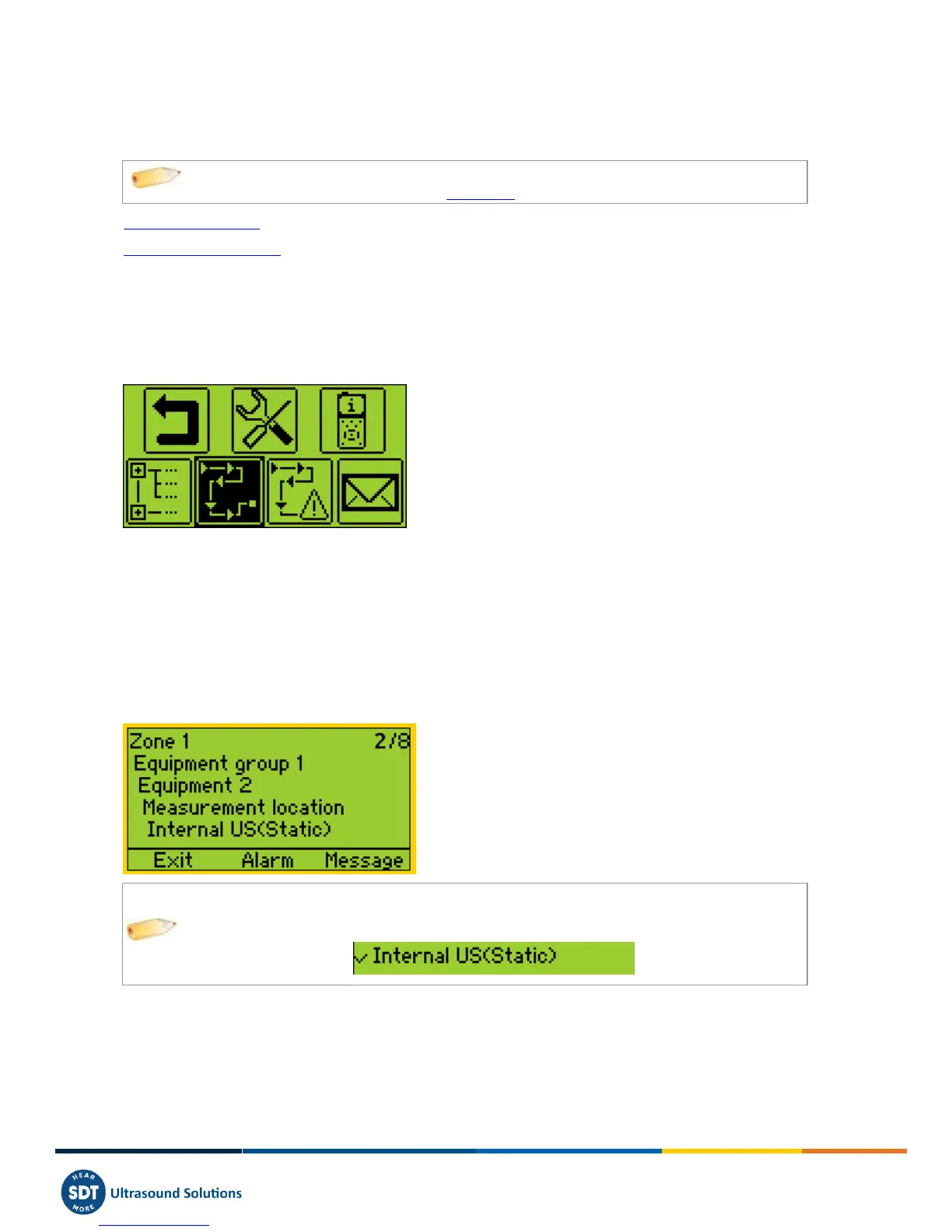
Press Enter Key, using Down Arrow highlight "Planned Survey":
Then press Enter Button one more time.
A screen propose you to select one of the uploaded surveys. Using Up or Down Arrows, highlight the chosen Survey and
then press Enter Key.
15.1.2 Selecting the first Measurement
On a new screen, the SDT270 indicates to the operator:
The first Measurement point with its path.
The Sensor required for this first Measurement of the Survey.
The Measurement order and the total of Measurements as defined with Ultranalysis Suite.
You can change the order of data collection by using the left and right arrows.
The
sign before the Sensor name indicates a Measurement is already stored.
If you want to see the attached alarms or enter a message, please refer to the following chapters. If not, push the Enter
Key and go to the chapter Setting up the SD270.
15.1.3 Viewing alarms attached to the Measurement
From the selecting Measurement screen, you are able to view the alarms attached to the Measurement by pressing F2
Button.



 To Next Page