EasyManua.ls Logo

SDT SDT270 - Main Menu Icons; Miscellaneous Function Key Icons

SDT SDT270
63 pages
Print Icon
To Next Page IconTo Next Page
To Previous Page IconTo Previous Page
Loading...
MAN.270.EN--05--SDT270-user-manual-Eng.docx
58/63
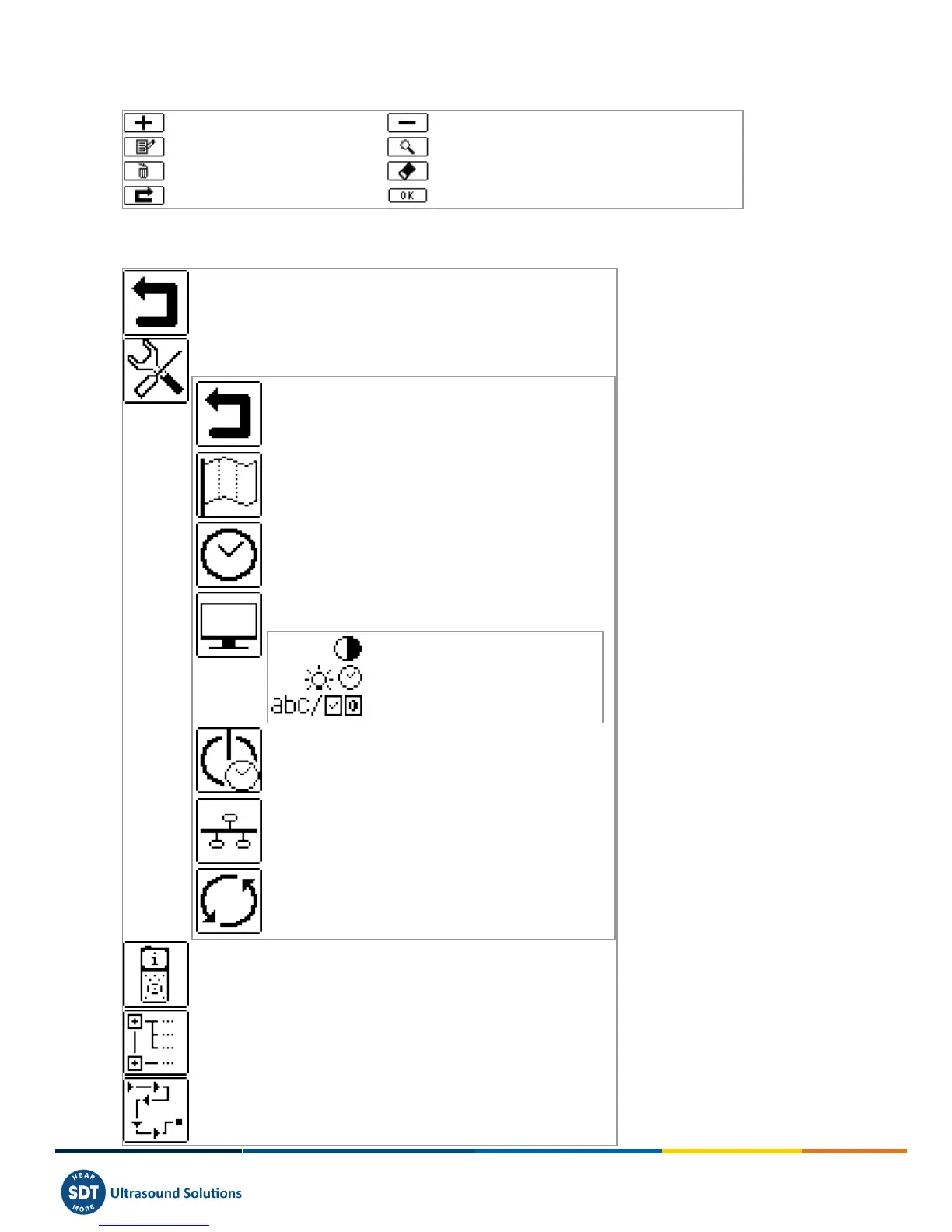
24.2 Miscellaneous function key icons
Increase value
Decrease value
Activate editing mode
Activate displaying mode (allows to see survey data)
Delete
Erase a character
Skip (go to next screen)
Ok / Continue
24.3 Main menu icons
Back to measurements screen
Open "Device settings menu"
Back to "Main menu"
Open "Language menu"
Set date, time and their format
Open the "Lcd menu"
Adjust screen contrast
Adjust operating time of backlight
switch between icon and text interface
Open "Power Down Menu"
Open "Network Menu"
Open "Factory settings" screen to restore original settings
Show system information
Browse tree structure
Enter "Planned survey mode"

Table of Contents