4.3.3
AUTO.:rRUNCATION
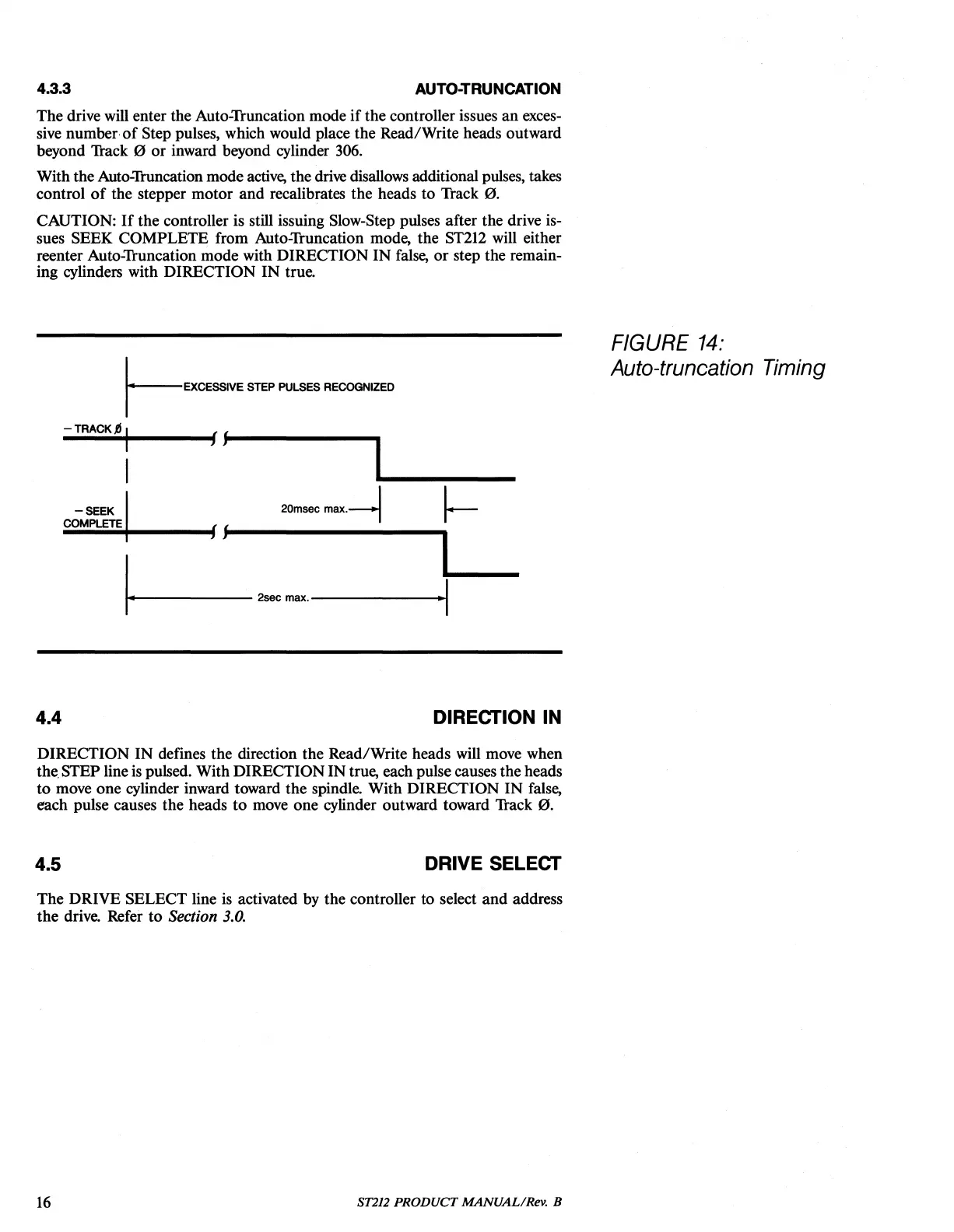
The drive will enter the Auto-Truncation mode
if
the controller issues
an
exces-
sive number·
of
Step pulses, which would place the Read/Write heads outward
beyond Track
0
or
inward beyond cylinder 306.
With the Auto-Truncation mode
active,
the drive disallows additional pulses, takes
control
of
the stepper motor and recalibrates the heads to Track
0.
CAUTION:
If
the controller is still issuing Slow-Step pulses after the drive is-
sues SEEK COMPLETE from Auto-Truncation mode, the
ST212
will either
reenter Auto-Truncation mode with DIRECTION IN false,
or
step the remain-
ing cylinders with DIRECTION
IN
true.
I-EXCESSIVE
STEP
PULSES
RECOGNIZED
-TRACKJj 1
---
..
,,----
..
/jt--------
-
SEEK
1
20msec
max.-1
1-
1+1------
2sec
max.------~.I
FIGURE
14:
Auto-truncation Timing
4.4
DIRECTION IN
DIRECTION IN defines the direction the Read/Write heads will move when
the.
STEP line
is
pulsed. With DIRECTIONIN true, each pulse causes the heads
to move one cylinder inward toward the spindle. With DIRECTION IN false,
each pulse causes the heads
to
move one cylinder outward toward Track
0.
4.5
DRIVE SELECT
The DRIVE SELECT line
is
activated by the controller to select
and
address
the drive. Refer to
Section 3.0.
16
ST212
PRODUCT
MANUAL/Rev. B





 To Next Page