MAIN CONTROL PC BOARD
9.3.1
Required Tools:
T-lO
Torx driver
or
standard blade screwdriver
Rest the drive
on
a padded surface, oriented with the PCB
up
and
the edge-
connectors
to
YOUf
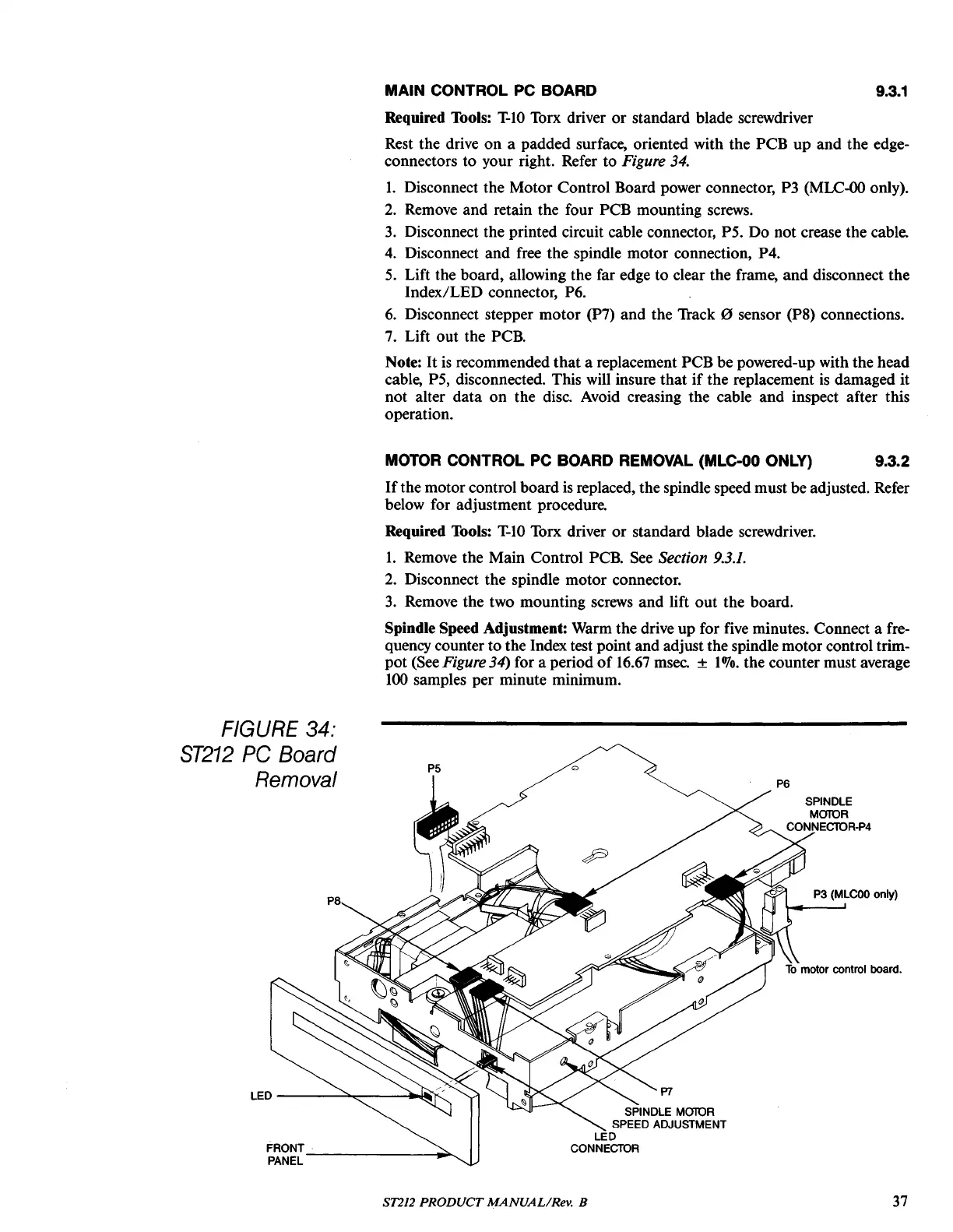
right. Refer
to
Figure
34.
l.
Disconnect the Motor Control Board power connector, P3
(MLC-OO
only).
2.
Remove
and
retain the four PCB mounting screws.
3.
Disconnect the printed circuit cable connector, P5.
Do
not crease the cable.
4.
Disconnect
and
free
the
spindle
motor
connection, P4.
5. Lift the board, allowing the far edge
to
clear the frame,
and
disconnect the
Index/LED
connector, P6.
6.
Disconnect stepper
motor
(P7)
and
the Track 0 sensor (P8) connections.
7.
Lift
out
the PCB.
Note:
It
is
recommended
that
a replacement PCB be powered-up with the head
cable, P5, disconnected. This will insure
that
if
the replacement is damaged it
not
alter
data
on
the
disco
Avoid creasing the cable
and
inspect after this
operation.
MOTOR CONTROL PC BOARD REMOVAL
(MLC-OO
ONLY) 9.3.2
If
the motor control board is replaced, the spindle speed must be adjusted. Refer
below for adjustment procedure.
Required Tools:
T-lO
Torx driver
or
standard blade screwdriver.
l.
Remove the Main Control PCB. See Section
9.3.1.
2.
Disconnect the spindle
motor
connector.
3.
Remove the two mounting screws
and
lift
out
the board.
Spindle Speed Adjustment: Warm the drive up for five minutes. Connect a fre-
quency counter
to
the Index test point and adjust the spindle motor control trim-
pot
(See
Figure
34) for a period
of
16.67 msec. ±
1070.
the counter must average
100
samples per minute minimum.
P7
SPINDLE MOlOR
SPEED ADJUSTMENT
LED
CONNECTOR
P5
FRONT
~
PANEL
LED
-------"'~--~lIIIf'._...
P8
FIGURE
34:
ST212
PC
Board
Removal
ST212 PRODUCT
MANUAL/Rev.
B
37





 To Next Page