4.2 Record
Operations related to record, including: Record, Playback, Backup, Screen shot(only Hybrid
mode and full analog have)
4.2.1 Record Configuration
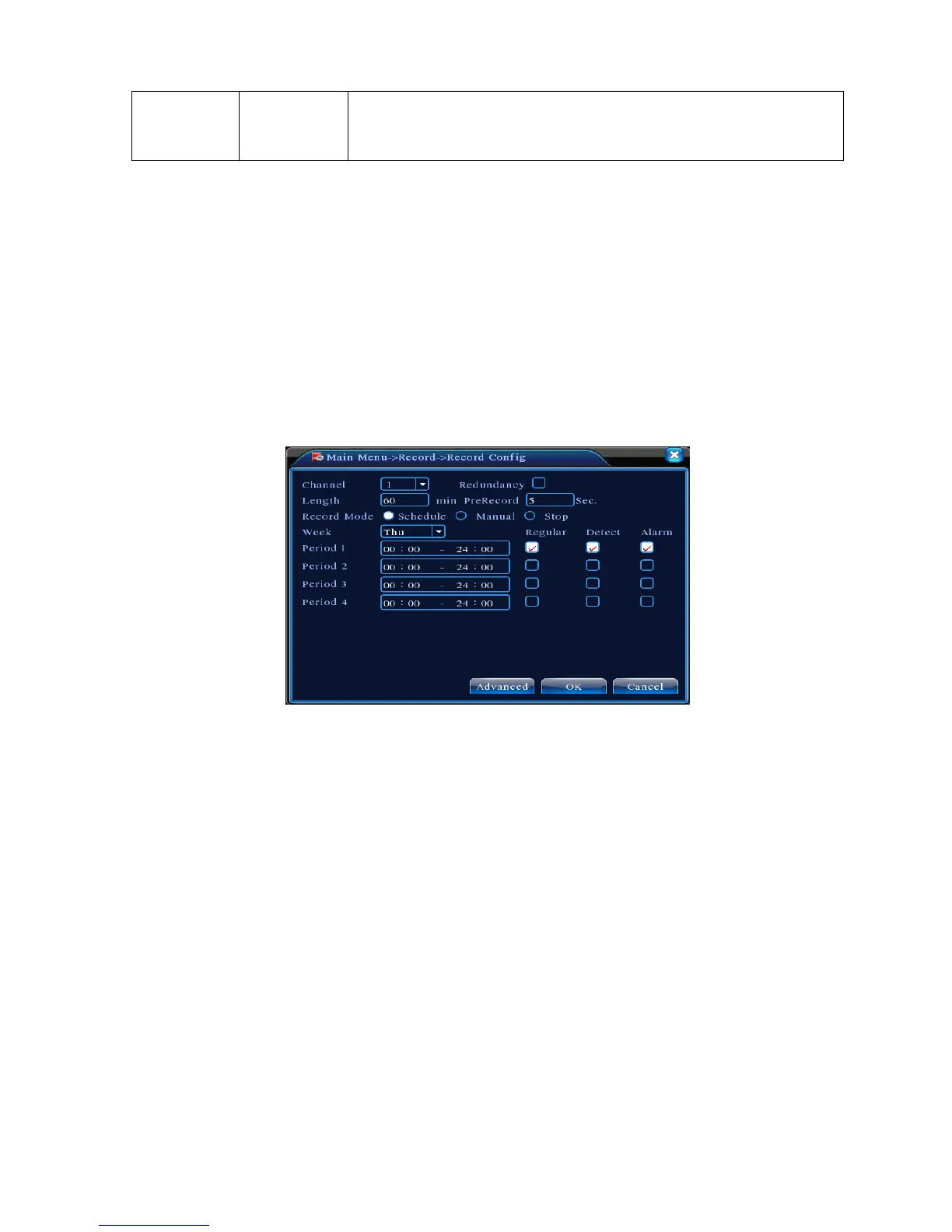
Set the recording parameters in the surveillance channel. The system is set 24 hours consecutive
recording in the first startup. You can enter [main menu]> [recording function]> [recording setup] to set.
Note:There is at least one read-write hard disk.(refer to chapter 4.5.1)
Picture 4.1 Record Configuration
【Channel】Choose the corresponding channel number to set the channel. Choose the all option to
set the entire channels.
【Redundancy】Choose the redundancy function option to implement the file double backup function.
Double backup is writing the video files in two hard disks. When you do the double backup, make
sure that there are two hard disks installed. One is read-write disk and the other is redundant disk.
(refer to 4.5.1)
【Length】Set the time length of each video file. 60minutes is default value.
【Pre-Record】Record 1-30 seconds before the action. (time length is decided by the code stream)
【Record mode】Set video state: schedule, manual or stop.
Schedule:Record according to the set video type (common, detection and alarm)and time
section.



 To Next Page