第 34 页
Backup format:configurate the backup file format,according to require,can choose
Start/pause:Click the play button to start the backup and click the pause button to stop the
backup.
Note:During backup you can exit the page layout to carry out other functions.
【Burning】the file will be burned synchronously after click it.
【Erase】Choose the file to delete and click erasure to delete the file.
【Stop】Stop the backup.
4.2.4 Snapshot Storage
*Note:part products have this function.
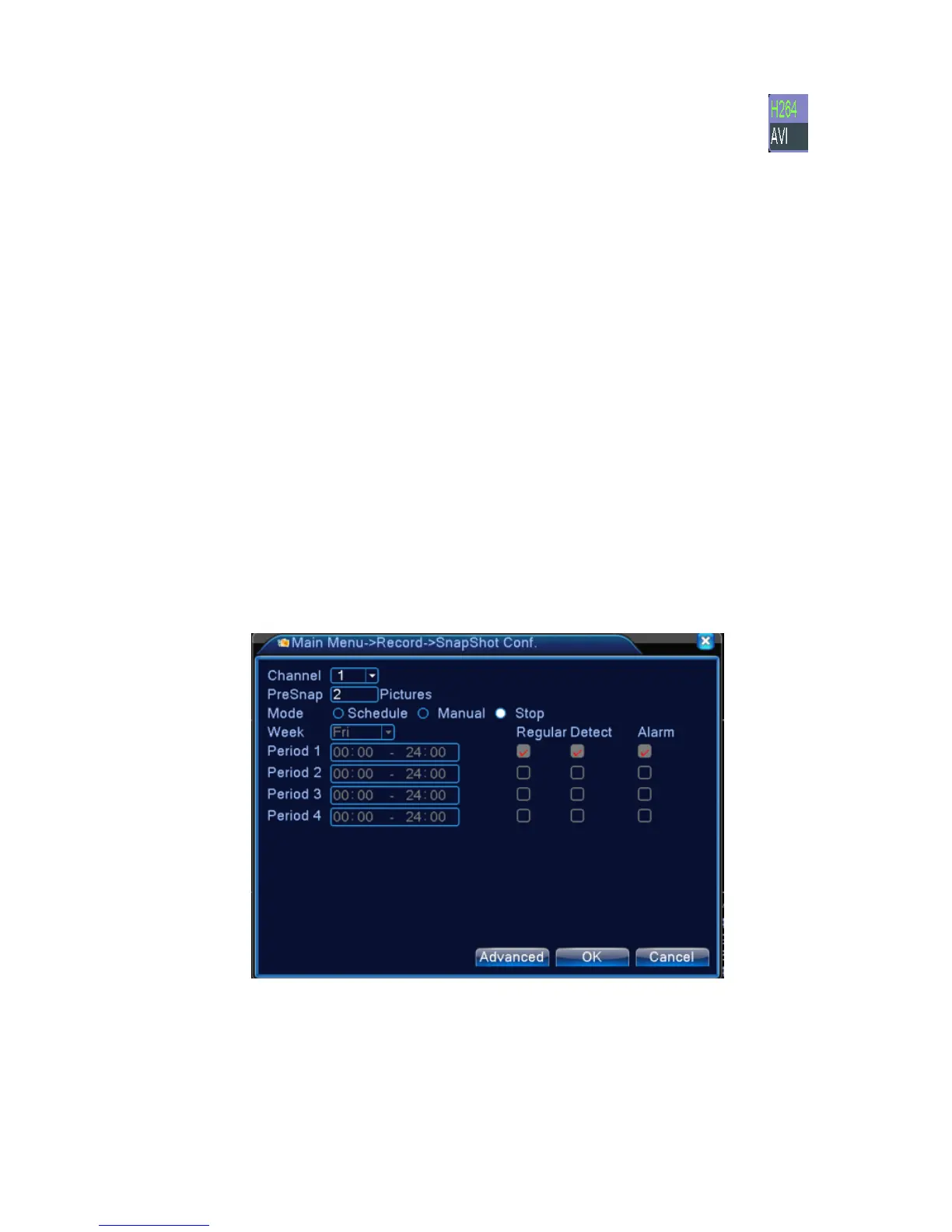
Setup snapshot parameters for different channels.At first time it's set for 24hours snapshot
continuously,please go to Main Menu--Record--Snapshot Storage for appropriate setting.
Note:If normal snapshot storage,please setup snap at Main Mend--advanced--snapshot(please
refer to chapter 4.5.1 HDD Manager)
Picture 4.2 snapshot storage
【Channel】Select the related channel to set,click"all"to set all channels.
【Presnap】Setup presnap picture quantity before recording,default is 5 pieces
【Record】Set record status."Schedule","Manual"and"Stop".



 To Next Page