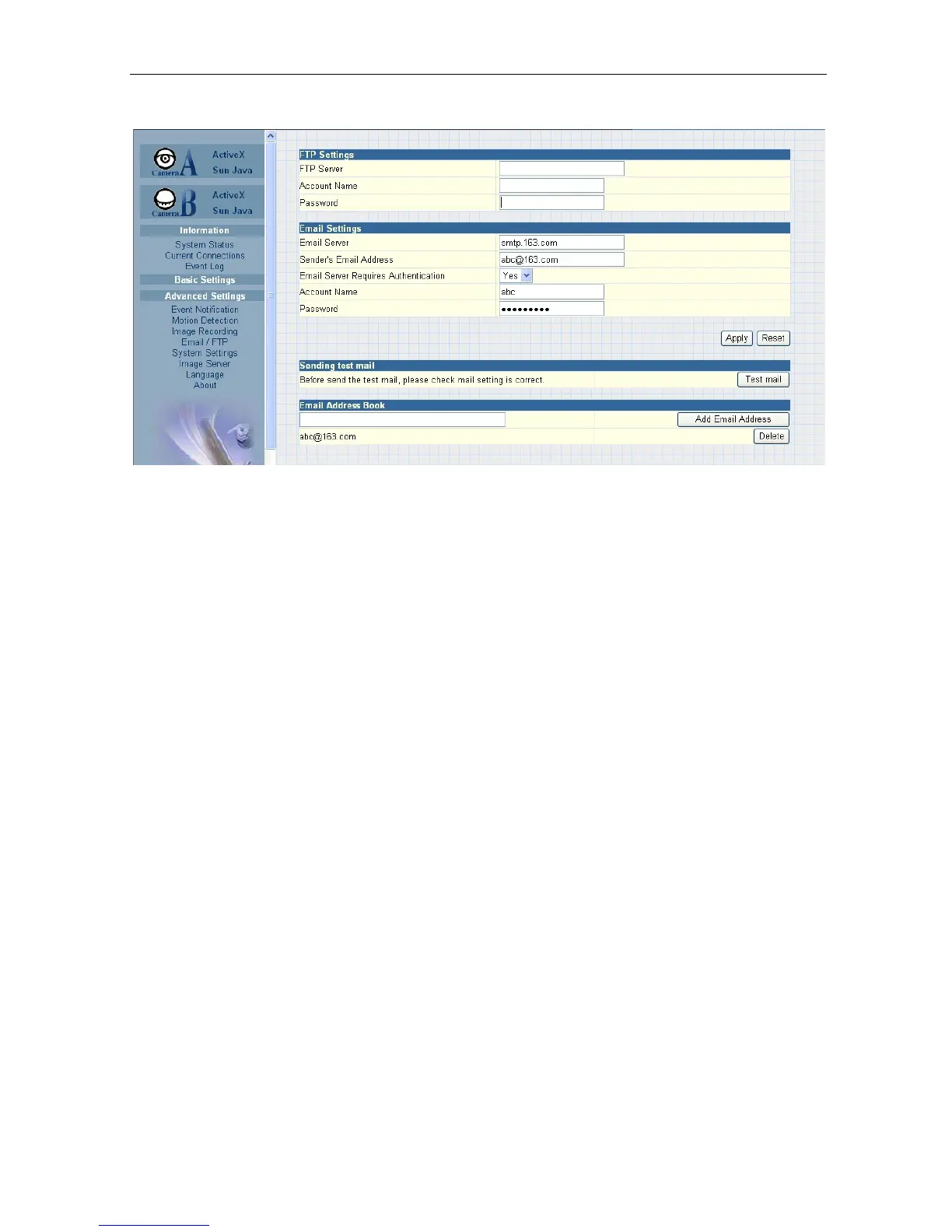
Fig.39 IP Camera Email / FTP Page
i. FTP Settings
“FTP Server”
The administrator will have to enter the FTP server address here.
“Account Name”
Enter the FTP account name here
“Password”
Enter the corresponding
password.
Click “Apply” to save the above settings.
ii. Email Settings
“E-mail Server”
The administrator will have to enter the Email server address here.
“Sender’s Email Address”
This will determines the IP Camera’s Email address.
“Email Server Requires
Authentication”
If
set
to
“YES”,
the
administrator
will
have
to
provide
the
account
name
and password in order to access the Email server.
Otherwise, enter “NO”.
“Account Name”
Enter the account name or login name to the Email server.
“Password”
Enter the password for the above account name.
Click “Apply” to save the above changes.
iii. Email Address Book
Enter an Email address in the box provided and click “Add Email Address”.
The
new email address will
be added to the list.
The administrator can store up to 20
email addresses here.
IP Camera Manual 33



 To Next Page