Phone App 123
Thephoneappopens.
2.
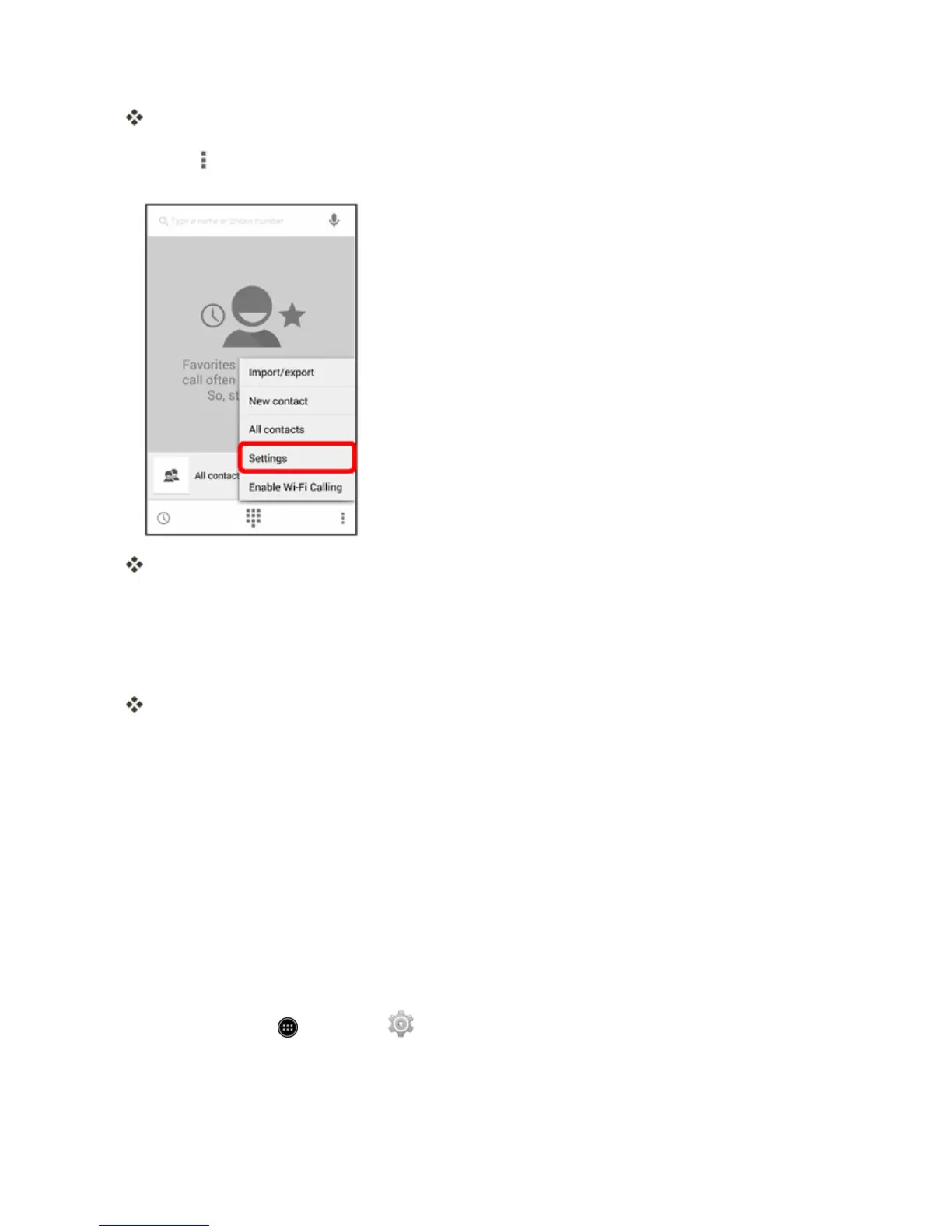
Touch >Settings.
Thecallsettingsmenuappears.
3. Configureyouroptions.
l Touchamenuitemtodisplayitsoptions.
l Selectyouroptionsandfollowthepromptstosetthem.
Yourcallsettingsoptionsareset.
TTY Mode
ATTY(teletypewriter,alsoknownasaTDDorTextTelephone)isatelecommunicationsdevicethat
allowspeoplewhoaredeaf,hardofhearing,orwhohavespeechorlanguagedisabilities,to
communicatebytelephone.
YourphoneiscompatiblewithselectTTYdevices.PleasecheckwiththemanufacturerofyourTTY
devicetoensurethatitsupportsdigitalwirelesstransmission.YourphoneandTTYdevicewill
connectusingaspecialcablethatplugsintoyourphone’sheadsetjack.Ifthiscablewasnot
providedwithyourTTYdevice,contactyourTTYdevicemanufacturertopurchasetheconnector
cable.
ToturnTTYModeonoroff:
1.
Fromhome,touch >Settings .



 To Next Page