115
9
Non-accessed EAN Deletion
Yon can delete EANs that had not been accessed for a certain period. You can program a period in the
PGM2 mode.
Follow the procedure shown below.
Non-accessed EAN deletion
1.
Select the X1/Z1 mode from the mode selection screen.
2.
Select "4 EAN DELETE".
3.
Select "1 READING" to take a report, or "2 DELETE" to delete non-accessed EANs.
4.
When you select "2 DELETE", select you want to delete all the non-accessed EANs (1 ALL DELETE)
or delete the non-accessed EANs individually (2 IND.DELETE).
NOTE
It is recommended to take a report fi rst before executing deletion operation.
■
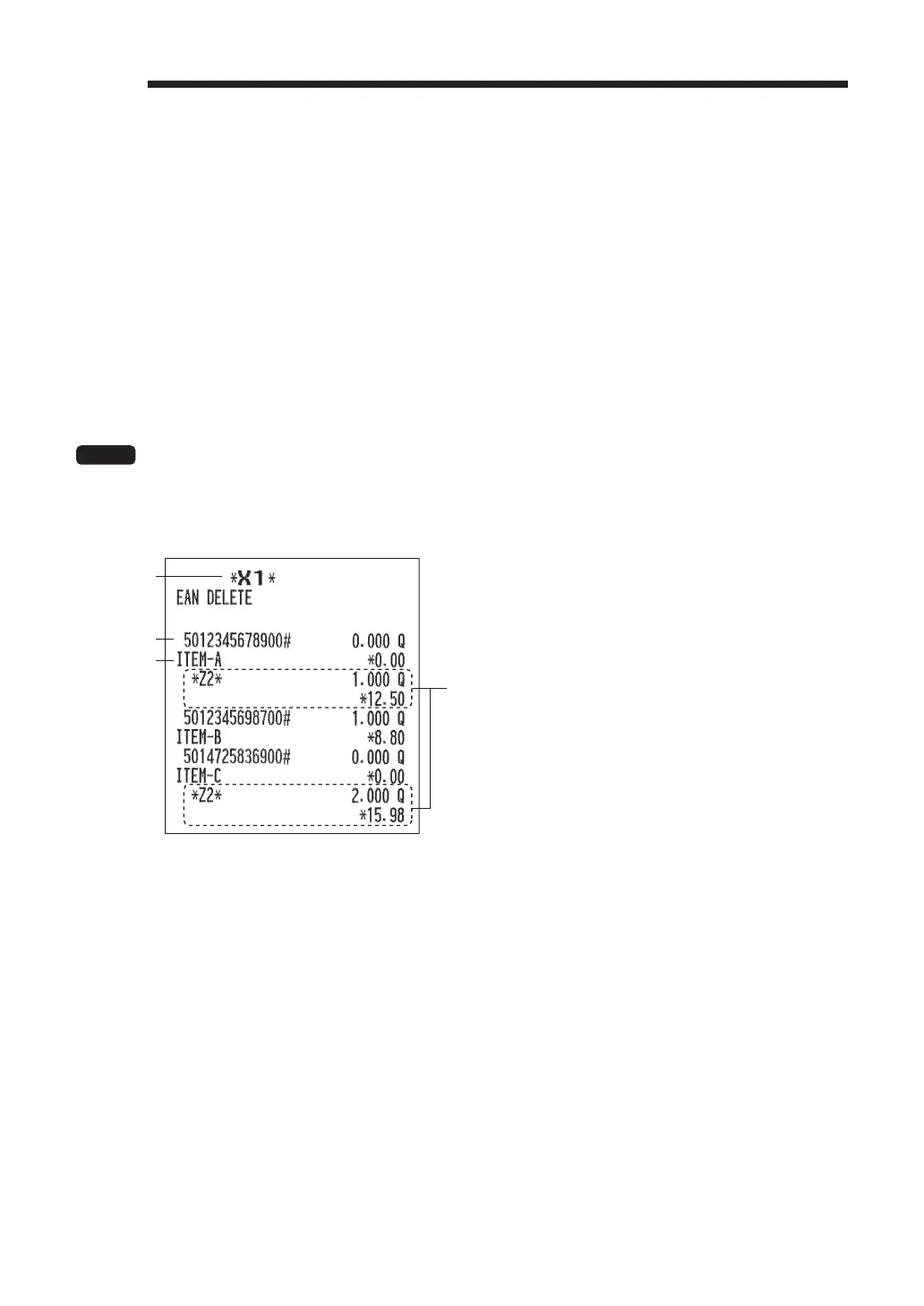
Non-accessed EAN report
EAN code
Description
*1
These lines are printed when there is any sales data
to be printed in periodic sales report. *
2
*1 When you select "2 DELETE", "Z1" is printed instead of "X1".
*2 When you select "2 DELETE", the EAN data for periodic sales report is also deleted.



 To Next Page