MX-M260/M310/M260N/M310N SIMULATION 6 - 16
Operation/procedure
Used to clear each paper feed counter individually.
1. Select the counter to be cleared with the 10-key.
2. Press the [START] key. The confirmation menu is shown.
3. Select “1: YES.”
1: YES (Cleared)
2: NO (Not cleared) (Default)
Operation/procedure
Used to clear the original and staple counters individually.
1. Select the counter to be cleared with the 10-key.
2. Press the [START] key.
The confirmation menu is shown.
3. Select “1: YES.”
1: YES (Cleared)
2: NO (Not cleared) (Default)
Operation/procedure
1. Press the [START] key. The confirmation menu is shown.
2. Select “1: YES.”
1: YES (Cleared)
2: NO (Not cleared) (Default)
Operation/procedure
1. Press the [START] key.
The confirmation menu is shown.
2. Select “1: YES.”
1: YES (Cleared)
2: NO (Not cleared) (Default)
Operation/procedure
1. Press the [START] key.
The confirmation menu is shown.
2. Select “1: YES.”
1: YES (Cleared)
2: NO (Not cleared) (Default)
Operation/procedure
1. Press the [START] key.
The confirmation menu is shown.
2. Select “1: YES.”
1: YES (Cleared)
2: NO (Not cleared) (Default)
Operation/procedure
1. Select the counter to be cleared with the 10-key.
2. Press the [START] key.
The confirmation menu is shown.
3. Select “1: YES.”
1: YES (Cleared)
2: NO (Not cleared) (Default)
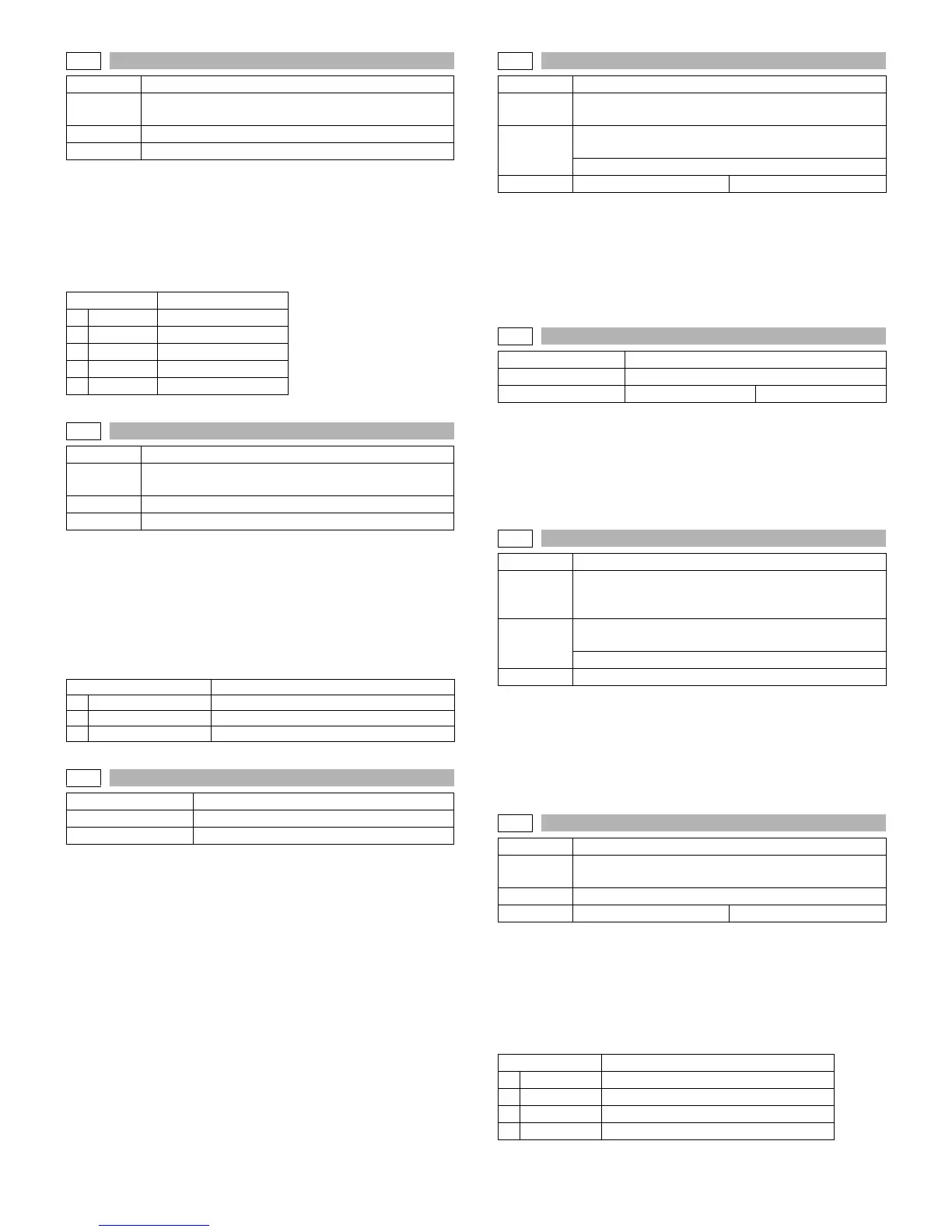
24-2
Purpose Data clear
Function
(Purpose)
Used to clear the number of use (the number of prints)
of each paper feed section.
Section Paper feed
Item Counter
Item Content
1 BYPASS
Manual feed counter
2TRAY1
Tray 1 counter
3TRAY2
Tray 2 counter
4TRAY3
Tray 3 counter
5TRAY4
Tray 4 counter
24-3
Purpose Data clear
Function
(Purpose)
Used to clear the number usage data of the stapler,
RSPF, and scanning.
Section Transport/Finisher
Item Counter
Item Content
1
SPF
RSPF counter
2
SCAN
Scan counter
3
STAPLE
Stapler counter
24-4
Purpose Data clear
Function (Purpose) Used to reset the maintenance counter.
Item Counter
24-5
Purpose Data clear
Function
(Purpose)
Used to reset the developer counter. (The developer
counter of the DV unit which is installed is reset.)
Section Image process
(Photoconductor/Developing/Transfer/Cleaning)
Developer/Toner hopper
Item Counter Developer
24-6
Purpose Data clear
Function (Purpose) Used to clear the copy counter.
Item Counter Copier
24-7
Purpose Data clear
Function
(Purpose)
Used to clear the OPC drum (membrane decrease)
correction counter. (This simulation is executed when
the OPC drum is replaced.)
Section
Image process
(Photoconductor/Developing/Transfer/Cleaning)
Photo conductor
Item Counter
24-9
Purpose Data clear
Function
(Purpose)
Used to clear the printer counter and other counters.
Section Printer
Item Counter Printer
Item Content
1 PRINTER
Printer counter
2IMC
IMC counter
3DUPLEX
DUPLEX counter
4OTHERS
The other counters



 To Next Page