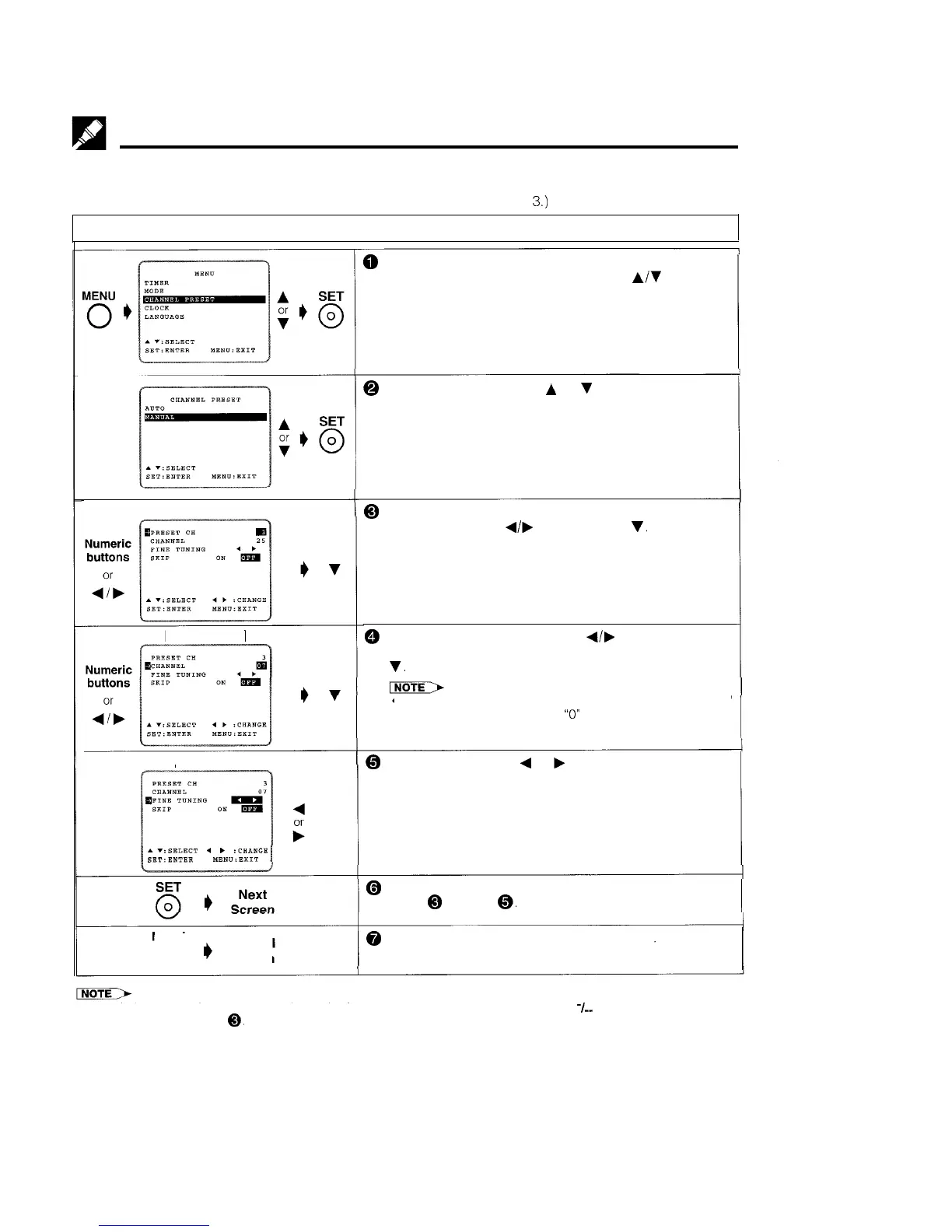
Setting the Channels
MANUAL TUNING
PREPARATION
*Select the video channel on your TV and turn on the VCR. (See page 5, item
3.)
Example: Tuning Broadcast TV Channel 7 to preset Channel 3.
[Preset CH]
[Broadcast CH]
[Fine tuning]
..:SELECT
4
t
:CHRNDE
SBT:ENTER
MEN”:EXIT
MENU
0
I)
Normal
Screen
@ Press MENU.
Select item “CHANNEL PRESET” with
A/Y
and press
SET.
@
Select item “MANUAL” with
A
or
v
and press SET
@ Select the preset channel position number with the
numeric buttons or
4,
and then press
v.
@ Press the numeric buttons or
A/,
until you see the
desired broadcast channel on your TV, and then press
v.
l When Digit select is set to two digit input, and the channel
number is only one digit, enter
“0”
first.
@ For fine tuning, press
4
or
b
until the broadcast channel
comes in clearly on your TV.
@ Press SET. If you wish to preset more channels, repeat
steps @ through
0.
@
To return to the normal screen, press MENU.
l Numeric buttons on the remote control can also be used to select channel numbers. Press %- to switch between one and
two digit numbers for step
0.
13



 To Next Page