!I
Recording with the Timer
The timer can be set manually for automatic recording of up to 8 events over a 365 day period.
PREPARATION
.Select
the video channel on your TV. Turn on the VCR (See page
5,
item 3).
l Load the cassette, ensuring the erasure protection hole is covered. The VCR power will automatically turn on
*Check
that the clock is displaying the correct time. (See Setting the Clock on page
11.)
PROCEDURE
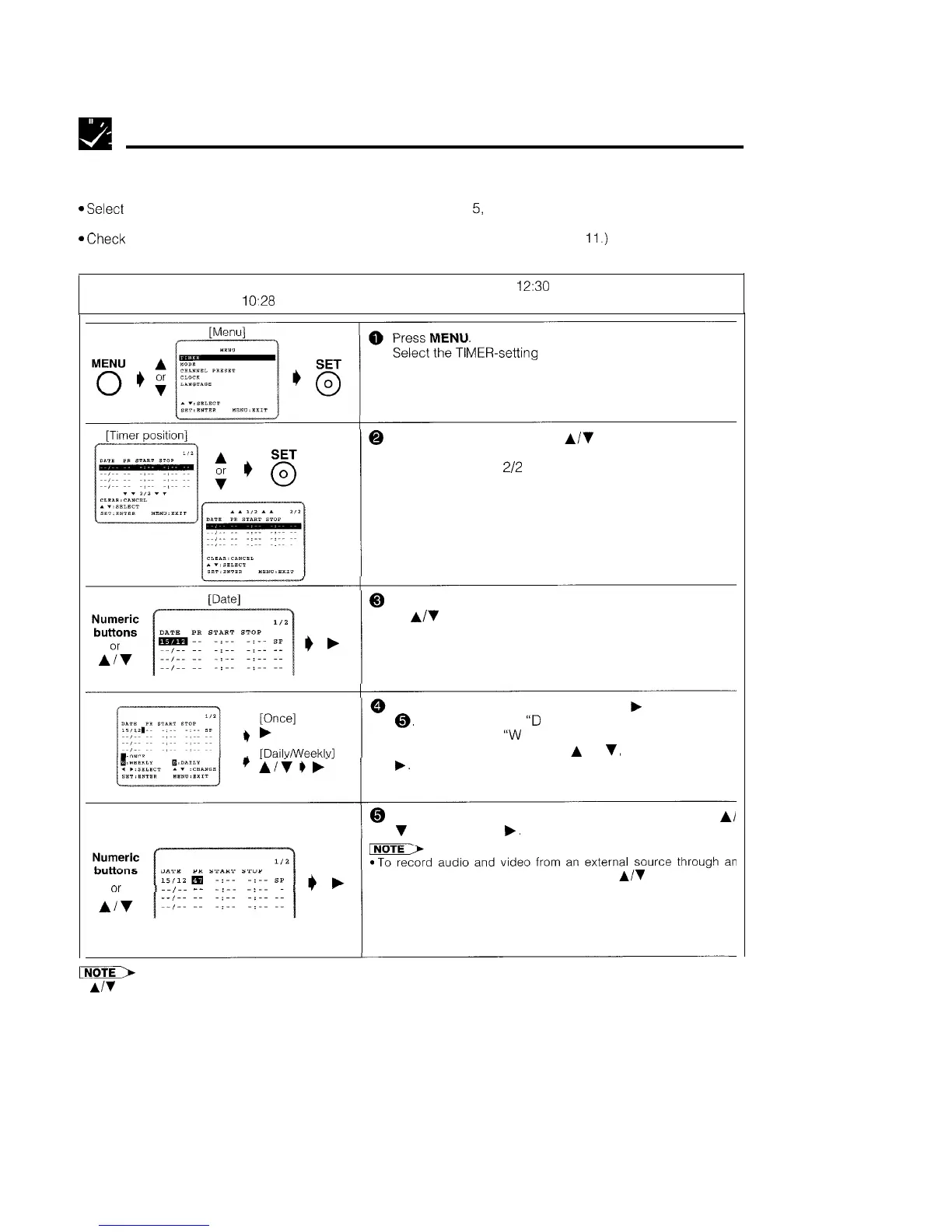
Example: Recording channel position 47 in SP mode from 12:00 PM to
12:30
PM, December 15, 1999, if the
present time is
lo:28
(morning), December 14, 1999.
MER-setting
mode and press SET.
0
Select the timer position with
A/V
and press SET.
l If the timer positions 1 to 4 have already been set, the
screen changes
2/2
(timer positions 5 to 8).
@ Set the date for timer recording with the numeric buttons
or
A/V
on the remote control and then press . .
l First set the “day” digits and then “month”. If there is
only one “day” or one “month” digit, enter a 0 first.
If you want to record only once, press
b
and go to step
8,
Otherwise, select
“D
(DAILY)” to record at the same
time each day or
“W
(WEEKLY)” to record at the same
time each week by pressing
A
or
v,
and then pressing
[Channel]
..I..
_-
-:-- -:--
--
@ Set the channel number using the numeric buttons or
A/
v
and then press
b.
AUDIO/VIDEO terminal
on the VCR,
press to select an AV
channel. (When an AV position is selected, “AV” is displayed where
a channel position number is usually displayed.)
pimF>
l
A/V
can also be used to set the date and time instead of the numeric buttons.
l
Press 0 first if the day, month,
hour or minute is a single digit.
Continued on next page
22



 To Next Page