Ba
Channel
SkipKancelling
Skip
Channel skip
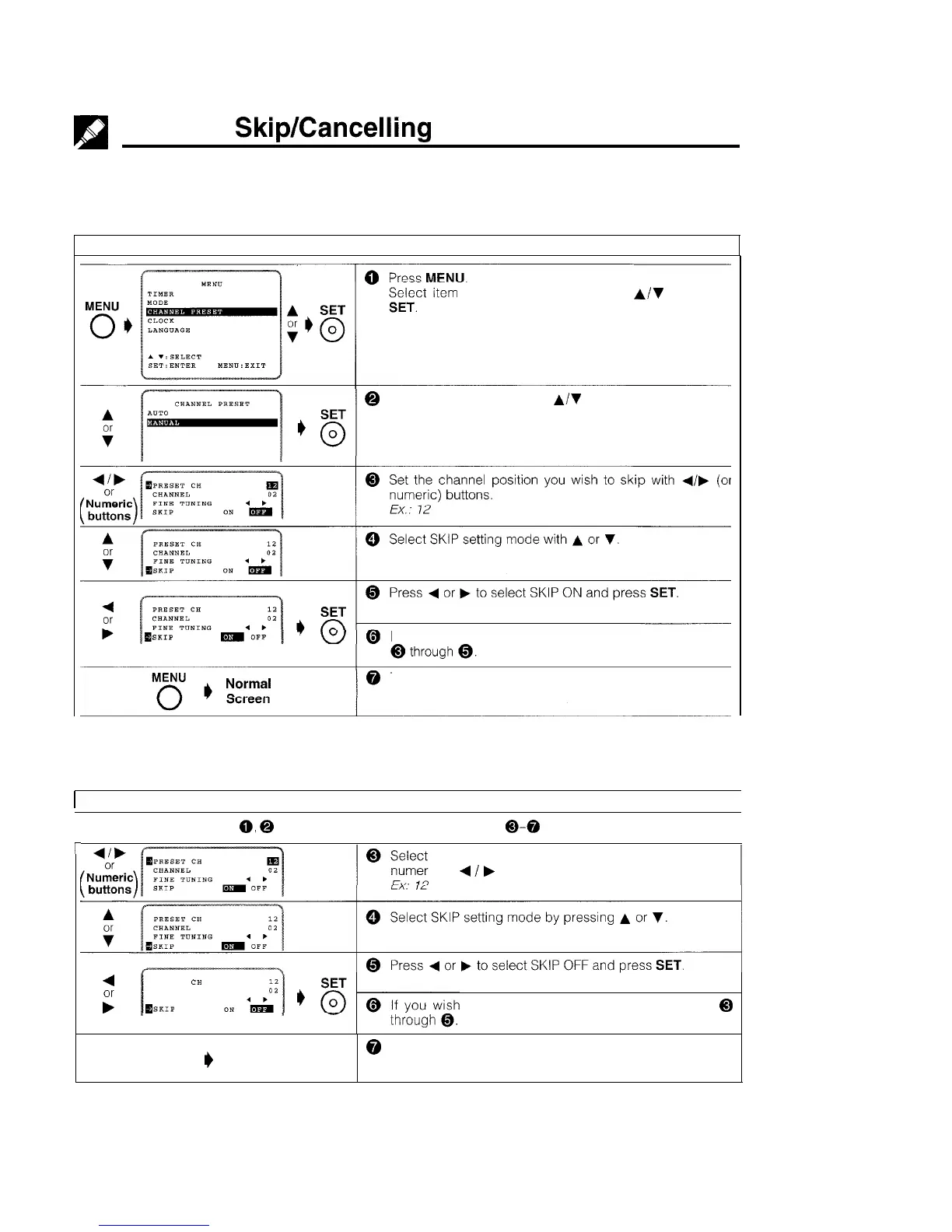
If there are channel positions that are not preset, you can skip them with the following procedure
PREPARATION
l Select the video channel on your TV and turn on the VCR. (See page 5, item 3.)
Example: Skip channel position 12.
“CHANNEL PRESET” with
A/V
and press
@ Select item “MANUAL” with
A/V
and press SET.
If you
wish to set more channels to be skipped, repeat steps
To return to the normal screen, press MENU.
Cancelling skip
PREPARATION
l Select the video channel on your TV. And turn on the VCR. (See page 5, item 3.)
1
Example: Reset channel position 12.
I
l Follow the same procedures
0,
@
in Channel skip, and then the procedures
0-0
below
r
the channel position you wish to unskip with the
ic or
4
/
b
buttons.
4
PRESET
CH
F
CHANNEL
FINE TUNING
msKIP
to unskip more channels, repeat steps
@
MENU
0
I)
Normal
@ To return to the normal screen, press MENU.
Screen
14



 To Next Page