Recording with the Timer
Confirming
Timer
Programmes
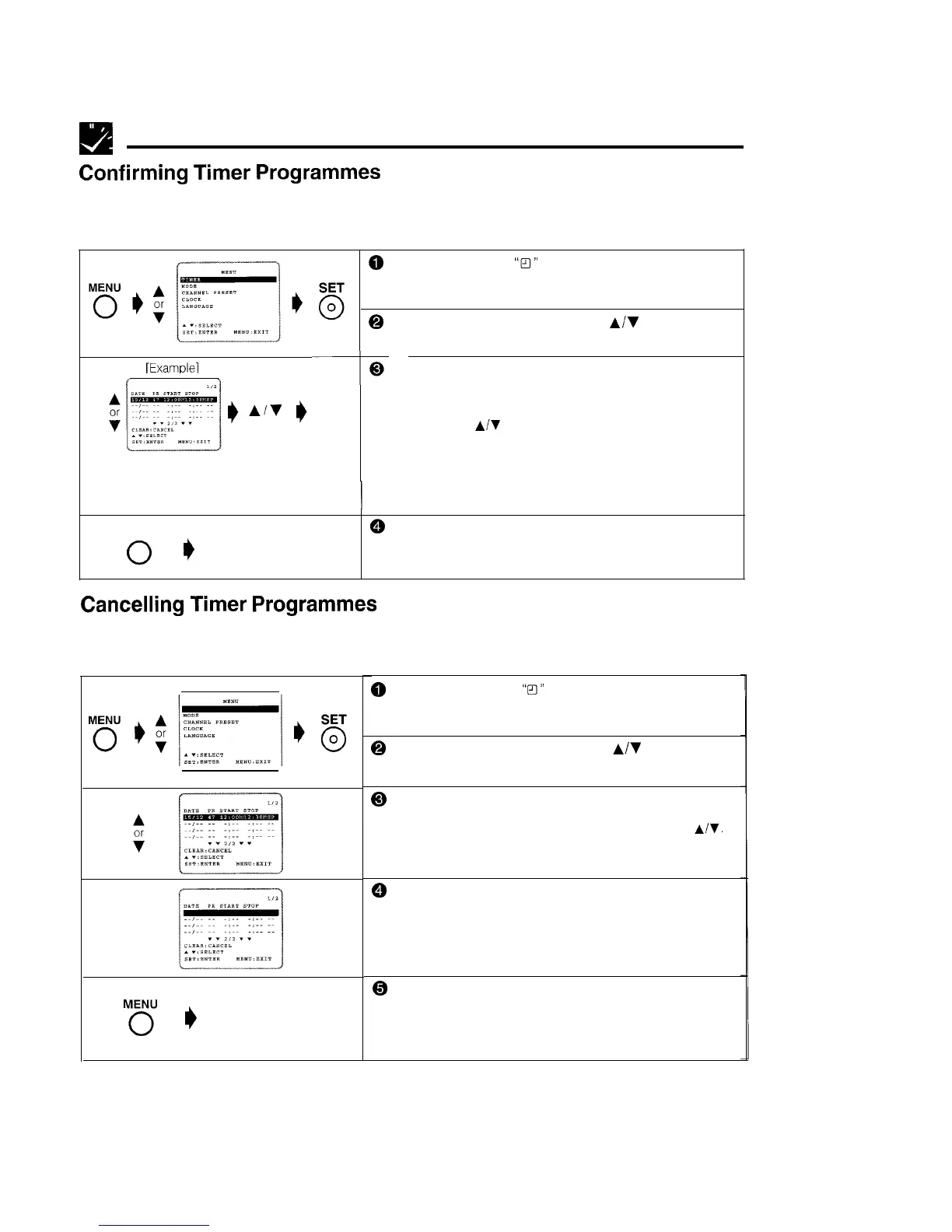
You can see on the On Screen Display a list of all timer programmes that are already set
PREPARATION
l Turn on your TV and VCR and select the video channel on the TV.
IExamolel
0
Press MENU. (If the
“FI’”
indicator on the VCR display is
lit, cancel the timer standby mode by pressing TIMER
ON/OFF
and then turn on the power.)
@ Select the TIMER-setting mode with
A/V
and then press
SET.
0
SET
0
0
The screen for confirming programmes that have been
set will appear.
l Check the information displayed.
l If you want to correct the data, select the programme to be
changed with
A/Y
and then press SET. Correct the setting as
described on pages 22 and 23.
MENU
Normal Screen
0
To return to the normal screen, press MENU.
*After checking or correcting the programme contents, press
TIMER ON/OFF to enter the Timer Standby mode.
Cancelling
Timer
Programmes
Perform the following procedure to cancel timer programmes that have already been set.
PREPARATION
l Turn on your TV and VCR and select the video channel on the TV.
CLEAR
0
M6
e
Normal Screen
@ Press MENU. (If the
“13’”
indicator on the VCR display is
lit, cancel the timer standby mode by pressing TIMER
ON/OFF
and then turn on the power.)
@ Select the TIMER-setting mode with
A/v
and then press
SET.
@ The screen for confirming timer recording programmes
that have been set will appear.
l Select the programme number you wish to cancel with
A/Y.
(The selected programme will appear highlighted.)
@ Double-check that it is the programme you wish to
cancel, and press CLEAR. It will be cleared on the
screen.
@ To return to the normal screen, press MENU.
l If there are still some programmes set, press TIMER ON/OFF
to enter the Timer Standby mode
24



 To Next Page