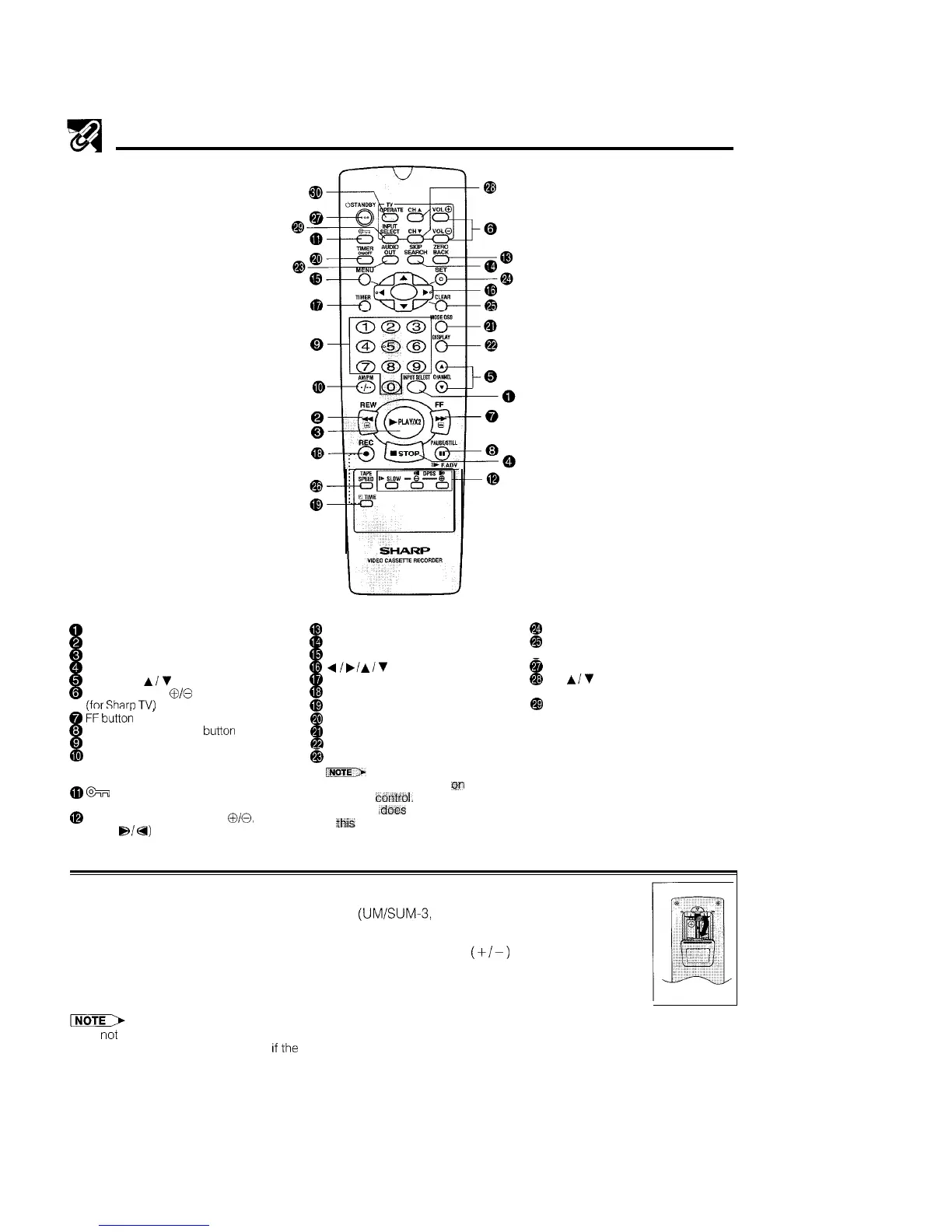
Remote Control
0
INPUT SELECT button
@
REW button
@ PLAY/x 2 button
@
STOP button
@ CHANNEL
A/V
button
@
VOLUME (VOL)
@I/@
button
ffor
Sham
TV)
@
iF
button
’
@
PAUSE/STILL (F. ADV) button
@
Numeric buttons
4%)
AM/PM button
-
Digit select (When inputting up to
two digit numbers)
@
%
button
(New Child-proof Lock)
@
SLOW/@/@ buttons (SLOW
010,
DPSS
s/a)
@
ZERO BACK button
@
SKIP SEARCH button
@
MENU button
@~/,/A/V
button
@
TIMER button
@
REC button
@
q
TIME button
@I
TIMER ON/OFF button
@
MODE OSD button
@
DISPLAY button
@I
AUDIO OUT button
iNail)
l
AUDIO OUT is printed
in
the
remote
cbntrol.
However this
function ,does not operate with
Ihis
model.
@!
SET button
@
CLEAR button
@TAPE SPEED button
@
STANDBY
button
@I
CH
A/V
buttons
(for Sharp TV)
@I
INPUT SELECT button
(for Sharp TV)
@TV OPERATE button
(for Sharp TV)
Inserting the Batteries
First, install the batteries properly. Fit two R6
(UMISUM-3,
AA) 1.5 volt batteries
(included) or equivalent. If the remote control stops working, insert new batteries.
Ensure the batteries are inserted correctly, matching the polarities
(+I-)
indicated
in the remote control.
l Do noi subject the remote control to shock, water or excessive humidity.
l The remote control may not function
If
ihe
VCR sensor is in direct sunlight or any other strong light.
l Incorrect use of batteries may cause them to leak or burst. Read the battery warnings and use the batteries properly.
l Do not mix old and new batteries, or mix brands in use.
l Remove the batteries if you will not use the remote control for an extended period of time.
7



 To Next Page