m
Playback
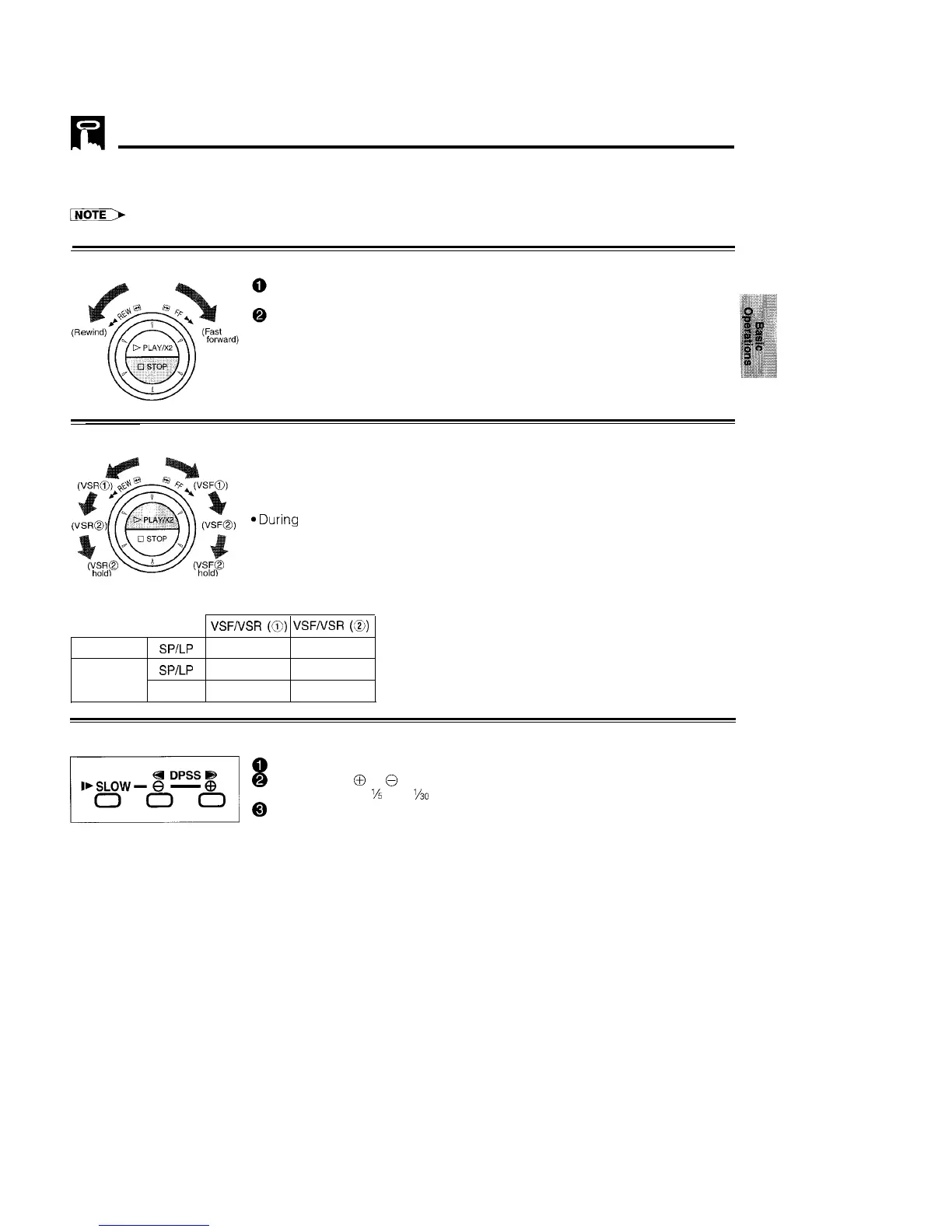
Shuttle System
The shuttle system lets you control all the basic playback functions using just the shuttle ring part
l The shuttle ring does not rotate 360”.
DURING STOP MODE
Fast Forward and Rewind
Turn the ring either to the right or the left and release it. (The shuttle ring will
return to centre.)
Press STOP to stop fast forward or rewind.
DURING PLAY MODE Video Search
*Turn the ring to the left or the right during playback to enter VSF (Video Search
Forward), or VSR (Video Search Reverse) mode. Select from two speeds by
turning the ring. Release the ring (the shuttle ring returns to centre) to return to
playback.
aDuring playback, turning the ring all the way to the left or right locks the VCR in
VSF (Video Search Forward), or VSR (Video Search Reverse) mode. Press
PLAY/X2 to return to regular playback.
TAPE SPEED
VSF/VSR
(a)
VSF/VSR
(8)
PAL TAPE
SPILP
x3
x7
SPILP
x3 X5
NTSC TAPE
EP
x5 x15
Slow Motion Playback (with the Remote Control)
@
Press SLOW on the remote control during playback.
@ Press SLOW
@
or
@
(to the right of SLOW) to vary the slow motion playback
speed between
%
and %O of the normal playback speed.
0
Press PLAY/X2 to resume normal playback.
17



 To Next Page