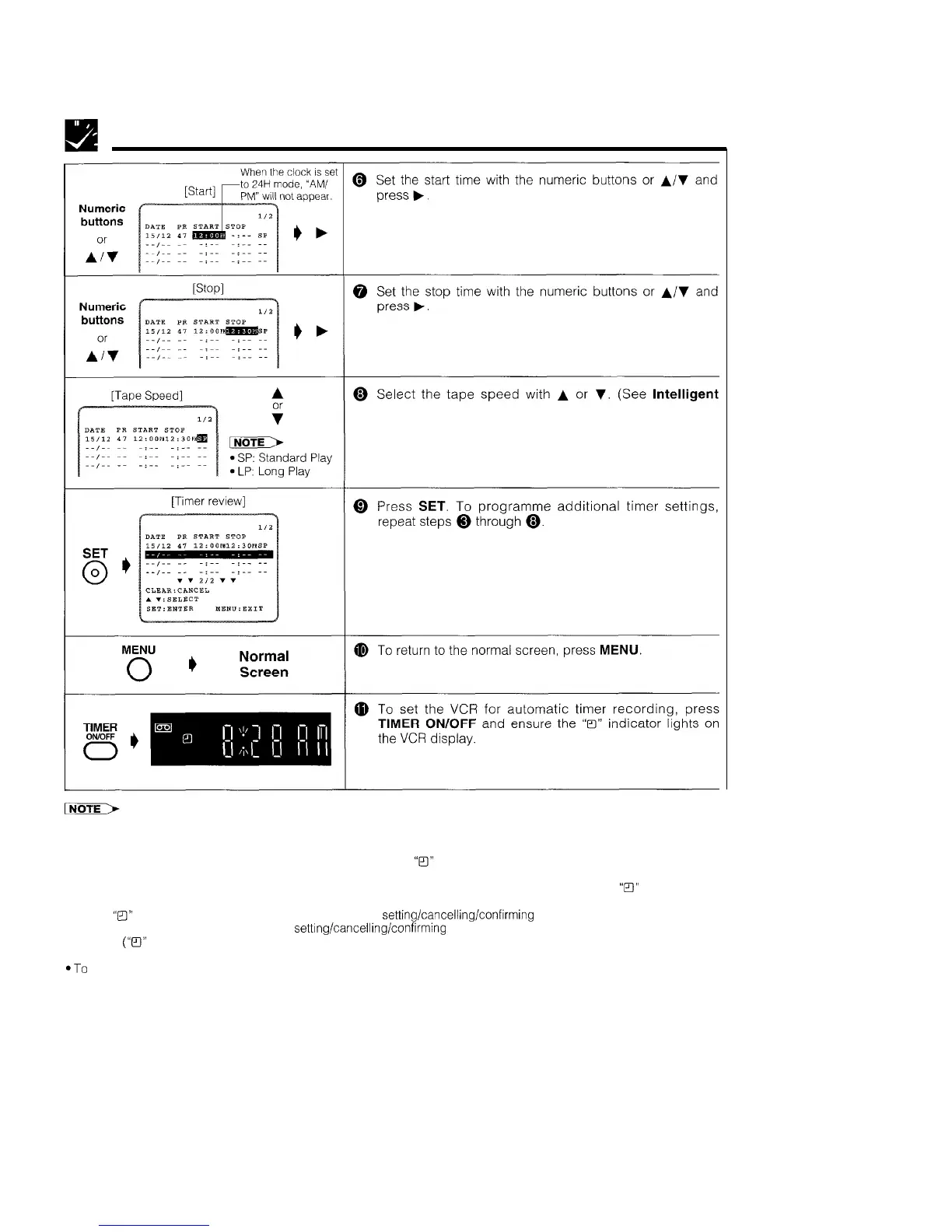
Recording with the Timer
Timer Recording (JUST REC) on page 26.)
l If the video cassette runs out before recording all the programmes, your VCR will stop, eject the cassette, and shut off
automatically.
l If power is interrupted for more than 60 minutes (power failure, etc.), all timer settings will be cancelled.
l If TIMER ON/OFF is pressed when there is no cassette loaded,
“B”
flashes for 5 seconds, indicating that timer recording is
not possible.
l If TIMER ON/OFF is pressed while a cassette with an uncovered erasure protection hole is loaded,
“B”
flashes and the
cassette is ejected.
l When
“ITI’”
is lit, regular VCR operation, clock setting and setting/cancelling/confirming timer positions are not possible. For
regular VCR operation, clock setting and setting/cancelling/confirming timer positions, press TIMER ON/OFF to disengage
the timer
(“B”
disappears), and then turn on your VCR.
l During timer recording, the timer cannot be set.
*To
terminate timer recording, press STOP during timer recording.
l If the same time is input for the start time and the stop time, the timer setting will be cancelled.
23



 To Next Page