Shure Incorporated
15/86
1.
2.
1.
2.
3.
4.
1.
2.
Securing the Microphone to the Conference Unit
Insert the microphone into the microphone connector.
Insert the 1.5 mm hex wrench into the hole next to the microphone on the conference unit and turn counterclockwise.
Using the Conference Units
Once a unit has powered on, tap the touchscreen to access the home screen, or insert a preprogrammed NFC card if avail
able.
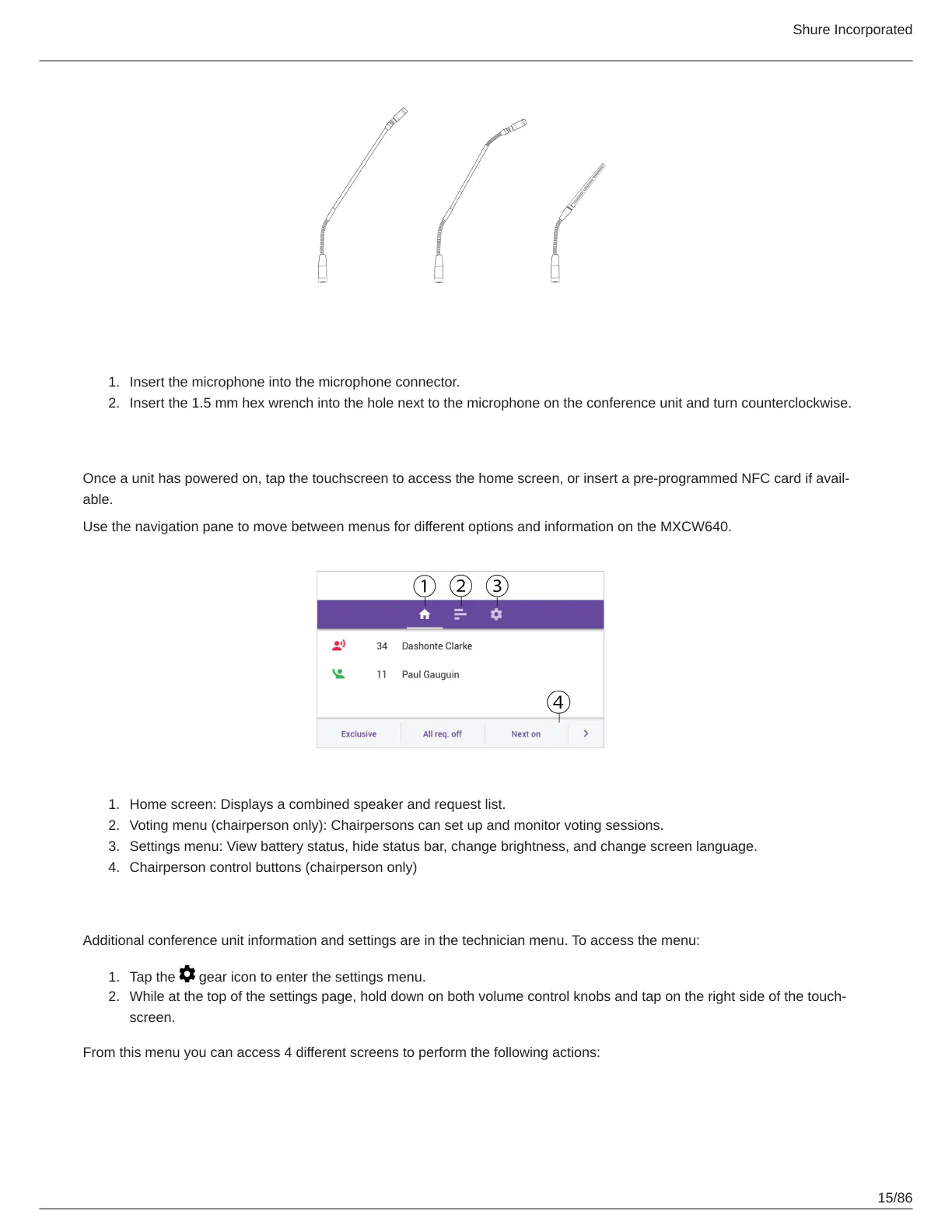
Use the navigation pane to move between menus for different options and information on the MXCW640.
Home screen: Displays a combined speaker and request list.
Voting menu (chairperson only): Chairpersons can set up and monitor voting sessions.
Settings menu: View battery status, hide status bar, change brightness, and change screen language.
Chairperson control buttons (chairperson only)
Technician Menu
Additional conference unit information and settings are in the technician menu. To access the menu:
Tap the gear icon to enter the settings menu.
While at the top of the settings page, hold down on both volume control knobs and tap on the right side of the touch
screen.
From this menu you can access 4 different screens to perform the following actions:













 To Next Page