656 234 2010-11-22| Sicam srl società unipersonale
Faults | SBM V655 | 43 en
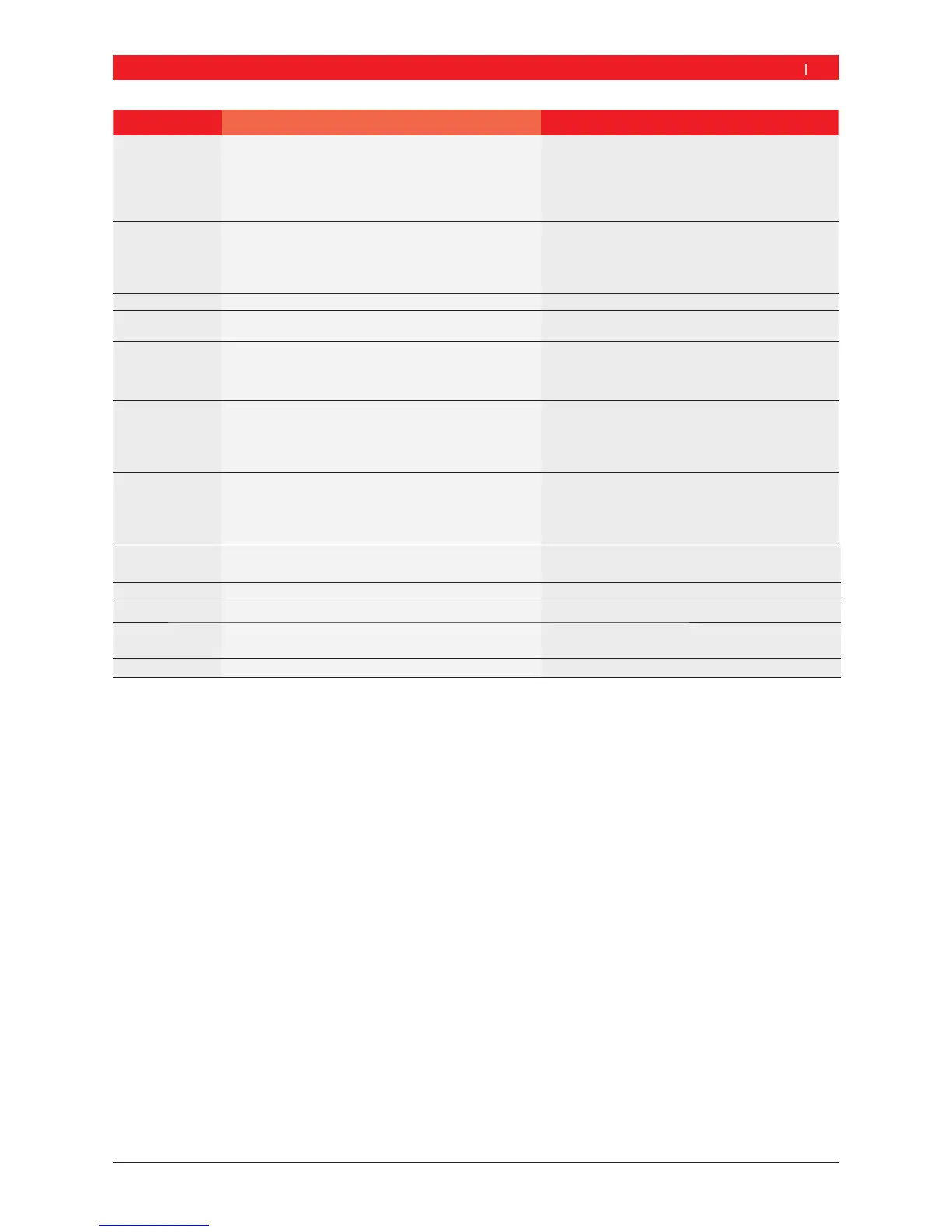
Faults Causes Remedy
11 1. Measurement sensor for phase recognition defective
2. No motor operation
1. Check connection of light barrier PCB.
2. Make sure the light barrier PCB is protected
against light and provide a cover if necessary.
3. Check and if necessary replace the light barrier
PCB.
4. Check the mains connection.
17 Weight outside setting range (weight required for balan-
cing is more than 250 g)
1. Check whether the wheel is correctly attached to
the flange.
2. Determine the outer weight position (neverthe-
less), attach a 100 g weight and start a different
measurement.
18 Wheel data not entered Enter wheel data before performing measurement.
19 Input signal of right measurement sensor
lower than that of left sensor
Interchange the connections of the two measure-
ment sensors.
20 1. Pedal pressed during measurement
2. Irregular rotational speed of motor
3. Wheel speed below minimum value
1. Do not press pedal whilst motor is in operation.
2. Make sure the SBM V655 is not subjected to any
impact during measurement.
3. Check mains voltage (probably too low).
21 The PCB has detected an excessively high wheel speed
with the wheel guard open (shaft rotating at high speed
although the machine has not been started): Power sup-
ply unit is deactivated
1. Switch off the SBM V655 .
2. Lower the wheel guard, switch the SBM V655 on
again without moving the wheel.
3. If the error message persists, contact customer
service.
22 Irregular measurement sensor signals 1. Check that the light barrier PCB is protected
against light and provide a cover if necessary.
2. Check and if necessary replace the light barrier
PCB.
3. Check and if necessary replace the display PCB.
29 ATTENTION: One vernier caliper not in rest position. 1. Set vernier caliper to rest position.
2. Repeat calibration of electronic vernier caliper .
30 Gauge arms deactivated. Perform calibration prior to reactivation.
31 Pedal being pressed. Deactivation takes place.
32 Pedal has been pressed.
33 Incorrect operating system Use a different PCB.


 To Next Page