103
Appendix
Gigaset WLAN Repeater 108 / englisch / A31008-M1030-B101-3x-7619 / appendix.fm / 06.11.2008
Template 2005_05_02
Windows XP
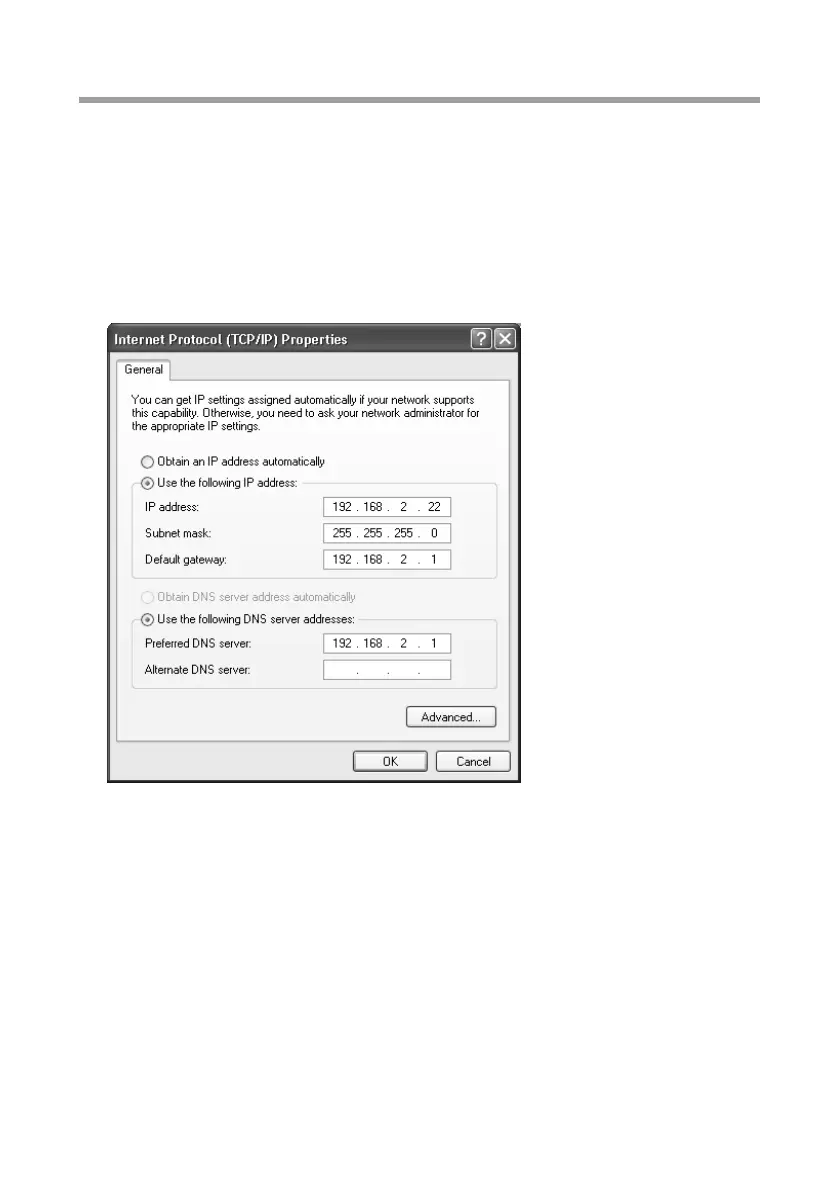
To set a static IP address for a PC:
ì Click on Start – Control Panel, select Network and Internet Connections and then
click on the Network Connections icon.
ì Double-click the LAN connection with which you are connected to the Gigaset WLAN
Repeater 108.
ì On the General tab, click on Properties.
ì Select Internet protocol (TCP/IP) and click on Properties.
ì Activate the option Use following IP address.
ì Enter the IP address for the PC in the IP address field. Please bear in mind the infor-
mation on page 102.
ì Enter the subnet mask in the Subnet mask field.
ì Enter the IP address of the access point or the router in the Default gateway field
(not the address of the Gigaset WLAN Repeater 108).
ì Activate the option Use the following DNS server addresses.
ì Enter the IP address of the access point or the router in the Preferred DNS server
field (not the address of the Gigaset WLAN Repeater 108).
ì Click on OK or Close to close each window.
ì Restart your network (see page 108).














 To Next Page