39
Security Setup Wizard
Gigaset WLAN Repeater 108 / englisch / A31008-M1030-B101-3x-7619 / security_config.fm / 06.11.2008
Template 2005_05_02
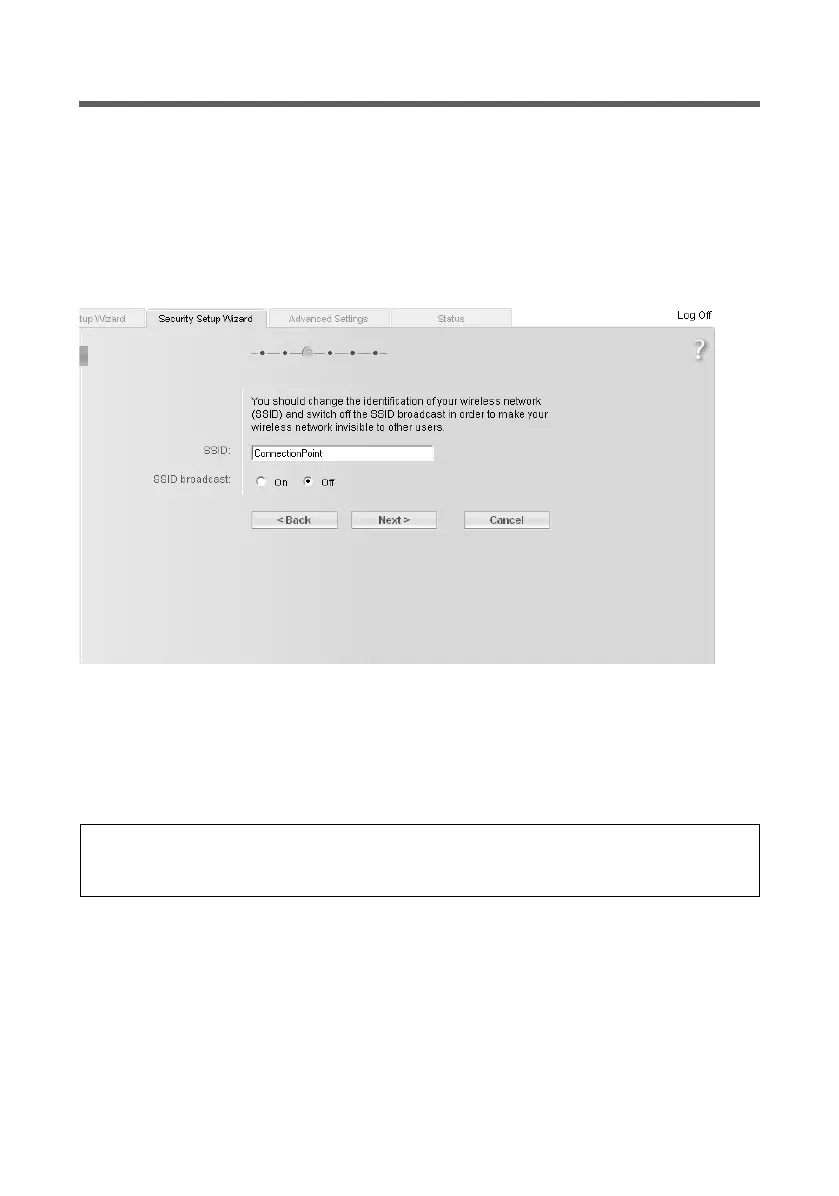
SSID
This screen only appears in Repeater or access point Operating Mode. In Ethernet
adapter operating mode, the screen is displayed after the data encryption is set (see
page 40).
Before the wireless network components can communicate with each other, you must
use the same SSID (Service Set Identifier).
The default SSID for the Gigaset WLAN Repeater 108 is ConnectionPoint. For security
reasons you should change this SSID and deactivate SSID broadcast.
SSID
ì In Access point Operating Mode : enter a character string of your choice. The SSID is
case sensitive. It can be up to 32 alphanumerical characters long.
ì In Repeater and Ethernet adapter operating modes: enter the SSID of the network or
access point to which you wish to connect the Gigaset WLAN Repeater 108.
If the On option is activated for SSID broadcast, the Gigaset WLAN Repeater 108 will
send the SSID in all data transmissions, and the SSID will be displayed on PCs that have
a wireless network adapter. In this case, unauthorised persons could use the SSID to gain
access to your local network.
ì Activate the Off option to enhance the security of your wireless network.
ì Click on Next > to proceed to the next step.
Please note:
The connection to wireless Ethernet adapters that do not have valid SSIDs will be
interrupted until the new SSID has been entered in them as well.














 To Next Page