95
Appendix
Gigaset WLAN Repeater 108 / englisch / A31008-M1030-B101-3x-7619 / appendix.fm / 06.11.2008
Template 2005_05_02
Assigning IP addresses automatically
Your Gigaset WLAN Repeater 108 has a DHCP server that automatically assigns
addresses in the network. As a rule, you do not have to do anything, as the Obtain an
IP address automatically function field is set during the installation of TCP/IP. If, how-
ever, you integrate your Gigaset WLAN Repeater 108 in an existing network with static
address blocks, domain names or subnets or if you cannot launch the configuration pro-
gram straight away, you should check the TCP/IP properties and make any necessary
changes. This is described below.
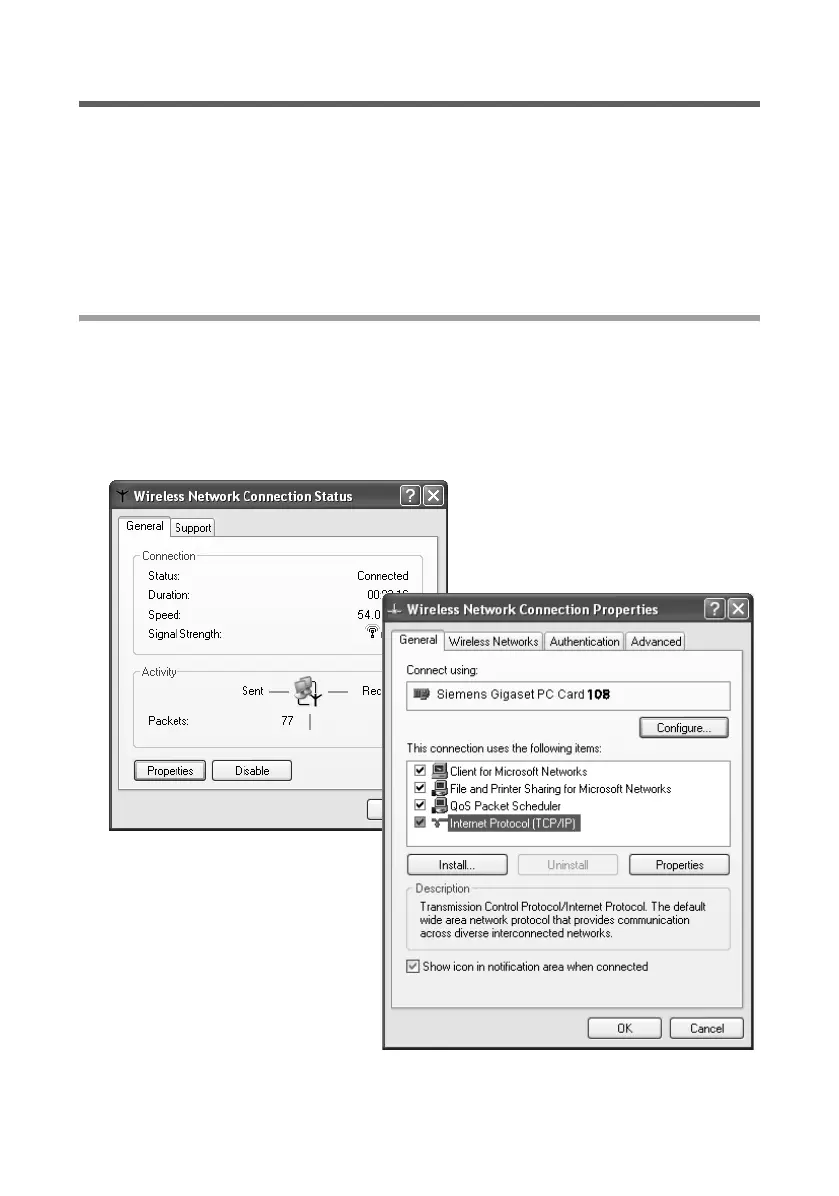
Windows XP
ì Click on Start and select Control panel.
ì Select Network and Internet Connections, then click on the Network Connec-
tions icon.
ì Double-click on the LAN connection with which you are connected to the Gigaset
WLAN Repeater 108.
ì Click on Properties.
ì Select Internet protocol (TCP/IP) and once again click on Properties.














 To Next Page