63
Configuring the Advanced Settings
Gigaset WLAN Repeater 108 / englisch / A31008-M1030-B101-3x-7619 / advanced_config.fm / 06.11.2008
Template 2005_05_02
Permitted clients
Only Access Point and Repeater operating mode
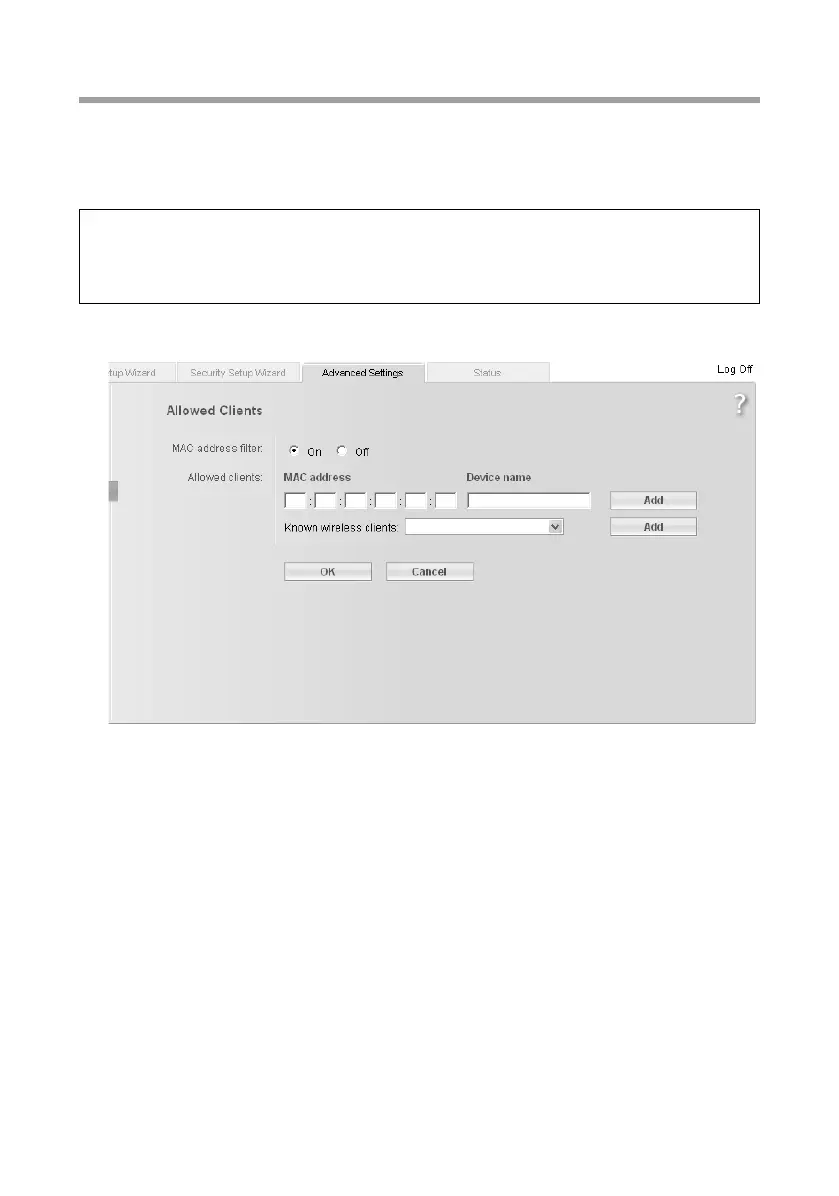
In this screen you can specify which PCs will have wireless access to the Gigaset WLAN
Repeater 108 and hence to your LAN.
ì In the Wireless Network menu, select Allowed Clients.
The default setting for access control is disabled. This means that all PCs that use the
correct SSID can register.
The access control is based on the MAC addresss of the PCs' network adapters.
ì Activate access control via the On option in the MAC address filter field.
Entering PCs manually:
ì Enter the required PCs with MAC address and Device name in the appropriate
fields.
ì Click on the Add button to add the entry to the list.
ì Click on the Delete button to delete the entry from the list.
ì Apply the settings by clicking OK.
Note:
The access control setting is only valid for wireless access from the PC to the repeater
or access point. If you use a router in your wireless network and have configured
access control there for PCs, this must also be set on the repeater.














 To Next Page