59
Configuring the Advanced Settings
Gigaset WLAN Repeater 108 / englisch / A31008-M1030-B101-3x-7619 / advanced_config.fm / 06.11.2008
Template 2005_05_02
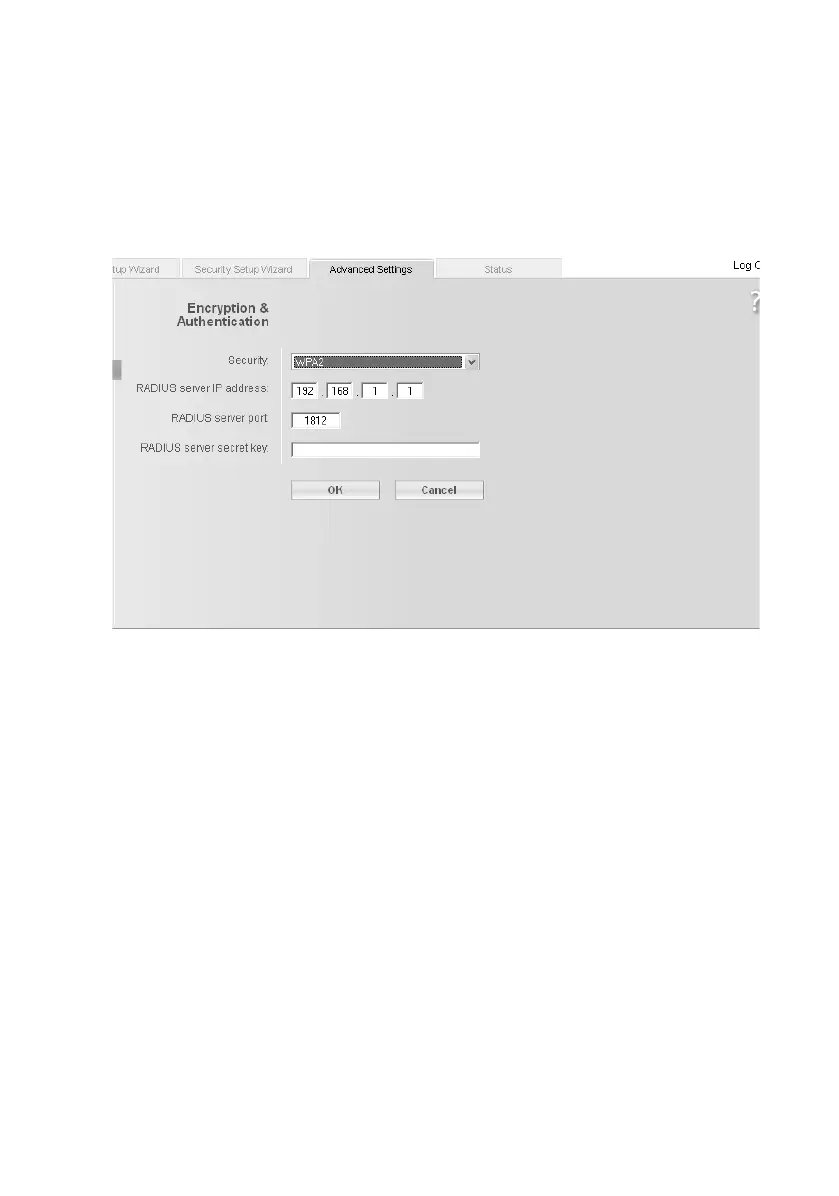
WPA and WPA2 with authentication server (Access point Operating mode only)
In large networks (e.g. in companies) WPA enables the use of an additional authentica-
tion service. In this case, user access is controlled by user accounts and passwords, in
addition to WPA encryption. A RADIUS server acts as an authentication server. You can
select the new standard WPA2, if this is supported by all components in your wireless
network, or select WPA2 / WPA, if you are using devices that only support WPA.
ì Select the required option in the Security field.
ì Enter the IP address of the RADIUS server in the RADIUS server IP address field.
ì Enter the port of the RADIUS server in the RADIUS server port field.
ì In the RADIUS server secret key field, enter a key conforming to the conventions of
the RADIUS server, which is to be used by the server for authentication.
ì Click on OK to apply the settings.














 To Next Page