EasyManua.ls Logo

Simrad EQ42 - User Manual

Simrad EQ42
80 pages
Print Icon
To Next Page IconTo Next Page
Loading...
02244.30
M A N U A L
M A N U A LM A N U A L
M A N U A L
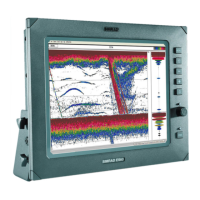
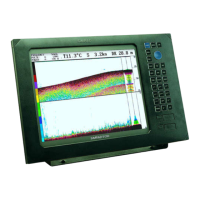
SIMRAD EQ42/50/52
Echosounder
183-0300-202 English

Questions and Answers

  • J
    James LopezJul 30, 2025
    How to adjust the brightness on Simrad EQ42?
    • S
      stricklandanthonyJul 30, 2025
      If your Simrad Marine Equipment displays a picture that is too dark or too bright, you can adjust the image by pressing the [PWR] key, adjusting the light/contrast, and then pressing the [ENT] key.
  • D
    David PadillaAug 3, 2025
    What to do if my Simrad Marine Equipment has no picture on the display?
    • M
      Megan WalkerAug 3, 2025
      If your Simrad Marine Equipment shows no picture on the display screen, try the following: * Press the [PWR] key on the keypad. * Replace the fuse, ensuring you use only a type 6A3F fuse.
  • H
    hmartinezAug 7, 2025
    Why is my Simrad Marine Equipment showing noise instead of targets?
    • R
      ryan75Aug 7, 2025
      If your Simrad Marine Equipment is showing a normal picture, but no targets are displayed or only random noise is visible, consider the following: 1. Go to the Echosounder setup and select the correct transducer type. 2. Check the wiring of the connectors and rewire if necessary. 3. Ensure the connectors are correctly mated to the console. 4. Increase the receiver gain. 5. Adjust the range. 6. Go to “Echosounder setup” in the Echosounder menu and turn Demo mode OFF.
  • C
    cantrellashleyAug 11, 2025
    What to do if Simrad EQ42 Marine Equipment keys are not responding?
    • E
      Erika CooperAug 12, 2025
      If your Simrad Marine Equipment is not responding to key operations, try disconnecting the power and then connecting it again.
  • D
    david36Aug 16, 2025
    How to fix Simrad EQ42 with no normal picture?
    • K
      Kelly JohnsonAug 16, 2025
      If your Simrad Marine Equipment is not showing a normal picture, try turning the unit off and then on again.
  • K
    Kevin TrevinoAug 20, 2025
    How to reduce noise in echo picture on Simrad EQ42?
    • M
      Mary LopezAug 20, 2025
      If you are experiencing excessive noise in the echo picture on your Simrad Marine Equipment, ensure that all connected equipment is properly grounded between it and the echosounder.
  • C
    Cathy ChavezAug 25, 2025
    Why does Simrad EQ42 Marine Equipment delete data after turning off?
    • M
      Michael NealAug 25, 2025
      If all data on your Simrad Marine Equipment is deleted after turning the unit off and on, the internal battery likely needs replacement. The battery life is typically 3-5 years and must be replaced by an authorized dealer.

Summary

Introduction and Safety Summary

1.2 Safety Summary

Details critical safety precautions for the operation and handling of the echosounder.

Fundamentals and Initial Start-Up

2.2 Key Functions

Describes the primary control panel keys and their operational functions.

Position Menu

Navigation Menu

Echosounder Menu

5.1 Echosounder Display

Interpreting the primary echosounder display modes and visualized data.

SETUP MENU

7.7 Factory Settings

Procedures for restoring the unit to factory default settings or performing resets.

Principles of Operation

Installation and Service

9.1 Installation of EQ42 Echosounder

Instructions for mounting the EQ42 model, including physical installation options.

9.2 Installation of EQ50 Echosounder

Instructions for mounting the EQ50 model, including physical installation options.

9.3 Installation of EQ52 Echosounder

Instructions for mounting the EQ52 model, including physical installation options.

9.4 Place of Installation of Display Unit

Guidance on selecting the optimal location for installing the echosounder display unit.

9.6 Electrical Connections

Details on connecting power, transducers, and interface cables to the unit.

9.6.1 Power Supply Connections

Connecting the unit to the appropriate power source and understanding voltage requirements.

9.6.2 Fuse

Information regarding the correct fuse type and importance for equipment protection.

9.6.3 Transducer Connection

Connecting the echosounder transducer to the designated ports on the unit.

9.7.2 Determining the Position for the Transducers

Guidance on selecting the best location for transducer mounting to ensure performance.

9.9 Repair and Service

Information on handling unit servicing, repairs, and obtaining spare parts.

9.10 Troubleshooting

Solutions for common symptoms and faults encountered with the echosounder.

Warranty Information

Simrad EQ42 Specifications

General IconGeneral
BrandSimrad
ModelEQ42
CategoryMarine Equipment
LanguageEnglish

Related product manuals